Blog

  • How to Create an XML Sitemap in few Minutes

    How to Create an XML Sitemap in few Minutes

    When it comes to SEO and marketing, you must learn many Google ranking factors to increase your search engine visibility. 

    It consists of; generating content ideas, keyword research, producing high-quality content, backlinks, auditing your site, etc. Working on these steps is time-consuming and requires lots of hard work.

    But when it comes to some easier SEO techniques that deliver high value, one of them is –creating an XML sitemap and submitting it to Google.

    Even if you’re committed to the long journey of blogging, you’d much rather push a few buttons to get more traffic: less effort and big wins. 

    Even though an XML sitemap is a “technical” part of SEO, it’s not difficult to make one. Also, it’s not that “technical” either.

    You could create a perfect XML sitemap in just a few minutes. It’s not about coding; you have to know how to click.

    It’s a super easy, free, and relatively simple way to improve your SEO.

    Let’s give it a try!

    What is an XML Sitemap?

    XML stands for “Extensible Markup Language.” It’s a way of displaying information on sites. This is an example of an XML sitemap,

    An XML sitemap is a list of a website’s URLs. It maps out the website’s pages and structure.

    The question is, why should you even have an XML sitemap?

    Purpose of an XML Sitemap

    Search engines use crawlers to find your site’s pages to index.  It is important because Google ranks your website PAGES, not just websites.

    These crawlers read information, but an XML sitemap is an easy way for the crawler to index your site.

    A well-structured sitemap is an important factor for ranking. 

    Sitemaps give page update signals to search engines; when a page was updated, the frequency of updates, the importance of pages within site, and how to find and index content within the site’s structure.

    Information in a sitemap looks like this;

    • Pages location on the website (its URL): <loc>http://www.xyz.com/mypage</loc>
    • Priority of the page to other pages on the site: <priority>1</priority>
    • Last changes made: <lastmod>2021-05-17</lastmod>
    • Frequency of changes: <changefreq>weekly</changefreq>

    What happens if you aren’t using a sitemap?

    Your website will be showing duplicate pages/content, which is a bad sign for SEO.

    In addition to that, a sitemap is a quick and easy way to get indexed by Google.

    With a sitemap, Google gets an idea about your site and the pages you want to index. Google will crawl your site within few minutes and index your content.

    Benefits of an XML Sitemap

    If you’re still unsure and asking yourself that “do you need a sitemap?”

    Let me help you to answer it too,” yes.” 

    It only takes a few minutes and gives you these benefits of an XML sitemap:

    1. It provides information to Google to crawl and index your site.
    2. The XML site map tells what to crawl on your website.
    3. It tells Google about the information on your website.
    4. The XML sitemap tells Google about your content updates. 
    5. The XML sitemap tells Google about the frequency of your content updates.
    6. It helps your website instantly get indexed for dynamically-generated pages.
    7. It helps to overcome the barrier of a website with weak internal linking.
    8. It helps to overcome the problem of not yet having a strong external link.
    9. It helps Google crawl your website more productively.
    10. It shows all the pages on your website to Google, even if they are deep within the architecture to crawl quickly.

    There is 3 step process to create your own XML sitemap. 

    Here’s it;

    Step:1. Create your XML sitemap.

    Step:2. Add your XML sitemap to your website.

    Step:3. Submit your XML sitemap to Google.

    Create an XML sitemap without a CMS

    You can create an XML sitemap for any website with a desktop-based program, Screaming Frog. 

    You don’t need,

    • CMS 
    • Size of the website or website’s age
    • To own the website/ have login access 

    You can use Screaming Frog for free crawling for up to 500 pages. 

    But if your website has more than 500 pages, you will need to purchase a Screaming Frog license for crawling.

    Let’s create an XML sitemap for any website using Screaming Frog’s free version.

    1. Open Screaming Frog and type your URL into the top box.
    1. Now click start.
    1. It takes a few minutes to few hours to crawl your website, depending on your website’s size.
    1. Once you finish crawling, the status bar will display “100”.
    1. In the menu bar, click “Sitemaps.”
    1. Now click “Create XML Sitemap.”
    1. Now choose which sections of your site you want to include in the XML sitemap.

    Here is an explanation of each tab.

    • Noindex Pages: Noindex pages have HTML code in the header, telling the search engines not to include the page in the search index. 
    • Canonicalised: It means more than one URL pointing to the same page of content on a website.
    • Paginated URLs: A paginated URL includes rel= attributes (rel= “prev” and “next”) to navigate through a series of content on a website.Do not check this box.
    • PDFs: Google indexes all kinds of content, PDFs included. I recommend that you have PDFs in your XML sitemap, as long as the PDFs on your website are essential.

    Remember, a sitemap is for SEO, and If you want people to find your website’s pages, then include it in the sitemap.

    For now, let’s check the box “include PDFs.”

    If you are not sure about “Last Modified,” “Priority,” and “Change Frequency,” please leave them by default.

    1. Now include images in a sitemap by clicking the “Images” tab.
    1. Here, click “Include Images.” And 3rd  box will be checked automatically.
    1. Press “Next.”
    1. You’ll be prompted to save the created XML sitemap on your device, click “Save.”
    1. Here you go! Congratulations, you’ve created an XML sitemap for your website.
    2. Now, all you have to do is, upload this file to your website via FTP. 
    3. You must submit it to search engines for crawling. Otherwise a sitemap means nothing.

    How to submit an XML sitemap to Google?

    Once you have created an XML sitemap file, let’s learn how to submit it to Google.

    First of all,  connect your Google Search Console account with your website. 

    Follow this the step by step guide by Google.

    Once connected, log in to your Google Search Console account. Now select your website in the top left corner.

    1. Click on the sitemaps on the Google Consol’s dashboard as shown below.
    2. See the “Add a new sitemap” option and enter your sitemap URL in the blank space.
    3. Now press the submit button.

    Congratulations!! You are done with the XML sitemap’s submission. Now, Google will take care of the rest; you sit back and relax

    Bottom Line:

    Many local business owners, entrepreneurs, and website owners get afraid when they hear the term “XML sitemap.” 

    Because It sounds a technical term, even If you’re not an SEO or a computer expert, it’s not that hard to create and submit an XML sitemap.

    You can create sitemaps easily in 10 minutes by using programs like Yoast or Screaming Frog.

    But if you have zero knowledge about sitemaps, the entire process from start to finish may only take 20 minutes.

    If you’ve never made an XML sitemap for your website, create one today to get SEO benefits.

    Once you’re done, perform a technical SEO audit to check all other issues on your site.

    Kindly share your experience of creating an XML sitemap for your website.

  • A Guide to Improve Your Website’s Rankings- For Free

    Getting ranked in the top three search results is a dream come true for any Website owner. But the journey towards this goal is a bit daunting. 

    So hiring expensive SEO firms to take all your worries away is a somewhat logical step for those who can afford to do so.

    But not all of us have that kind of money to spend for increasing our website’s chances of showing up in the top results. So what’s the other option?

    It is spending months upon months learning and implementing effective SEO strategies. But what if you are unable to devote so much time and energy to this task?

    If you don’t want to spend a lot of money on hiring SEO firms, but you also don’t have a lot of time that you can devote to learning and implementing SEO strategies, you’ve landed on the right page

    In this article, you’ll learn how to track and improve your website’s ranking. All the methods and tools mentioned in this article are available for free.

    Let’s start with some statistics gathered by trusted sources.

    Close to 71 percent of search clicks are captured by the first page in Google search results. And reportedly, this percentage has increased to 91 percent in recent years.

    Tracking Your Website’s Rankings

    Your website is up and running, you upload content frequently on it, and its layout is also goods. So what’s the next step?

    It is tracking your performance and marking what kind of content performs well and what doesn’t.

    There are many free and paid tools that you can use for this purpose.

    A good tool will provide you with information regarding the organic traffic your website generates in particular time frames, such as weeks and months. 

    • It should track and report the keywords for which your website is ranking.
    • It should track any backlinks for your website.
    • It should also alert you if there are any bugs or errors in your website.
    • A report should be sent to you monthly to inform you what strategy is working and what simply isn’t.

    You can choose between many tools like Ahrefs, Ubersuggest, or any other tool of your choice.

    This tool will save you the time and effort you’ll have to spend on manually tracking your backlinks, keyword rankings, or finding errors that need to be fixed as early as possible. A monthly report providing all these statistics can be a very convenient solution for all your needs.

    Tracking Keywords

    Simply adding keywords to the content on your website will not help you increase your website’s rankings. Instead, you’ll have to track your progress over time. Take notes of what’s performing well and what’s not.

    Many free keyword tracking tools are available for you to use for this purpose. These tools provide you with data on the words and phrases your website is ranking for.

    These tools also let you search for a specific word or phrase to check if you are ranking for it or not. Finally, these tools let you choose a specific region or country so you can track your progress within a specified area.

    You can also track these rankings over time and keep a record to compare later on. 

    Now you know what kind of tracking tool will work best. Next, let’s move on to the strategies for improving your website’s rankings.

    Improving User Experience:

    In a survey, 88 percent of online shoppers said they would not return to the website they had a bad user experience on.

    Search engines strive to find the best possible results for their users. If they fail to provide such results, the users will switch to a better search engine.

    This search engine strategy is something you should keep in mind, especially when designing your website and choosing the content you are going to upload on it.

    Because users matter so much to the search engines, they are less likely to rank a website with low-quality content. 

    In addition, as the search engines are introducing newer algorithms, they’re getting better at determining what content is good and what’s not.

    Stats shows that 53 percent of mobile device users will leave the page that takes more than 3 seconds to load.

    Your website must work fast because mobile users are not very patient, and if your website takes more time to load, the chances are that your website has a high bounce rate.

    As your website’s bounce rates increase, its chances of getting ranked well in search results decrease simultaneously.

    The reasons for a high bounce rate can be a long loading time, low-quality content, outdated content, and bad website layout.

    Websites with a high bounce rate are also likely to have less user engagement. To a search engine, less user engagement means that the website is not useful.

    But a higher bounce rate can also mean that the user has fulfilled his/her purpose for visiting the website and is now leaving satisfied with the website’s performance. If the user leaves satisfied, they are likely to revisit this website, and search engines will notice this action, which will help increase Google’s or any other search engine’s trust in that website.

    To improve your website’s rankings, you’ll have to shift most of your focus from optimizing your website for the search engines to optimize it for the users.

    There is no doubt that search engine optimization is necessary, but at the end of the day, you are not hosting this website so that search engines can get some value from it; you are doing it for your customers or users, and they should be your main focus.

    Mobile-First Strategy

    In the first 4 months of 2021, mobile users accounted for 54.8 percent of the total traffic on the internet.

    This number will keep on increasing in the coming years because browsing the internet using your mobile device that is already present in your pocket or your hand is quite convenient.

    Despite this fact, website owner’s still don’t focus on optimizing their websites for mobile devices. Mobile phones have smaller screens and less RAM and ROM than laptops or PCs. Therefore, a website designed for a desktop will not look good on a mobile screen, and if the image and video files are large, the mobile phone will take considerably longer to load the website.

    Google and other search engines prefer websites optimized for mobile phones because most of their users are browsing with their mobile devices.

    Here are the things you should focus on to make your website mobile-friendly

    • Improve the loading speed of your website.
    • Remove any outdated or low-quality content pages.
    • Avoid adding large images and video clips to your website.
    • Optimize your website for local search.
    • Focus on a responsive web design.
    • Use a simple layout.
    • Maintain consistency throughout your website.
    • If possible, create a separate URL for your mobile site.

    Optimizing your website for mobile devices will give a boost to its search engine rankings.

    You can also create a mobile app for your website users to build a more personal relationship with them.

    Bottom Line

    If your website is not ranked well, it’ll hardly generate any traffic no matter how good the content on your website is. On the other hand, a ranked website has much more potential for generating organic traffic and converting it into leads.

    Improving the SEO of a website requires a lot of effort and time, but if you seriously want to grow your business or brand, SEO is the way forward. It is the key to your success.

    Hiring SEO firms can be quite expensive. If you cannot afford one, focus on learning a few tips and tricks that can help improve your website’s rankings.

    Which tools do you use to track the progress of your website?

  • Easy Google Chrome Shortcuts You Can Learn And Start Using Today

    The key to simple web surfing is literally at your fingertips. You can hasten all your online searches without having to take your hands off the keyboard if you learn just a few Google Chrome keyboard shortcuts. 

    You do not have to enable anything yet.  It’s as easy as pressing the correct combination of keys to use these Chrome shortcuts.

    Google launched its Chrome browser thirteen years ago. And now, close to two-thirds of mobile, tablets, and desktop users depend on it to browse the internet. 

    Although the browser’s clean interface and extensions make it popular, it’s the keyboard shortcuts that unleash Chrome’s strength.

    Google Chrome is the most popular browser for desktop-based web browsers demanding a whooping market share of 64 percent. In contrast, Safari, the second most common browser, only accounts for 19% percent of the market share. 

    According to recent statistics from Statcounter, the percentage of internet browsing usage on mobile devices continues to outnumber desktop by a wide margin. 

    And as of March 2021, mobile has 54.25 percent of the web browsing market share, while desktop has 42.9 percent.

    But this doesn’t mean that you should trench your conventional keyboard and mouse. 

    The desktop web experience is still alive and kicking, and it’s best for researching and heavy surfing.

     Even though lavish mobile phones and tablets today have as much processing capacity as desktop computers, most people still prefer working on a PC or Mac. 

    That’s why you need to learn Google Chrome Shortcuts on the keyboard because they’ll improve your web browsing experience and save you a lot of time.  This blog post will show you some of the Google Chrome Shortcuts you can start using right away. 

    Google Chrome Shortcuts You Can Start Using Right Now

    From opening your homepage (Ctrl + Shift + H) to refreshing tabs ( Ctrl + R, intelligent shortcuts thrive in Google Chrome. With Google Chrome shortcuts, there’s always a quick way to have different things done.

    So, regardless of whether you are a novice or a grizzled web old-timer, here are the Google Chrome shortcut keys you need to learn and start using right away. 

     Clear Browsing Data

     If you use Windows, press Ctrl + Shift + Delete

     If you are on Mac: ⌘ + Shift + Delete

    Why You Need to Clear Browsing Data

    Your browser tends to save data, which can cause problems logging in or accessing websites over time. Clearing the cache or browser history and clearing cookies is a good idea. 

    The disadvantage is that you will lose your passwords and usernames, and you’ll need to enter them again. However, your privacy will be guaranteed, and the performance of your browser will significantly improve. 

    Go Incognito Mode

    If you use Windows, Press: Ctrl + Shift + N

    If you are on Mac: ⌘ + Shift + N

    What is Incognito Mode

    Incognito Mode can be a valuable method for protecting our online privacy. However, we’ve also become acutely conscious of our online behavior and the data trail we’re leaving behind.

     Every website we visit keeps track of our activities, touchpoints, and preferences, which can target us and create a comprehensive image of our online behavior.

    You may have experienced this when you’re looking for a specific item online, and a pop-up ad for it appears on any website or channel you visit.  

    Please make no mistake about it: your online information is precious. It can be used for personalized targeting unless you take action to enhance your online privacy.

    Enabling Incognito Mode when surfing the internet is one way to prevent data loss and protect your privacy.

    In a nutshell, incognito mode is a web privacy feature that prevents sites from storing your browsing history. 

    Every time you browse using a typical window, the browser keeps the URL of all the pages you visit and can retain it long after closing the windows down. 

    You can visit your web pages later if you need to without wading through loads of previously opened pages. 

    Also, the browser you are using stores cookies as well. Cookies are just tiny text files that save all site login details. They also gather data about the pages you visit and build advertisements customized to your internet preferences. 

     Nonetheless, when you activate Incognito Mode, any cookies that a website attempts to install on your device are blocked or deleted. And no records of your browsing are saved in your local search history.

     In other words, whatever you do when using this feature will be lost forever. In addition, other workstations and your family members or friends won’t be able to see your browsing history. 

    Though Incognito Mode deletes data kept on your computer, your given IP address will still be visible to all the interested parties.  

    So, your boss, school, the sites you visit, and your internet provider can see your browsing history and track you if they want to and steal your crucial details if they need to. The best way to keep your web history private is to use a VPN.

    Press Control or Command + W to Close Tabs

    This one is quite simple but helpful. To close one tab at a time, press the command key (Ctrl) and the “w ” key. It’s a simple way to close a single tab and proceed to the next when you finish reading it. 

    Although getting a few tabs open isn’t a big deal, if you’re like me and have a million accounts available, your machine will slow down significantly. This fast shortcut allows you to kill as many tabs as you want in the shortest time possible. 

    Command or Control +/- to enlarge/shrink the page

    Occasionally, when surfing the internet, you can come across a website with tiny text. This could be blog comments, the fine print of a contract, or the text in one of those agreements we all click through. 

    This will magnify the page if you hold down control and press the “+” key. You should keep pressing it to enlarge the page even further. Then, control and the “-” access to return to normal or zoom out.

    You can use this Google Chrome shortcut key when you are surfing the web in the presence of your parents or when you have connected your PC to TV, 

    It’s just a fast and straightforward way to make things harder or easier to read (if somebody is prying on your screen next to you).

    Open Links in A New Tab by Pressing Control +or Command + Click 

    Clicking a link while holding down the control key, the link will open in a new tab.  You can use this a lot when you are researching. You’ll peruse a page and control-click each link that may be helpful as you keep on reading. 

    Other Google Chrome shortcuts on desktop include:

    Command Action
    Ctrl + Shift + BOpen the bookmarks bar
    Ctrl + FFind words or phrases on the current web page
    Ctrl + Shift + GGo back to the previous  mention of  words or phrases you searched for
    Ctrl + D Bookmark web page
    Esc Escape full screen 
    F Enter Full Screen
    Ctrl + N Open a new window 
    Ctrl + 9 Switch to the left tab
    Ctrl + Shift + TReopen the recently closed tab
    Ctrl + TOpen a new tab

    Closing Thoughts

    These are some of the most useful Google Chrome shortcuts you can start using now. Of course, you do not have to master them all at once. Just pick the ones you find easier to memorize and keep learning more as you go on.  

  • Tips to make an epic discovery call that leads to closing sales

    When a customer decides to meet with your sales team for a discovery call, they’re interested in what you’re offering.

    Consider this scenario: Your prospect is shelled with numerous  ineffective pitches and marketing messages, but they’ve agreed that your company may have what they’re actively looking for.

    A discovery call is greater than just the first meeting between a sales representative and a prospect. If you can prevent the call from going off the rails, it might be a gold-plated chance.

    What is A Discovery Call?

    A discovery call is an initial conversation with a potential client after expressing interest in your products or services. 

    It’s a rare opportunity for you to get to know the customer and see if they’re a good match for your business after receiving many pitches from other interested individuals.

    Reasons Why the Discovery Call is Crucial In the Buying Process

    Presenting the product or service as a solution to prospects’ challenges isn’t enough. It would be best if you established a connection to their most profound emotional problems.

    Buyers today have unlimited access to an incredible amount of data. As a result, they’re more knowledgeable and have more choices than ever before. 

    The prospects need to feel that your solution directly addresses their needs and concerns. This usually determines the prospects’ tipping point during the sale process.   

    As a result, ensure the exploration process includes the prospect’s viewpoint: Each day, they receive hundreds of voicemails and emails trying to get their attention.  

    Some of these messages are generally useless because they don’t apply to the prospect’s current needs. And you must ensure that your words don’t get lost in the waddle as well.

    You have to present yourself as an expert during the discovery call to increase your chances of getting the opportunity to show your expertise. 

    For example, Picture this: An IT director is under attack for a humiliating infringement of customer data.

    If you’re offering an automated backup solution, map out your discovery call so that he understands how your technology can help him deal with the threat of a cyber-attack. You will be doing the prospect no favors if you fail to do so.

    Your sales team’s first opportunity to improve the buyer experience is during the discovery call. 

    Sales reps who get it right from the get-go will learn the buyer’s key motives and show how they can solve their most pressing challenges.

    Discovery calls to determine the course of your deal and how you will conduct the rest of the sales process.

    You’ll be able to build an authoritative relationship with your customer if you do it correctly.

    If something goes wrong, you’ll be playing catch with your prospect in all of your discussions before he or she abandons you. That’s why you need to get it right from the beginning. 

    Tips to Help You Master the Art of Sales Discovery Call

    Even though you can complete the discovery process via email, it’s a good idea to do so over the phone because it enables proper conversational flow between the parties.  Remember, 

    The discovery call aims to learn more about the potential lead, including their pain points, ambitions, business details, and budget.  It also helps establish the prospects’ immediate needs,  to determine whether or not they are an excellent fit for a specific product.

    Discovery calls often provide the caller the opportunity to add more detail to the prospect’s file.   

    Even if the prospect d isn’t eligible to move on to the next level, the saved information will be used to predict when they might qualify and when to contact them later.

    As you can see by now, discovery calls are crucial to finding the correct prospects. And to make an excellent discovery call, you have to ask relevant questions to get the most out of it.

    Discovery Call Must- Ask Questions

    Remember, you get what you ask for most of the time. And for your discovery call to be fruitful, you have to ask the right questions so that you can get all the necessary details you need.

     Here are some of the critical questions you could ask during the sale discovery call.  

    Set up the Tone

    Keep in mind that you are interrupting somebody’s day every time you call them. So your initial objective should be to establish a bond with a super friendly intro.

    To attain this rapport, start by asking questions such as:

    • How did you start in this sector
    • What aspects of (your job/industry/location) do you enjoy the most?
    • What’s the weather like where you are right now? (when the caller’s locality  differs from the prospects’)
    • Do you have an interest in (something about their place or job)?

    Qualify the Prospect

    It’s time to qualify the prospect after you’ve established some rapport by asking questions such as:

    •  What is the biggest problem you are contending with currently?
    • What’s your existing procedure presently?
    • What are your main objectives for this year?
    • Are you having problems with (your product’s key feature)?
    • What motivates you to make this transition now?
    • What is one of the most difficult challenges you are currently facing?
    • What makes you want to learn more about our product?
    • What would it look like if we come up with a perfect solution for your problems?
    • What section of your work is the most difficult for you?
    • Have you ever tried to solve the issue so far?
    • What would be the perfect solution for you?
    • How do you envision our solution fitting into your job process currently or in the future?
    • What would you do if you didn’t need our product or another similar product to solve your problem?
    • What features would the solution have to have for you even to consider it?

    Get ready to Complete the Transaction.

    Finally, before moving on to the next phase, double-check that you have everything you need. Then, use these questions to gain insight into both technicalities and possible future issues:

    • Do you have a list of the requirements you’ll need to choose a solution? 
    • Who came up with the checklist?
    • What problems do you think you’d have if you used a solution like ours?
    • What kind of change would you like to see a year from now if you choose this option?
    • Have you ever bought a solution similar to this one?
    • What are other people involved in the buying process?
    • Is there a possibility for me to  make this process go more smoothly?
    • Use these questions as a guideline instead of a manual.

    Use them for brainstorming and modify them to suit your sales discovery process and personal style because it is unique. 

    How To Make Fruitful Discovery Call

    Ensure that your prospect needs your product before making a discovery call. 

    Someone who urgently requires the solution is more likely to work around possible problems to make things work out.

     Selling your solution to somebody who doesn’t need it, on the other hand, would damage your brand and make them less likely to buy from you in the future.

     Ascertain That They See a Need For Your Solution

    Yes, you know they require your solution but are they aware that they need it?

    A good discovery call provides you with details and ensures that the right leads are aware of the need for your solution.

    In a discovery call, this is why establishing a polite, casual tone is critical. Then, you can use the empathy you build at the start to comprehend their dilemma fully and let them open to a solution: And, of course, your answer. 

    If the prospect still doesn’t recognize a need for your solution after all of your sales efforts, they might not be a suitable match for your product.

    If this happens, and before you hang up, double-check that they have all the details they need to contact you if they change their minds.

    Ensure They Can Afford Your Solution

    After establishing that they require your solution and fully understand that, consider whether they can comfortably afford it and have a reasonable budget.  

    To increase the chances of success, emphasize how your solution will significantly elevate their ROI.

    If they see the need for your solution and have a budget for it, some of them will have no problem expanding the budget if the need arises.

     If they cannot buy your solution now, discuss when they envision themselves needing your answer,  who will be calling the shots, and how the whole process will be like.

    Do not Leave Empty Handed- Ensure They Purchase Your Solution.

    After knowing that they know, they need your solution and can afford it, ensure that they buy your solution. After all, what would be the point of all your struggles?

    You must be aware of all relevant stakeholders involved in the decision-making process. Be sure to talk with the most important decision-maker.

     Inquire about what they hope to get out of your solution. To prepare for future hiccups, you must first understand the potential for them to occur.

    Speak with all the key stakeholders involved in their decision-making process. Please get to know what they are dying to obtain from your solution.  Know all the possible glitches that may arise later and stay prepared for them. 

    Ensure you’re familiar with their buying procedure and walk away with something to show for your hard work. 

    Closing Thoughts

    The discovery call is an essential aspect of the sales process. Maintain a casual, polite, and inquisitive tone during the calls to ensure success. Discovery call improves the buyer’s experience, so it’s crucial to get everything right. 

     However, please do not cram lengthy details into your prospect’s head, and don’t try to close the deal too quickly. 

  • How to get site indexed faster by Google with simple 8 Techniques?

    How to get site indexed faster by Google with simple 8 Techniques?

    Do you need more organic traffic to your site? Yes! We all do.

    To grow your website or business, organic search traffic is essential. Statistics show that 53% of your website’s traffic can be organic 

    Traffic doesn’t matter if your site doesn’t appear in the search results.

    You have to get your new site indexed by Google, Bing, Yahoo, and other search results. 

    You can either opt for the “tortoise” approach, where you sit back, relax and wait for the magic to happen naturally, but this will take longer.

    Or you can make it happen quickly. This way, you will give more focus and time to increase your conversions, built up social presence, write and promote your content.

    If I talk about myself, I would instead get my sites indexed as quickly as possible, and then I will have enough time to build my audience.

    Site indexation may seem a fairly complex task.

    It’s not just about writing some content, optimizing search engines, uploading it to the site, and sitting back to wait for the magic to happen.

    Not necessarily.

    Google’s indexation process is very effective in reaching your marketing goals.

    There are many techniques you can take to help Google index your pages faster.

    In this article, I’ll share 8 ways to get your site indexed by Google and increase your organic traffic.

    Crawling and Indexing

    Google finds your new web pages by crawling the website and then add those pages to their index. Google uses a web spider called Googlebot for this process.

    Let’s simplify these terms.

    • Crawling: Process on the website to discover new content.
    • Indexing: Storing your web page in a vast database.
    • Web spider: Software to carry out the crawling process.
    • Googlebot: Web spider of Google.
    •  

    Let me explain the process in more detail:

    When you search for something in Google, you’re asking Google to show you all relevant pages from their index. 

    Google’s algorithm has millions of pages that fit the search term, but it sorts out and shows you the most relevant and best results first.

    So, Indexing and ranking are 2 different things. In simple terms;

    • Indexing is appearing for the race.
    • While ranking is winning the race.

    You can’t win a race without appearing for it in the first row.

    Check if your site is indexed in Google

    Go to Google.com, then search for site:yourwebsite.com

    The below results are the numbers of your pages Google has indexed. For example, 111 pages are indexed in the above picture.

    But, If you want to check the index status of a specific blog post/page, use the same site:yourwebsite.com/blog-post

    If your blog post/page isn’t indexed, it will show the following results.

    When you go into  Google Search Console, you can get an accurate index status of your site’s Coverage report.

    Login to your Google Search Console account. In the index bar, click on “Coverage.”

    Have a look at valid with and without warning pages.

    If valid pages are not zero, then Google has at least some of your pages indexed. If it’s zero, then you are in serious trouble because none of your web pages are indexed by Google.

     If you’re not a Google Search Console user, then Sign up as it’s free. 

    Another way to check if a specific blog post is indexed or not, go to the URL Inspection tool and paste your URL.

    If it says, “URL is on Google,” then this page is already indexed.

    If your blog post isn’t indexed, it will show the following.

    How to get indexed by Google?

    If you find that your website or web page isn’t indexed in Google? Follow this:

    1. Login to Google Search Console
    2. Go to sitemaps and click on it.
    3. Enter your site like; https://www.abc.com/sitemap.xml
    4. Click the “submit” button.

    This process is good practice when you make a new site or post. You’re effectively informing Google that you’ve written something new to your site and that they should check it.

    However, if indexing problems prevent Google from indexing old pages, follow the checklist below to diagnose and fix the issue. 

    1) Crawl blocks in your robots.txt file

    If Google is not indexing your entire website, it could be due to a crawl block in a robots.txt file.

    You check this issue by going to yourdomain.com/robots.txt.

    Check out these 2 snippets of code:

    1User-agent: Googlebot
    2Disallow: /
    1User-agent: *
    2Disallow: /

    Both of these codes tell Googlebot that they’re not allowed to crawl your site’s pages. 

    To fix this issue, remove them. 

    2) Remove no-index tags

    If you don’t tell Google to index your pages, it won’t index. 

    There are 2 ways to do it:

    1. Meta tag: Pages with the meta tags of “noindex”in their <head> section won’t be indexed by Google:
    1<meta name=“robots” content=“noindex”>
    1<meta name=“googlebot” content=“noindex”>
    1. X-Robots-Tag: Crawlers also respect the X-Robots-Tag; it’s a   part of the HTTP header.

     You can apply this by changing your server configuration or using a language like PHP.

    When you go to the URL inspection bar in Google Search Console, it tells you if Google is blocked from crawling your website or page due to this header. 

    By entering your URL, you can check for the “Indexing allowed? No: ‘noindex’ detected in ‘X-Robots-Tag’ http header.”

    3) Submit your page in your sitemap

    A sitemap tells Google about the important or least important pages on your site. It may also guide how your pages should be re-crawled.

    It’s a good practice to include your pages in a sitemap to help Google find them. 

    To check if your page is in the sitemap, click on the URL inspection tool in Google Search Console. 

    If it shows that “URL is not on Google” and “Sitemap: N/A,” it isn’t indexed.

    4) Remove canonical tags

    A canonical element is an HTML element that tells Google which is the preferred version of a page. It may look like this:

    <link rel=”canonical” href=”/page.html/”>

    Most pages either have no canonical tag or self-referencing.

    It signals Google that the page itself is the only version and preferred. In simple words, you prefer to index this page.

    But if your page has a canonical tag, it may tell Google about a preferred version of your non-existent page, and it won’t get indexed.

    To check it, use Google Console’s URL inspection tool. 

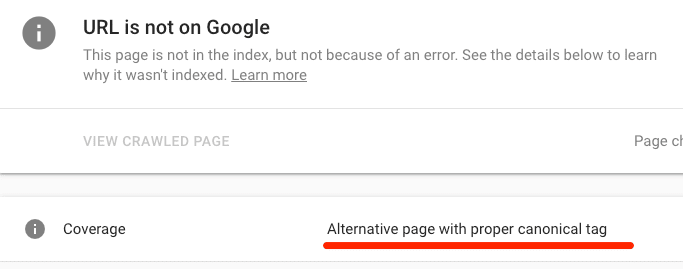
    If canonical points to another page, it will show a warning, “Alternate page with the canonical tag.”

    If you want to index the page, you should remove the canonical tag. 

    5) Nofollow internal links fixation

    Nofollow links don’t flow PageRank to the destination URL. Google also doesn’t crawl for nofollow links.

    To all the indexable pages, make sure that internal links are followed.

    You can do it by using Ahrefs’ Site Audit tool to crawl your site.

    If you want this page to be indexed by Google,  remove the nofollow tag from these internal links, delete the page, or noindex it.

    6) Add internal links

    Google finds new content by crawling your site. If you neglect, internal linking then it may not be able to find your new pages.

    The best solution to this issue is to add internal links to the page.  You can link the pages which are already crawled and indexed by Google.  But for faster Google indexing, always inter-link to your powerful pages.

    Google is likely to re-crawl such pages faster than less important pages.

    7) Unique and high-value content

    Google will not index your low-quality pages because they provide no value to the users. 

    Have a look at Google’s John Mueller remarks about Indexing in 2018:

    He said that if you want Google to index your web page or website, it needs to be “inspiring and awesome.”  Ask yourself: Is this page or post genuinely useful? If a user clicked on it from search engines, would that user find help on this page?

    If your answer is “NO” to both of those questions, you must improve the content quality.

    8) Build high-quality backlinks

    When you build high-quality backlinks, it tells Google that the site is important. 

    For transparency, Google doesn’t use only index sites with backlinks. But high-quality links help Google crawl and re-crawl your pages faster than those without. That leads to quick Indexing.

    Bottom Line

    When Google isn’t indexing your web pages or site, there may be 2 reasons:

    1. Technical issues
    2. Low-quality & worthless content

    In some cases, both of those issues may exist. However, technical issues are far more common. Technical issues lead to the auto-generation of indexable bad-quality content. 

    Still, if you follow the checklist above, you can surely solve the indexation issue. Always remember that Indexing and ranking are 2 different factors.

    Finally, you can get SEO help from professionals to stay on top of marketing and get results much faster.

    Let me know about your indexing tactics!

  • Top 5 SEO tips to optimize videos

    Top 5 SEO tips to optimize videos

    Videos are becoming increasingly popular for B2B marketing. Brands with dedicated video marketing strategies generate more leads, enjoy better brand awareness, and earn more revenue.

    YouTube, Facebook, and Twitter are great places for your video content, but prospects aren’t in buy-mode as they scroll through these social platforms.

    However, 90% of B2B decision-makers use search engines for business decisions. 

    So, to get the benefits of video marketing, videos must be optimized for search engines. 

    You can get good results, more views, and qualified leads on your videos by following few best practices for video SEO.

    Here a question arises, what is video SEO?

    Video SEO optimizes your videos for relevant keywords to be indexed and ranked on the search engine results pages. 

    In the last few years, video marketing is becoming more popular with businesses. Once marketers began to work on DSLR cameras in the late 2000s, it’s easier to make videos and get them online (on YouTube) without a videography degree.

    If we browse the internet, we won’t end up without seeing a video.

    One more thing is the latest mobile phone in our pockets that can shoot relatively high-quality videos anywhere. 

    According to Phil, now it’s become difficult to get ranked in the universal search results than it was about three years ago.

    If you want to rank your video on universal search results, you have to do  a lot with; 

    • The authority of your website, 
    • How video-focused it is
    • How it ranks for video-related queries. 

    How Does Google Rank Videos?

    In its general and video search results, Google ranks videos using similar ranking criteria as written content. Such as the quality of content, the number of backlinks, and RankBrain are the most important factors. 

    In the same way, if you’re hosting videos on your website, the video optimization tasks are similar to those for images and written content.

    Following are 5 steps you should take to improve your video search rankings to stand out in search results:

    Transcribe Your Video Content

    Providing both transcription and video on a single page offers more benefits: 

    • It caters to the preferences of different readers.
    • Your video content is more likely to appear in general search results.

    As I have discussed earlier, video transcriptions are optimized for search results in the same way as site content. While this may break duplicate content rules, transcriptions actually give a good user experience by fulfilling the needs of different learning styles. 

    While some visitors may prefer reading, others may prefer watching a video. To make business decisions, 85% of executives prefer reading over watching videos.

    To transcribe video content, you can take 2 approaches;

    1. Provide a complete, word-to-word transcriptions. Just like Moz doing for their Whiteboard Friday videos.
    2. Provide brief text highlights. For example, Content Marketing Institute does for their This Old Marketing podcast.

    Full transcriptions provide high engagement SEO opportunities and encourage more views with compelling content discussed in more detail in the video. 

    Ultimately, follow your target audience preferences: you can poll them to find out or do A/B testing to see the best engagement results of both approaches. 

    Optimize Video File Metadata

    In general, search results, titles & descriptions of the videos appear in searches. While Google will find something to show if this data is not provided, you’ll have more views and chances of ranking multiplies once your metadata is optimized.

    Titles and descriptions of videos should be;

    • Compelling to encourage click-through rates.
    • Relevant to the content.
    • Include your main keywords 
    • Feature titles should not be more than 55 characters.
    • Meta descriptions should not be more than be 155 characters.

    Additionally, search results display thumbnails for video results. 

    Thumbnails of videos are just like the images to blog posts; if you choose the right and high-quality thumbnail, chances of clicking on your videos are increased.

    Most video processing programs select thumbnails automatically by using a single screen from the video; it is highly recommended to create a customized, high-quality thumbnail that illustrates the content of your video and grabs viewers’ attention, and sparks interest.

    Provide Structured Data using Schema Markup

    To help Google find and understand the objective of your videos, website owners should provide structured data using Schema markup (semantic vocabulary).

    The markup includes the following information;

    1. The video title
    2. Video description
    3. The duration of your video
    4. Upload date, height, and width dimensions
    5. Thumbnail, 
    6. Video embed or content file URLs

    Structured data can also enable special features such as the “live video badge” for live streams.

    Submit a Video Sitemap

    Another way to help Google crawlers to discover your video content on your site is by submitting a video sitemap. You can increase your video discovery by creating a video sitemap and then submitting it to Google Console. 

    A video sitemap must include video title, descriptions, metadata tags, play page URL, thumbnail, and video file URL to help Google understand what the videos are about. Other optional fields can also be included: video length, number of views, category, rating, and live status. 

    5. Find the low competition keywords related to your video

    The best way to know if viewers prefer video content for specific questions is to conduct keyword research.

    You can simply do that by typing those words in searches. If you find video results on the first page of results, it shows that viewers are typically satisfied with video content for that search. 

    For instance, if you conduct a Google search for the query “Twitter tutorial,” you will find results in a YouTube video in the first 2 positions. Check out here,

    Make a list of keywords that populate video results in general search and create videos. 

    Now, you must produce high-quality or more comprehensive videos than those that are already ranked for relevant keywords.

    Bottom Line

    Video content standards are similar to text content in search results; they must be of high quality and without any fluffs. If you are optimizing low-quality and fluff videos, it’s not a valuable use of your time.

    Just like general text content, the engagement of users is an essential factor. If your targeted audience watches only a few seconds of your video and then leaves, your engagement will drop. Google will determine that your video is either low-quality or irrelevant to certain queries (keywords).

    Video content should be based on user intent, highly valuable with a high-quality production value. 

    But, that doesn’t mean you should hire professional actors or designing animations. Instead, it would be best to focus on the audio quality of your videos, clarity, and edit unnecessary content.

    Once you create a high-quality, engaging video, you can upload them to your website, add transcriptions, and optimize display results with file metadata, schema markup, and submit sitemaps. 

    After you complete these tasks, your video content will be more visible, get a higher ranking in search results for video marketing.

    Let us know if you have more tips and tricks for optimizing video search rankings.

  • 4 Traits of A Superb Product Promotional Videos

    Promotional product videos are the typical videos you see online or on TV. You create them to promote your products, services, attractions, or events. If the video is fantastic enough, it can generate a big hype encouraging viewers to be super interested in whatever it is promoting. 

    Because promo videos are specific to a product, you can use them to demonstrate its usage and merits. Promotional videos are short and range between one and five minutes. This Enables a well-produced video to grab viewer’s attention long enough to get the intended message and pique their interest. 

    Most of the time, they are similar to conventional ads with a call to action. However, at times the message is crafty but focuses on creating brand awareness. 

    Nowadays, technology is the heart and soul of most consumers. Therefore, promotional videos are a highly effective marketing tool for every business that needs to grow and stay ahead of the competition. 

    Promotional videos enhance customer engagement, conversion rates, and click-throughs rates. That’s why most companies are using them at every turn. 

    This blog post will show you why promotional videos are effective marketing tools and give you a few examples of well-done promo videos. But let’s see what a product video is in the first place.

    What is A Product Video?

    A product video is a descriptive video that successfully demonstrates the advantages of a product. Instead of focusing on the features of a specific product, product videos should emphasize how the product alleviates the pain points consumers could be encountering. 

    Demo product videos expand conversion rates by engaging and creating a creative story that illustrates how the product functions. 

    Product videos create a long-lasting impression in the customer’s mind by using metaphors and a story. Also, it lets consumers experience the product’s features rather than explaining them.  

    Product videos can be an effective marketing tool for businesses, whether they promote a commodity or a new software release. In addition, companies with complex products can use video to make their software more understandable.

    Example 

    Microsoft, for example, produces videos to promote new products ranging from document management services to CRM platforms. T

    The product videos effectively explain the new offerings so that consumers can understand quickly, providing them with a good reason to show interest in their products.

    What Makes an Exceptional Product Promotional Video?

    As earlier said, product promotional videos can be traditional TV ads or appeals for fundraising. 

    Some of them pop up in film festivals concealed as short films only to disclose that you need to download an app or purchase something in the last seconds.

    To get significant results from your product promotional videos, consider the following factors:

    • First, who is your target audience?
    • What is your main goal?
    • Where do you want the video to appear? Is it online or on TV?

    Understand that if people love your video, the chances are high that they will buy what you are selling. 

    No matter what you are offering or who your target audience is, below are the characteristics that every superb product promotional video should have:

    Never  Compromise on The Quality of The Video

    Yes, you do not have to break your bank account by using top-of-the-range modern equipment, but ensure that your audience can hear and see what you are saying. 

    You may have seen several poorly created product videos that left your mouth open, wondering whether the company understands the basics of a stellar product video. Right? 

    Such videos can do more harm than good. They can make people lose trust in the company’s standards, which will hurt the brand image.  Take time to make your video sound and look excellent. 

    If you can’t afford to hire a production company to make the video, you can illustrate your idea. But, do not settle for less. It’s advisable to make a simple polished video that resonates with your audience instead of creating a huge awful one. 

    Should Be Entertaining

    Creating a highly engaging video is easier said than done. Right from the beginning, somebody is watching your promotional video because they have no option. It can be either on TV during commercial breaks or a pre-roll just before a YouTube video begins playing. 

    To make your product video entertaining, come up with an exciting story with a beginning, middle, and twist at the end. Then, if you can get the people hooked right from the get-go, they’ll have the patience to watch the promo to the end.

     You can also create a short comedy as it works across all social media platforms. It gives viewers a reason to get glued to it instead of getting bored and hitting the skip button. 

    It Should Have a Human Side 

    People will always care about other people. They do not care about the in-depth research you carried out before creating your promo. Your target audience desires to see videos with a human touch.  So, your videos should have a human connection. 

    Promo videos should be thoughtful and should show a great sense of humor. Also, they should either be dramatic or mysterious to let the audience know that your brand has a unique personality and beautiful people behind it.

    Below is a superb example of human stories. The video is about a little girl who beat the odds just because of the human touch. 

    It Should be short

    Never assume that your audience has a lot of time to spare. Instead, understand that most people’s patience is close to nil and won’t hesitate to tune out at the drop of a hat. 

    So, grab viewers’ attention right from the start by appeasing them in the shortest time possible. It’s challenging to create long engaging promo videos, so making a short one is your best bet. 

    Include Captivating Visuals

    If you are advertising something using a video, then show don’t tell. Remember, video is a visual medium. Get your concept right. 

    For example, a talking apple won’t work for you unless you are making or selling iPhone or MacBook. So you’ll need to approach your project from a different perspective. 

    You chose to create a promo video, so offer your audience a good reason to keep watching instead of wanting to quit. For example, if you sell products, show people a very captivating demo. 

    If you are describing something to viewers, think of integrating some animation. 

    Below is an example of an excellent video that shows you the authentic product in action rather than just rumbling about it

    Reasons Why Promo Videos are Effective Marketing Tools

    • They sound more natural as you can see the character’s body language and facial expressions, which fosters loyalty and trust.
    • Most customers prefer learning about a company and its products via videos.
    • Videos entertain, educate, and inform
    • It’s easy to watch a video even when you are having a bad day
    • They are a great touchpoint with consumers

    Closing Thoughts 

    Product promotional videos should be short, entertaining, and impressive enough to pique the interest of your target audience. They do not have to cost you an arm and a leg but ensure they communicate the intended message to the viewers.

  • How to make your Google PageSpeed score 100%

    When you built a new website for your brand, you spend days and weeks over the design, production, and countless edits.

    But suddenly you encounter a problem that your new beautifully designed website has slow loading speed.

    Speed is an essential factor when it comes to search engine optimization and conversion rate.

    If your website speed is slow, people will bounce faster than conversions. But, making your website fast is not an easy task.

    Sometimes it’s difficult to diagnose the issue; it could be large page elements to poorly written code.

    But all you need to do is, identify and fix these problems fast.

    To check your website speed, run your website through Google’s PageSpeed Insights.

    If the score is 100%, your site speed is fast.

    The faster your website loads, you have a better chance of Google ranking and lower bounce rate. 

    Google offers this free tool to analyze your site’s speed, but they don’t give you the instructions on making a 100% score.

    Here are ways to score a perfect 100% on Google’s PageSpeed Insights and why your page speed is so important?

    Why is page speed so important?

    Page speed is an important ranking factor when it comes to Google’s search engine results.

    If your website isn’t on the first page, most people won’t click on the second page. It’s not so strange that the top 10 results will get more clicks.

    Backlinko surveyed ranked websites to figure out factors of top 10 results. They analyzed over 1 million search engine results pages on Google and found that page load speed was a basic factor in website ranking.

    The top-ranking websites on Google had the same thing in common: fast page speeds and very low bounce rates compared to 2nd or 3rd-page results.

    If your page takes 10 seconds to load, the likelihood of leaving your site increases by more than 120%.

    Backlinko graph shows that the top-ranking websites’ speed on Google’s first page is less than 3 seconds.

    According to Google, the average load time for most sites is over 8-11 seconds. In comparison, the best-speed website loads less than 3 seconds.

    Causes of a page to load slowly:

    • Heavy images: It is a good idea to optimize your images to take up less space. Best practices show the total size of a page should be less than 500KB.
    • Poorly-designed coding:

    Google shows that a 1.49MB page took 7 seconds to load.

    Suppose I say about a perfect 100% score on Google’s PageSpeed tool; it’s not an easy task. You won’t get results overnight.

    All you have to do is, work hard. If you want to traffic and more revenue, you must do it.

    It may be tedious and tiresome, but you can’t be lazy and risk revenue and traffic on the table.

    These are 4 ways to make your site speed score a perfect 100% with Google.

    Image compression

    One of the main reasons for slow pages is large image sizes.

    The top optimization strategy to fix your image size is “compression.”

    If you use WordPress, then “WP Smush Image” is the best plugin to optimize and compress your images.

    It is one of the fastest tools, and you can smush up to 50 images simultaneously.

    Browser caching

    Fetching the resources to load your website takes much effort, such as

    • Loading each image & page element
    • Heavy HTML & coding

    Whenever someone loads your site, this process is repeated. Automatically, it will have slow loading. Here you need the help of a tool, browser caching. 

    Browser caching is a tool that can make a big impact on page speed. It remembers the previously-loaded resources, so make it fast to load each time the same visitors come.

    But how it works? When a visitor comes to a new page on your website, your logos, data, and footers don’t need to load again. It will result in a faster loading speed.

    The best plugin to use in WordPress is W3 Total Cache. It involves no expert coding at all.

    Minimize HTML space

    Another big factor in getting a perfect speed score is minifying the space your HTML coding takes up. It is a process of fixing and removing duplicate and unnecessary data without impacting HTML.

    It involves removing, fixing, shortening, and formatting unused code when possible.

    In WordPress, the best tool to do all this is HTML Minify. Even if you aren’t a coding expert, you can easily do that.

    Implement Accelerated Mobile Pages (AMP)

    It’s a Google-implemented project to help pages load faster on mobile.

    Page speed is an important part of websites. Stats from KISSmetrics shows that 40% of people leave pages that take more than 3 seconds to load.

    The AMP plugin was made out of a collaboration between Twitter and Google.

    In simple words, AMP is an open-source initiative project designed to optimize and speed up mobile pages. 

    This plugin takes a mobile-friendly page and loads quicker by stripping it down to basics. Users will have a streamlined experience on mobile.

    You might have seen AMP articles when you browse the Internet on your mobile phone. For example:

    In Google search results, AMP articles are often related to the “Top Stories” section, and they load faster.

    If you click on any of AMP articles, the content will look like this:

    This feature streamlines the user experience on mobile.

    AMP is safe to increase mobile speed and conversion.  It also allows you to score 100% on Google’s PageSpeed.

    If you’re not familiar with HTML, try using a WordPress plugin, “AMP for WP.”

    With over 80,000 active installations, AMP provides updates and constant support. It’s a proven and safe way to speed up your mobile site.

    Bottom Line

    When you build a new website, you spend countless days, weeks, and months to make it look perfect. 

    No doubt, every image, icon, logo, and element must be of top-notch quality.

    But that often makes your website speed slower than Google’s best practices.

    The speed of your site also plays a huge impact when it comes to driving conversions.

    Nobody likes to wait 10-15 seconds for a site to load when choosing to click back to Google and select another website.

    Google is all about providing a perfect user experience. But if your site speed is slow in Google’s record and it sees people bouncing, they will lower your website ranking.

    It should be one of your top priorities when trying to optimize your website.
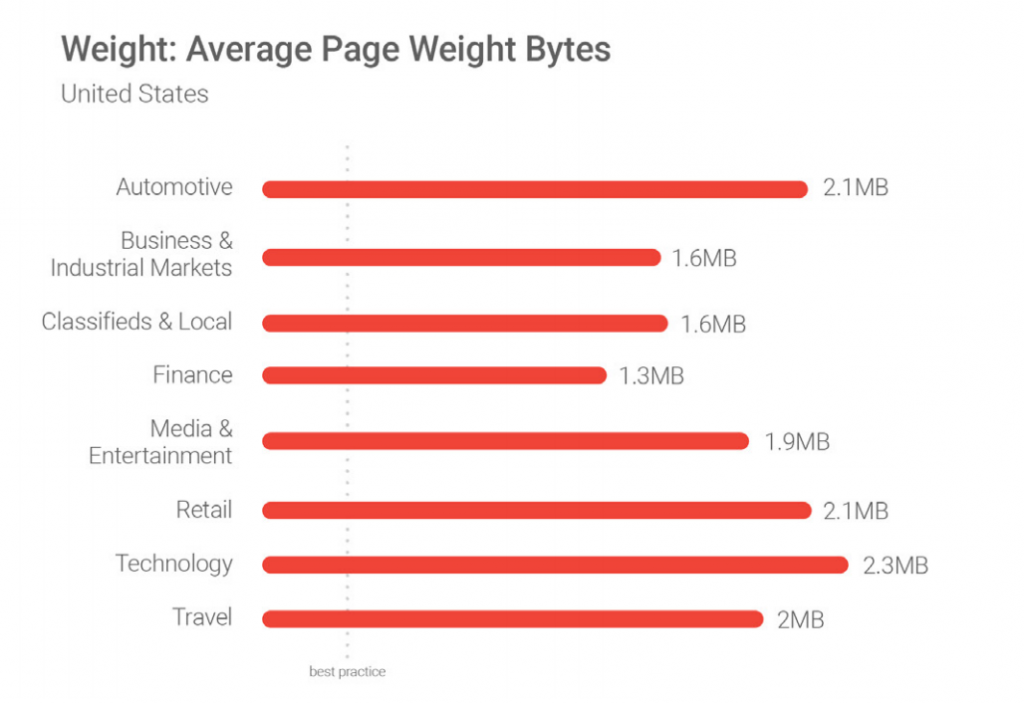
    Diagnose the issues, whether it’s images, poor coding, text, page elements, or all of the above!

    It’s a good idea to check your website speed in Google’s PageSpeed Insights. Your best score should be 100% or close to that. 

    Check Google PageSpeed Insights tool’s reports to figure out your next steps.

    Start with image compression, optimization with a Plugin.

    To leverage browser caching, use plugins that help your site use fewer server-based requests and load faster.

    The next step is to minimize your coding. It will help you fix unnecessary coding that impacts the speed of your site.

    The last step is implementing AMP to make your web pages load faster.

    These strategies can help you score a perfect 100% on Google’s PageSpeed Insights.

    Now let us know if you have any other way to increase your website speed?

  • Understanding and Managing the Customer Acquisition Cost

    Every business has to grow by maintaining an active customer base or by adding new customers regularly. 

    To grow these businesses (irrespective of the business nature), one has to invest effectively to maintain an active customer base with the continuous effort to add new ones. 

    This whole investment process in maintaining and acquiring new customers is called Customer Acquisition Cost, which in theory is also abbreviated as CAC, alongside the existing customer lifetime value. 

    Now Customer Acquisition can be referred to as a standard evolving with the growth of businesses using generic marketing campaigns, also known as advertisements. 

    We see advertisements everywhere. 

    Any ad that is randomly shown or displayed to you without your consent is referred to as unintended or untargeted marketing. 

    It shows advertisements to the general population without their consent and without checking their prior interests.

    But businesses don’t grow with just random advertisements in today’s advanced world. 

    One has to be target-oriented and aware of its users’ needs and interests. 

    So as technology evolves, businesses evolve too, and these businesses enhanced their marketing techniques as well. 

    They had to engage their existing customers by advertisements, but they were also looking to grow their customer base using a new advertisement methodology. The game of marketing was about to change.

    With new technologies like data processing, big data analytics, and artificial intelligence, these web-based businesses can engage and attract millions of users, creating targeted campaigns. 

    That is very specific to the users’ needs and requirements, convincing and enforcing these users to buy and eventually subscriber for updates. 

    This whole process leads to a long-lasting impact on the business in the industry and its users. 

    How to calculate your CAC?

    Now, I will explain to you the steps involved systematically to calculate the Customer Acquisition Cost. 

    I have divided the whole Customer Acquisition Cost into three main (3) categories:

    1. Targeted marketing (advertisement analysis and its cost)
    2. Ad marketing cost
    3. Production and manufacturing cost.

    To get into the technical processing and understanding of CAC, we need to first look into the formula to calculate the Customer Acquisition Cost. 

    So in simplest words, you can divide the amount of money you have spent by the number of customers you have gained during the time frame. 

    For example, a dress seller invested $1000 in marketing his products, successfully added 1000 new buyers in his exiting customer base, then calculated the CAC you simply divide $1000 by 1000 new customers, making the CAC for this dress seller $1. 

    But businesses do not rely on only one advertisement stream. 

    New startups may have one, but an established business organization will have more than one business advertisement streams. 

    In this case, organizations check the CAC on individual streams and are also very interested in knowing the Customer Acquisition Cost across all the advertisement channels. 

    This gives them an overview of advertisement performance against each channel, and they can make better decisions on where to increase or decrease the advertisement investment. 

    Across the channel, CAC assessment is the key marketing identified for the big giants of the industry. 

    This channel’s performance management can be further micromanaged on a campaign and keyword level. 

    All were responding uniquely, some of which might be more effective than others.

    Optimize CAC for minimum financial investment:

    With the change of weather, products change and with the requirement of change in the products new advertisements are required. 

    This whole process of change will affect the CAC. 

    This means that businesses can continuously improve their advertisements, leading to increased customer loyalty, and more and more revenue can be generated. 

    It can be done by constantly optimizing and improving Customer Acquisition Cost.

    Businesses can always do few things to improve customer service and increase revenue. 

    • First of all, being an online business, one has to ensure minimum cart rejections. To reduce the chances of getting a product selected and then deleted from the cart, one has to give lucrative incentives to the customers. Incentives always attract customers. 
    • Secondly, your website or mobile app needs to work smoothly, with no delays, no misdirection, and no errors, because all of these things annoy the customer, and he or she will eventually leave. The user experience on the app or the website will work as the word of mouth kind of advertisement that is beneficial for the business. But imagine what word of mouth is not good. This is a major loss for the business after having a very successful advertisement and CAC investment. 
    • Lastly, to have constant growth and minimum Customer Acquisition Cost, businesses must maintain a good customer relationship management system to track and record their customer activities. 

    By now, it is clear that Customer Acquisition Cost is a marketing expense businesses are ready to bear, expecting their advertisements to be effective enough to recover the marketing investment made and a definite increase in customer base. 

    A well-balanced customer relation management will result in a healthy customer lifetime value with a minimum investment in CAC.

    To maintain a healthy customer lifetime value index and a minimum CAC, the business’s product or services needs to have a unique viral effect that will lead to word of mouth and the sales connected with this. 

    In addition to getting into a strategic partnership or an alliance to reduce the lifetime value to customer acquisition cost, some other techniques can also be used. 

    A reward point scheme is a referral program where a customer gets discounts or rewards if they refer another customer to buy a product or service from you. 

    This will reduce the CAC of this referred customer to $0. Isn’t that a win, win situation. 

    The dependency of calculating a Customer acquisition cost may vary across different businesses, and it may vary from product to product. Still, some standard calculating points will always remain the same. 

    These points are not limited to only the ones mentioned and discussed below but can be altered as per the need of the business. 

    The first and most important factor is sales scalability; the bigger and quicker the sales operations are, the better results will be seen. 

    The second is the product purchase value which leads to the third factor, i.e., product purchase frequency or product design change frequency. 

    This leads to the fourth factor, which is customer lifetime value. In the end, the last or the fifth factor for any online business to calculate its CAC in its maturity.

    Bottom line

    To sum it all up, every business organization needs to calculate the cost per customer, running expenses, and revenue level to reach the three main goals of having a sustainable, long-lasting online business. 

    This business needs to have a minimum Customer Acquisition Cost and a maximum Customer lifetime value.

    Customer acquisition cost will be high only if the customer churn rate is higher than expected. 

    Explaining the Customer Acquisition Cost, I would conclude this article by stating some obvious highlights. 

    If you’re starting a new online business, you have to make a specific junk of your investment for CAC. 

    A safer independent investment for CAC will save your business in the long run and help grow in multiple directions. 

    It will also be an important task for yourself to continuously ask if you can decrease your CAC by using other marketing schemes or whether you have to invest more than you have planned to ensure your brand’s stable online journey. 

    This can also be done by constantly working on your no-cost to low-cost marketing schemes. 

    For that, you have to familiarize the CAC across all the existing channels of your advertisement. 

    A unique product and a high target business model are what you need as an entrepreneur to start your online business journey. 

    But you will also need money or funding, or revenue to continue growing your brand. 

    Or you can raise your capital by smartly looking into the CAC of each advertisement revenue stream and optimize your advertisement. 

    Using layman terms, you need to keep a firm hold on minimum CAC and a higher customer lifetime value. 

    Secondly, to have a successful advertisement to revenue outcome, you need to ensure the CAC investment recovery within some time frame. 

    Failing to observe or understand your CAC outcomes will eventually lead to business failure. 

    Investing wisely and statistically growing a business is important but growing a business with lousy investment to complete failure is wrong.  

    Remember that business is a constant competition, and you would not want to lose to your competitor, nor would you want your competitor to realize what you have done. 

    To constantly evolve and save your business strategy, you need to keep your advertisements highly targeted and customer-centric. 

    You must never let your competitor steal your customer!

  • 5 Top Demographic Questions You should Include in Every Survey

    Advertising for children’s toys cannot run late into the night.

     Why?

     Because the target population (the children) usually are snoring their nights away. 

    When it comes to advertising, you have to put the money where the mouth is. 

    Businesses need to know where their target audience will be and learn how to reach them effectively.

    Consumers are individuals with particular needs and want. And if you know what their desires, wishes, and wants are, then you’ll learn how to address their pain points and alleviate their suffering. So, it would help if you had loads of info about your customers. However, getting that information can be challenging. 

    Because not every customer is eager to share their life story, you need to collect this information quickly, painlessly, and in volume.

    That’s where demographic survey questions come into play. 

    So, What are Demographic Survey Questions?

    These are the basic questions you find at the top of the survey and focus on inquiring about the respondents’ background. The information obtained helps the marketing team identify a specific respondent to see where every person fits in the overall population.  

    The Importance of Demographics Question

    Demographic questions help you understand who your target market is, including their train of thoughts. 

    By including demographic questions for the survey, you can save yourself and your company much money by taking the time to put the questions in your survey.  

    Here are more reasons why you should include demographic questions in your customer survey.

    It Makes it Easier to Track Trends and Social Changes

     Suppose you want to track shifts and societal patterns over time. In that case, the demographic questions survey is appropriate because its categories and criterion seldom alter due to its simplicity. 

    Recognizing trends in this manner helps companies in tracking, monitoring, and analyzing the customer journey. And it becomes a bit easier for brands to predict the future of the market. 

    They are very helpful in all Your Marketing efforts.

    The more data you have regarding your target population, the better. For example, suppose you know that most of your target population consists of college kids. In that case, you’ll tailor your marketing message to best resonate with them in every way.

     Also, you’ll be able to reach them right where they like hanging out, and this will be a significant boost to your marketing efforts. 

    In other words, you will not be like someone groping in the darkness playing hit or miss games. Instead, you’ll market your products like a pro because you understand your target population, and your message will always hit home. 

    Disadvantages of Demographic Questions for Survey

    Every coin has two sides. Right? So do demographic questions for the survey. Besides these fantastic benefits, demographic questions have a few drawbacks. Let’s take a look. 

    The Information Obtained Could be Subject to Misinterpretation

    If you get your population target data from census material, you need to be extra cautious. Some of the information from these materials becomes fast and quickly outdated. For example, a person who is single today could be married in a few years. In addition, people’s lifestyles change at every turn. So, you need to factor this into all your marketing campaigns. What may once have been the ordinary might not be the case today. 

    Demographic Data can be Too Blurry.

    Though demographic information gives you helpful information about a person, such as gender or age, it will not offer you insights into their dislikes, likes, or personality. 

     And this could be something that many brands would like to know to target each person as an individual.  So, in short, demographic questions leave a lot to be desired. Nonetheless, they are still valuable for giving you a general feel of your target population.

    Demographic Survey Questions Examples

    Demographic questions assist your company in developing correct buyer personas. Buyer personas have a significant impact on your marketing campaigns, sales strategies, and customer service. The more specific your personas are, the better your understanding of your customer’s values and needs. 

    So, be sure to include the following questions in your survey.

    Relationship/ marital Status

    It is a norm for moms to prioritize their children over themselves. Consider this when carrying out your survey and contrast this with a single childless woman. In addition, marital/ relationship status impacts how an individual responds to survey questions. 

    Suppose you question a single woman about her priorities. In that case, she will likely give replies that revolve around herself, her jobs, friends, and parents. On the other hand, if you ask a married lady about her priorities, she’ll probably prioritize her kids, husband, and home.

    Example: “Are you married/ engaged?

    A. Yes

    B. No

    C. I would rather not disclose

    Gender/ sex 

    Gender or sex is the one question you’ll find in practically every survey. This is because a person’s gender significantly impacts their way of thinking and affects the survey’s outcome. 

    Women can balance both hemispheres, although men have a stronger left hemisphere. This explains why women are more aware of their emotions than men. In contrast, men prefer to think in a more unbiased, task-oriented manner.

    Make sure you use the word “gender” instead of “sex” when phrasing this inquiry.

    Gender is more of a matter of perspective, providing the respondent more leeway in their responses. You should also always give the option to “Would rather not answer.”  That way, participants will not feel compelled to divulge sensitive information as a result of this question.

    Example: “What gender do you like identifying  as?”

    A. Male

    B. Female

    C Prefer not to disclose

    Employment Status 

    Inquiring about a person’s annual income is an extremely sensitive question, up to a point where some people consider it intrusive.

    That’s why it is preferable to inquire about your respondents’ employment status rather than their annual salary. Take note of the responses of the employed versus those of the unemployed.  

    There’s a significant difference between employed and unemployed responses as their perspectives may differ regarding financial matters.

    You might also need to include a query inquiring what sector they work in. This can help you determine which business field to target. 

    Example

    Are you currently…?

    1. Employed for wages
    2. Self-employed
    3. Out of work and looking for work
    4.  Military
    5. Retired
    6. Out of labor but not currently looking for work
    7. A homemaker
    8. A student
    9. I prefer not to say

     Education

    Education is a crucial demographic question as it reveals the type of work a candidate could be doing. If all of your respondents have a Ph.D., you know their jobs require critical thinking. As a result, you can make a logical instead of a psychological one. These could be pointers as to why your company is more appealing to them. 

    When asking education-related queries, include some options for trades and apprenticeships. Most of your target population may have picked a different career path, and the survey responses should mirror this factor.

    Example: Name the highest degree or level of education you have attained. If you are currently enrolled, state your highest degree earned.

    1. Associate degree
    2. Bachelor’s degree
    3. Master’s degree
    4. High school graduate, diploma, or any equivalent
    5. Some college credit, no degree
    6. Trade/technical/vocational training
    7. No schooling completed
    8. Nursery school to 8th grade
    9. Some high school, no diploma
    10. Professional degree
    11. Trade School
    12. Doctorate
    1.  I prefer not to say

    Age

    The age of the respondent is a standard demographic question you find in almost every survey. 

    You’ll need to know how old the candidate is and whether or not they fit your target demographic. This question is best asked in a multiple-choice style with age ranges for every answer. 

    Because some customers may be uncomfortable disclosing their exact age, this format allows them to participate while still safeguarding their unique information.

    Other demographic survey questions include:

    • Location
    • Ethnicity
    • Place of Birth
    • Household Income
    • Employment
    • Family and Dependents
    • Religion
    • Political Affiliation
    • Voting Status
    • Language

    Closing Thoughts

    These are the demographic questions you should include in almost every survey. Always reconsider and upgrade the demographic questions you use in your research surveys for professional and ethical reasons. 

    The respondents’ answers will surprise you as most of them might not be what you were expecting. So, be ready for it. The most critical thing is that you collect enough information and use it to steer your business to the next level.