Web sites, a virtual place where I exist online. By me, I mean this website will be my physical presence. It can be my blog or my online business store.
Now, I am sure you already know that to exist online, I have to be presentable, and my business web page needs to be attractive, simple, elegant, informative, and clear.
But, just like in a physical world where I can sell anything to anyone simply by making an inspiring, comfortable shop, I can do the same in the virtual world.
If I want you to stick a little longer and read my blog completely on my website, I have to present the blog in the simplest ways to discuss something complex in the easiest ways.
It has to be catchy to generate more organic views.
How will I make you stick to my website for longer than usual time? This is a million-dollar question these days.
Everyone is trying to generate more and more traffic. How are they planning on having more traffic than ever?
This is what we will be discussing in today’s article.
Websites and designing a website that generates more and more views around the clock are not easy. So, without taking any more of your time, let’s dig in and see what site maps are and how information architects use them to make websites.
Engineer your website
Planning and designing a website is always very overwhelming for me.
I have so many ideas and thoughts, based on which I want to make a design website. And most of the time, I see myself getting lost with all the information I have, and I have no idea how to connect one thing to the other.
Why am I talking about the layout of my webpage, and why not the website’s content? Here is why,
The website has to be viewed by a client, customer, or reader.
Without a clear, simple, unique layout, I am sure the client, customer, or the reader will not be staying on my webpage for more time.
It has to be my idea, my place, but my place is nothing if it is not well planned or confusing the client, customer, or reader.
I have to ensure that my client doesn’t feel lost and my website feels like home to him.
To make the customer stick around and roam more on my website, I will be using a sitemap.
A site map helps to plan, organize, design, and build the website in the simplest ways. This makes a site map an overall layout of what needs to be where and how everything will be interconnected to give the website a mesmerizing look.
It will not be wrong to explain the site map as a flow chart. It starts from a page, which is divided into sections, and every section has multiple subpages.
Site maps are usually divided into two parts, an HTML or a visual one and an XML file system.
Looking for an example
Let me explain site maps with an example. What if I have to take you to a strange place? A place that is unknown to you and leaves you all alone there.
What will be your first thought? You will be out of your comfort zone, in a new place where you have no idea of why you have been left there alone.
To be familiar with the place, you need to explore and memorize its surroundings. Only then will you be able to move around from one place to another place without hesitation.
For example, you will get to know which street connects your house to the public bus stop. Where do the buses go from that stop? How many sections that place has? How are they interlinked, and how are they connected?
Let’s replace patterns with flow charts and flow charts with maps. Yes, you read it right.
Physical maps, if I would have given you the map in the beginning. Would that not be a convenient thing to do? Yes, that was, as it clearly shows how the place is interconnected and how things work there. So now you can ask me why I need to have a sitemap and what its benefits are.
Why sitemaps?
So now I have my sitemaps with me. What now?
This site map will be handed over to the information architect, who will design and define the website’s layout. They will categorize information into sections and pages while ensuring the relevant information is reachable. Site maps help you to see how the website looks to the customer.
To explain to you the need for a site map, I will share some stats.
Now, this may sound crazy but let’s be honest and face the facts. Living virtually on the internet is the new motto, and everyone is trying to go live.
Are these stats compelling enough to convince you that every website needs to have a clearly defined agenda?
Because without an agenda, to plan the website is similar to overload it with information in a form that doesn’t make any sense? This phenomenon of being lost in a site without a site map is a classic example of failure.
One source of information
You have to remember that building a website from scratch is not an easy task or even one man’s job. It has to be a team of highly skilled people who are collaborating towards the same goal.
This means that everyone can have his or her thoughts towards your site map or information architecture. This is why you need to clearly define and convey the site map and what kind of information architecture is required.
Your site map will be the pathway that will be followed by everyone from your team working on the development of your website. It becomes the Bible for your team to follow.
And in case if they come up or feel like adding a new section, page, or subsection, they will know what to look up to and how to be the perfect architects of that addition.
One more thing, this site map will allow your team to identify, highlight and remove unnecessary information from the website.
Unnecessary information is the information added to the website, but now with a finalized site map, that doesn’t make any sense and will only confuse the customer.
Any unnecessary information which doesn’t fall in line with the site map should be immediately removed. Similar is the case with duplicate information. It should be removed immediately.
Bottom Line
Simply said, a site map makes you aware of what exactly you are doing, how it is connected, how the customer sees this, and how I can make the customer stick to my website more. This well-structured use of a site map is only beneficial if everyone on the team knows what is happening and in which direction the website will be built.
The site map has to be updated if anything is being updated or deleted. However, it should never be outdated as an outdated site map will cause severe problems, and the customers will be annoyed, resulting in decreased traffic.
In the end, if you know why you need a website and what you will be using it for, then please remember to finalize your site map to overcome the overwhelming feeling of being lost and occupied.
Sometimes people confuse machine learning (ML) with artificial intelligence (AI). In fact, machine learning is a subgroup of AI that enables the latter to do activities extra efficiently and smartly by giving it learning abilities. These advantages constitute machine learning, and acts as a significant factor of AI, as seen by the most recent machine learning stats.
We therefore gathered the most essential and latest machine learning statistics available, since its rising relevance necessitates more research. We’ve additionally incorporated information on how machine learning is now being utilised in the healthcare business, namely in properly identifying illnesses and prioritising treatment for COVID-19 patients.
Machine learning is now used in almost every area, including healthcare, financial services, amusements, retailing, and industrial production. Firms must now use machine learning to increase profits by reducing expenses, and automate business processes.
Following 42 machine learning statistics can assist you find your approach throughout this complex area in a society which flourishes on revolutionary technology.
1. Netflix saved $1 billion by combining the advantages of personalisation and content suggestions with their machine learning system.
16. Cost estimates for Machine Learning projects are typically increasing by 25%, with the financial services, industrial, and IT enterprises experiencing the highest substantial expenditure rise this year.
26. Chatbots are preferred as the major form of contact for customer care queries by 45 percent of end customers.
27. In the upcoming years, investment in Machine Learning will grow more than 300%.
28. Sixty-two percent of consumers are eager to contribute their information to Artificial intelligence in order to improve organization and user interaction.
29. 44 percent of businesses are concerned that if they are extremely delayed to deploy Intelligence, they may risk losing out to startup companies.
30. AI is being used by administrators to eliminate monotonous activities which include documentation (82 percent), organizing (79 percent), and time tracking (78 percent ).
31. Firms who use Machine learning and artificial intelligence for marketing boosted their sales by higher than 50%, decreased work time by 60-70 percent, and generated cost savings of 40-60%.
32. Whenever artificial intelligence is established, 49 percent of customers are eager to purchase most often, whereas 34 percent are prepared to spend additional cash.
33. Business – to – business firms that have been using AI in purchases have seen call-time reductions of up to 70% as well as a 50% boost in prospects and engagements.
34. According to business executives, virtual assistants have improved revenue by 67 percent on average.
36. 47 percent of AI-powered firms claimed to be able to optimise marketing and advertising, whereas 32 percent claimed to be able to minimise operational expenses.
40. Advertising executives are greater than twice as inclined to disclose expenditures in Learning technology and sales force automation.
41. Machine learning is currently the second most sought-after career.
42. Artificial intelligence is listed as a necessary expertise in over 98,000 positions on LinkedIn.
Final Words
Machine learning is a key component of artificial intelligence; it essentially teaches on its own and your business operations to become significantly more intelligent.
Implementing and engaging in machine learning will undoubtedly yield interesting observations for your organisation and the subsequent digital delivery you expect.
The coolest feature regarding ML is the advances it has enabled, such as Artificial written work, lip-reading, automating information gathering and assessment and sometimes even properly forecasting illnesses as well as the seriousness of a medical illness.
Focusing on its amazing accomplishments, this technological innovation has considerably improved over the years and has already overtaken human capabilities. Machine Intelligence is altering several aspects of human life. The very minimum we could do is think about it somewhat collectively.
To be successful in any profession, you must work constantly and remain dedicated, and have a strong love for what you accomplish. It requires time, dedication, as well as a solid groundwork to achieve positive outcomes.
Setting objectives for your small business as well as determining the finest approach to attain goals is essential. Establish a strategy for marketing your firm, increasing brand reputation and gaining a regular flow of consumers, and afterwards start working toward your objectives. Employ strategic advertising tactics to differentiate your company from the competition and start on the journey to prosperity.
There are numerous tools available to help you flourish in 2021, however by gathering data and evaluating small company statistics, you may gain knowledge and discover whatever can assist your firm develop with time.
You may use innovative techniques to accomplish excellence and create a solid groundwork for your company to rely on, progress, and continuously achieve objectives.
Here are several useful and strong small business statistics to consider as you plan your route to accomplishment for your company in 2021.
9. In 2018, 91% of poll participants indicated they purchased at local small businesses at least once per week.
10. In the year 2018, Because of the ease, 61 percent of poll participants said they usually bought at local small businesses.
11. Consumers visit autonomously operated eateries, fast food joints, nightclubs, and bars in 77 percent of cases. Apparel, accessories, and department stores come in second at 40%, followed by booksellers at 32% as well as gift, novelty, and souvenir businesses at 30%.
12. Small Business Saturday seems to have had a good influence on 97 percent of customers’ neighbourhoods, and 80 percent plan to purchase at totally independent businesses or food outlets on that day.
22. Food and drinks enterprises accounted for approximately 14% of all smaller firms, establishing this among the highest prominent categories for smaller companies. Retail outlets, comprising eCommerce companies, accounted for 13% of all replies, as did business activities. The second most preferred category, with 10% of entries, was healthcare, cosmetics, and wellness solutions. Banking, medical coverage, and legal completed out the leading biggest and most popular professions, accounting for 6% of smaller firms polled.
28. The main justifications given by POC entrepreneurs for starting their independent enterprise were indeed a desire to be their individual boss (28%), a desire to explore their own interests (19%), and unhappiness with organisational Culture (15%), which were also given by white businessmen.
29. According to recent demographic data 1.1 million employer companies in the United States are controlled by females while 1.0 million are represented by minorities.
30. A minority-owned business would also have $1.2 million in yearly revenues including 8 employees on average.
31. Women-owned smaller companies are growing at a higher pace than emerging enterprises overall, at a frequency of 21% each year.
32. In 2021, 29 percent of small company owners polled opted to establish their personal firm as they wanted to become their personal boss, which continues amongst the most common motives year after year.
33. The percentage of individuals who started small businesses because they were dissatisfied with corporate American (17%) grew by 11% this year, potentially reflecting the difficulties individuals are having with organizational actions mostly during epidemics, such as unemployment.
35. Individuals were also driven by the prospect of building something from the initial concept, according to the investigators.
36. What motivates individuals to form their independent small businesses? Individuals would like to operate for themselves, make greater revenue be increasingly hands-on, as well as end up taking on extra responsibilities.
37. The majority of small company founders (58%) launched a fresh standalone firm from the beginning, whereas 18% acquired existing independent enterprises.
50. In November 2020, around 29 percent of small company entrepreneurs polled indicated that the effect of the coronavirus is one of their greatest significant problems.
Final Words
Due to the Covid-19 epidemic, your business might encounter problems in 2021, several of which might be beyond your reach. There seems to be no limit to the achievements that could strive to develop in 2021 and that in the coming years by employing brand management tactics and discovering new methods to hold your firm running.
The above small business statistics open the door to fresh insights about the firms’ performance, loss, and difficulties. However, these statistics put the spotlight on a roadmap for how small firms might well be productive and remain to flourish.
It is necessary to incorporate innovative marketing strategies in order to maintain your firm healthy and enthusiastic, especially whenever faced with difficulties.
Someone who has started or is thinking about starting a business will almost certainly utilise the online services for business development and transactions. Marketing extends to both physical businesses with a commercial appearance and those who want to operate entirely online and incorporates the creation and maintenance of an economical, interesting, and user-friendly website, as well as certain linked web applications.
Recreational corporations might be able to drag off simple format-type sites – nevertheless, for a truly professional image, an exceptional webpage tailored for your organisation is essential. PHP development has become among the most popular in web programming in the recent years.
PHP is a popular open – source software and general-purpose programming language designed largely for web application development. It may be included within your HTML.
Here are the top statistics and facts that you must consider:
1. PHP’s mascot is indeed a large blue elephant.
2. PHP’s original term was ‘Personal Home Page.’
3. PHP is now known as “PHP: Hypertext Preprocessor”.
4. Despite PHP being freeware, it is still not released under the General Public License or GPL.
5. PHP is used by about 244 million sites on the internet.
6. Rasmus Lerdorf didn’t invent PHP to be employed as a programming language. This was created solely to administer his own website. Despite years of development and verification and validation, the authorised version of PHP was published in 1997.
7. PHP employs conventional computing object-oriented coding, as well as a hybrid of the two.
8. PHP is compatible with all mainstream operating systems including Microsoft Windows, Ubuntu, Chrome Os, Mac OS and XRISC OS. It has implemented a required sign in function to increase the security of your web application by authorising the right login and password.
9. There seem to be no formal specs or regulations for PHP.
10. PHP originally created to substitute a sequence of Perl scripts used to maintain Personal Home Pages.
11. The most well-known PHP projects or frameworks are: Symfony, Laravel, CodeIgniter, and Faker.
12. In 1994, PHP was created in C as a collection of Common Gateway Interface (CGI).
13. Throughout the globe, PHP has been used to create 244 million websites. As a result, it would be the most widely used computing language in the realm of website development.
14. The most recent edition of PHP is 7.3.0, and users may participate in the PHP language by visiting this web page.
15. PHP 4, fueled by Zend Engine 1.0, was launched on May 22, 2000.
16. When creating a webpage or a web based application, the developers are most likely anticipating the overall project expansion. As a result, scalability is necessary since the website must develop as well as be equipped to manage rising demand. PHP-based websites may be simply expanded by integrating extra servers when required.
17. PHP’s usage of its core resources reduces both burden and session duration. As a consequence, the execution pace is relatively fast, therefore benefits not only programmers and moreover its consumers, who receive the result quicker.
18. Because PHP is open – source software, some argue that it is insecure. However, in reality, every programming language is insecure; it was just a question of how they ‘re utilised. The layer of protection is determined by a designer’s skills and abilities. Another method of avoiding security issues, for instance, seems to be to conduct a testing process. By the way, it’s an important achievement in every assignment the workforce completes.
19. Because PHP is freely available, it does not necessitate the use of anything additional costly software. There seem to be no additional license or licence fees to pay, and there absolutely no limitations. Because of the numerous interconnection possibilities, PHP is open to use, which saves programming costs.
20. On the application server PHP is the greatest technology for developing tailor – made projects since it is completely constrained by any customized settings. As a result, developers may design a PHP-based online infrastructure that precisely meets the demands of their consumers. For example, when coupled with JavaScript, the development team may create functioning and visually appealing web pages.
21. Mostly in the past, PHP was thought to be a relatively simple and “light” alternative. This is because of its simplicity of implementation and quick construction process. Sometimes unskilled developers may complete their assignment quickly. The above is definitely one of PHP’s most significant advantages nowadays. Nonetheless, the number and diversity of alternatives increased considerably because PHP 7.4 is far more effective than just its predecessor.
22. Several programming technologies’ effectiveness deteriorates with age. Using PHP, the reverse is true, as demand is always increasing. New problems necessitate changes, which are delivered through annual upgrades. Backend development in PHP nowadays is more than just adding a database over your front end work. PHP can handle a wide range of activities such as collection of data, redirecting, mobile synchronization, and so on.
23. In general, this requires almost no effort to complete an initiative whenever PHP is used instead of another programming language again for the mission at hand. Minimal effort implies your job will be completed sooner. The marketplace ecosystem is always shifting.
24. PHP programmers’ daily fees are however 15% more reasonable than those of Python or Ruby programmers, for reference. As a result, developers are simpler to locate and less expensive to employ.
Conclusion
In practice, the programming language of selection is a negotiated settlement between both the advantages and negatives of the different options. In 2021, PHP will be the Programming language of choice for creating all types of websites, from landing web pages including basic WordPress webpages to sophisticated online ecosystems including Facebook.
PHP has always been the main topic of conversation for more than a generation and therefore has no plans to withdraw at any time in the future. It’s been discovered that PHP is used by over 80% of online consumers – the above statistic says volumes about the importance of this website technology.
We utilise PHP in commercial online applications for a variety of purposes including its versatility, simplicity, various interconnection options, and fast performance.
You may employ PHP programmers to build the finest innovative and long-lasting online alternatives for your company. Acquiring the proper Programmers, on the other hand, may not be as simple as it seems. And we’ve produced guaranteed facts and statistics that if one implements the guidelines we’ve given above, will solve all your web problems.
Blockchain tech is at the heart of Bitcoin as well as other trendy cryptocurrencies. And which is quite a considerable amount. However, computing researchers and economic executives believe it has the capacity to change global trade, law, and governance, among other things.
Each opinion may be documented confidentially inside an unchangeable shared database using blockchain solutions. The final findings would be unbreakable, without the chance of human manipulation.
There are only 2 of the thousands or millions of methods blockchain technologies has the potential to change the method we operate by enabling data accessible, confidential, and unchangeable.
This blog is much more than a collection of fascinating blockchain, cryptocurrency, and Bitcoin data. We believe it will also be a trustworthy resource of information to hot concerns concerning blockchain implementation and its possibilities in a variety of sectors.
Even if you’re already acquainted with the subject, we believe you ‘ll discover a handful of mind-boggling blockchain networking statistics.
Bitmain, a Chinese business that manufactures integrated circuitry semiconductors for cryptocurrency mining, is the country’s leading blockchain organisation in terms of marketplace capitalization.
As comparison to the entire year of 2017, blockchain investments increased by 280 percent during the first three quarters of 2018.
Based on Brock Pierce, prominent American businessman with extensive expertise in electronic cryptocurrencies, DApps, STOs, as well as the game development sector will drive blockchain growth in the coming years.
Lenovo, a Chinese company, revealed a mobile device that includes “Z-space,” a blockchain-based transaction infrastructure. HTC has also released a cryptocurrency smartphone.
Until blockchain reaches widespread innovation key concerns such as execution efficiency, interoperability, prices, legislation, and cooperation must be addressed.
Newcomers to the Block chain technology: 44 percent of players have used blockchain technology to acquire or exchange gaming stuff.
Several of the nation’s finest financial institutions are financing around $50 billion in the development of a blockchain-based virtual currency settlement process.
Blockchain expenditure in the global medical industry is estimated to reach $5.61 billion by 2025.
The cryptocurrency’s meteoric rise has captivated the interest of professional investors who see it as a possible safe harbor asset on pace with gold. JPMorgan decision – makers conclusively demonstrated that bitcoin might reach $146,000 in the longer run because it battles against gold as a “alternate solution” monetary unit.
The concept of bitcoin as an inflation hedge has gained momentum across traders, despite enormous intervention by governments across the world to combat the coronavirus pandemic. According to economists, such move might contribute to significant increase in pricing.
It is true that blockchain and cryptocurrency offer a great source of earring. However, there are various risks associated with its mining and other terminologies. You need to analyze its fundamentals and other statistics before investing.
The above statistics will guide you with better ideas regarding blockchain and its currencies.. Never try to trust blindly as cryptocurrency mining is not legal in every country. So try to grab as much information you can for a stable investment.
For businesses ‘data is the key to success; as the world evolves every minute, data is becoming more and more precious. Organizations like Google have built multi-billion dollar businesses by leveraging the power of data.
Any data analyst knows that data visualization is just as important as data collection and processing. Data visualization is the representation of data in a visual format. It can be in the form of a graph, a chart, a map, or any other visual format.
Creating loads and loads of spreadsheets, presentations, graphs, and charts is any data analyst’s nightmare. It is very time-consuming and requires a lot of effort.
Spending a lot of time creating data visualizations can shift the focus from data analysis and interpretation to data presentation.
If you are facing a similar problem, Google Data Studio is the way forward.
Explaining What’s Google Data Studio
Google Data Studio, also known as GDS, is a data visualization tool. It was introduced as a part of Google Analytics 360. Google launched a free version of GDS in 2016, and this free version was for individuals and small businesses.
A paid version of GDS was also introduced for bigger organizations; the paid version contained many premium features that were not made available on the free version.
In 2017, Google made GDS free for all users, and it has been evolving since, with new features being added every year.
Why choose Google Data Studio
There are a lot of data visualization tools, so why should you choose Google Data Studio?
Because it is Free and Beginner friendly, most of its features are easy to understand and use. You can share data very easily through GDS.
It lets you build immersive dashboards and eye-catching reports.
You can also schedule reports for when they are required. Google Data Studio also stores all of this data so you can track your performance over time. For example, marketing departments can track customer Key Performance Indicators or KPIs with GDS.
Important features of Google Data studio
Google Data Studio packs in some immensely useful features
Two hundred twenty devices can have a live connection and access to data at a time.
Data visuals are fully customizable.
Multiple pages and charts can be added to a single report.
You can apply many advanced formulas to generate better results.
Filters can be applied to data to generate relevant results.
Currently, the global data visualization market is worth $2.99 billion. However, it is expected to reach $5.17 billion by the year 2026.
If you are not using a data visualization tool, you might spend a lot of extra time creating each graph or chart manually. So to save your time for more important tasks, here is a guide for you to get started on Google Data Studio.
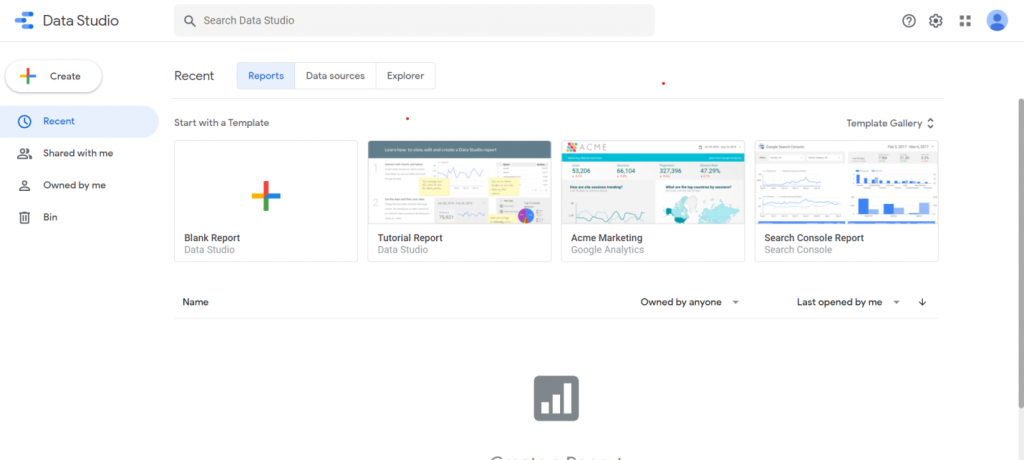
Click on the sign-in option and sign in with your Google account. Once you’ve signed in, Google data studio’s dashboard will open on your home screen.
Now you are ready to start creating your first report
Creating report
To create a report, click on the Blank Report option, you’ll be asked to enter your country and your company’s name.
Fill in all the relative information in the form and click on continue.
An untitled report page will open; all your data, including your visuals and text, will be stored here.
Now Is the time to select a data source.
Selecting Data source
Click on the Add data option from the toolbar
Two options will be provided to you.
“Connect to data” and “My data sources.”
Select any sample data from” My data sources.”
Once you have selected your data source now, you can select the visuals for it.
Creating visuals
Click on the “Add a chart” option from the toolbar, and a drop-down menu will appear.
A Pane will appear on the right side for you to adjust the dimensions.
Select an option from the “Add a chart” drop-down menu.
The chart you’ve chosen will appear on the screen.
Customization
Once the chart appears on the screen, it can be fully customized as per your choice.
Select the “Style” option from the right-hand pane, and a lot of options will appear, so you can fully customize the visual.
Text addition
For adding text, click on the “Text box” icon in the toolbar, and you can select the place where you want to add your text box.
Enter text in the text box and highlight the text you have entered. You can customize this highlighted text from the style option.
Once you are satisfied with how your report looks, download it. There is also an option to share it.
Downloading report
Select the “File” option from the top right corner and click on “Download as” select pdf, and your report will be downloaded as a pdf file.
You can also share your file by using the “Share” option from “file.”
Now you’ve gone through all the steps of creating a report.
Let’s look at some of the features of Google Data studio in detail
Report Templates
You can always start with a Blank report, but there is a wealth of report templates in Google data studio.
These templates can be really helpful if you are short on time. You can select a template and start adding your data to it.
You can also use these templates for generating ideas for your report and combine these ideas to create a mesmerizing report.
You can add any amount of pages to these templates. You can also use these templates to maintain consistency within your reports.
Data sources
Google data studio has a number of data sources to help you import data easily and effectively. These include
YouTube Analytics
Search ads 360
Tables by area 120
PostgreSQL
MySQL
Google surveys
CloudSQL for MySQL
Campaign Manager 360
BigQuery
Cloud Spanner
These are some of the popular ones, and there are many other options for you to choose from.
Embedding Content
External content such as YouTube videos can be easily embedded in your report. You don’t have to own all the content that you are using in a report.
Just press insert and select the URL embed option. Next, copy the URL of the video, spreadsheet, or document you want to embed in your report.
Enter this URL in your report through the URL embed option, and the embedded content will appear on your report.
You can adjust the size of this content according to your preference.
Scheduling Reports
If you are reluctant to share live reports with your customers or shareholders, you can always schedule reports to be delivered later to them.
You can even schedule reports to be sent daily to your customers or colleagues.
Follow the steps given below to schedule an email report
Select “share” and click on “Schedule email delivery.”
Enter the email addresses of the recipients. Your email address will be added by default.
Enter the date and time for starting this process.
You can also share reports on a daily, weekly, and monthly basis.
If the given options in “Repeat” are less than ideal for you, you can always customize the frequency for sharing reports.
Bottom Line
Getting started on anything new can be a bit intimidating at first. But, it is all about making that one bold move.
People who prepare reports manually may have some skepticism towards tools like Google data studio. But once you get started. There is no going back. The valuable time and resources you save from automated report creation and sharing can be used to solve more important issues.
What other data transformation tools do you like or use?
Its versatility favors both back-end and front-end development, in addition to testing them. As a result, you can find many JavaScript libraries and frameworks that serve various purposes. Hence, it can be confusing to developers when choosing the right fit for their project.
But don’t you worry! We’ve compiled a total of 40 JavaScript libraries and frameworks in this article, along with their features, benefits, and use cases. Stay tuned to find out about them and decide which one is suitable for your project.
What Are JavaScript Libraries?
JavaScript libraries contain various functions, methods, or objects to perform practical tasks on a webpage or JS-based application. You can even build a WordPress site with them.
Think of them as a book library where you revisit to read your favorite books. You may be an author and enjoy other authors’ books, get a new perspective or idea, and utilize the same in your life.
Similarly, a JavaScript library has codes or functions that developers can reuse and repurpose. A developer writes these codes, and other developers reuse the same code to perform a certain task, like preparing a slideshow, instead of writing it from scratch. It saves them significant time and effort.
They are precisely the motive behind creating JavaScript libraries, which is why you can find dozens of them for multiple use cases. They not only save you time but also bring simplicity to the entire development process.
To use a JavaScript library in your app, add <script> to the <head> element using the src attribute that references the library source path or the URL.
Read the JavaScript library’s documentation you intend to use for more information and follow the steps provided there.
What Are JavaScript Libraries Used For?
As we’ve said, JavaScript libraries are used to perform specific functions. There are around 83 of them, each created to serve some purpose, and we are going to cover some of their usability in this section.
You can use JavaScript libraries for:
Data Visualization in Maps and Charts
Data visualization in applications is crucial for users to view the statistics clearly in the admin panel, dashboards, performance metrics, and more.
Presenting these data in charts and maps helps you analyze that data easily and make informed business decisions.
Examples: Chart.js, Apexcharts, Algolia Places
DOM Manipulation
Document Object Model (DOM) represents a web page (a document) as objects and nodes that you can modify using JavaScript. You can change its content, style, and structure.
Examples: jQuery, Umbrella JS
Data Handling
With the enormous amounts of data that businesses now deal with daily, handling and managing them properly is essential. Using a JavaScript library makes it easier to handle a document following its content while adding more interactivity.
Examples: D3.js
Database
Effective database management is necessary to read, create, delete, edit, and sort data. You can also use sophisticated queries, auto-create tables, synchronize and validate data, and much more.
Examples: TaffyDB, ActiveRecord.js
Forms
Use JS libraries to simplify form functions, including form validation, synchronization, handling, conditional capabilities, field controls, transforming layouts, and more.
People love animations, and you can leverage them to make your web page interactive and more engaging. Adding micro-interactions and animations is easy by using JavaScript libraries.
Examples: Anime.js, JSTweener
Image Effects
Users can add effects to images and make them stand out using JS libraries. Effects include blurring, lightening, embossing, sharpening, grayscale, saturation, hue, adjusting contrast, flipping, inverting, reflection, and so on.
Examples: ImageFX, Reflection.js
Fonts
Users can incorporate any font they wish to make their web page more compelling based on the content type.
Examples: typeface.js
Math and String Functions
Adding mathematical expressions, date, time, and strings can be tricky. For example, a date consists of many formats, slashes, and dots to make things complex for you. The same holds when it comes to matrices and vectors.
Use JavaScript libraries to simplify these complexities in addition to manipulating and handling URLs effortlessly.
You can provide a better user experience via web pages by making them more responsive and dynamic, decreasing the number of DOM operations, boosting page speed, and so forth.
Examples: ReactJS, Glimmer.js
And those are just the most common use cases. Other uses of JavaScript libraries include:
Creating a custom dialog box
Creating keyboard shortcuts
Switching platforms
Creating rounded corners
Affecting data retrieval/AJAX
Aligning page layouts
Creating navigation and routing
Logging and debugging
And many more
The Most Popular JavaScript Libraries
Below, we’ve rounded up the most popular JavaScript libraries available today.
jQuery
jQuery is a classic JavaScript library that’s fast, light-weight, and feature-rich. It was built in 2006 by John Resig at BarCamp NYC. jQuery is free and open-source software with a license from MIT.
It makes things simpler for HTML document manipulation and traversal, animation, event handling, and Ajax.
According to W3Techs, 77.6% of all sites use jQuery (as of 23rd February 2021).
jQuery library
Features/Benefits:
It has an easy-to-use, minimalistic API.
It uses CSS3 selectors in manipulating style properties and finding elements.
jQuery is lightweight, taking just 30 kb to gzip and minify, and supports an AMD module.
As its syntax is quite similar to that of CSS, it is easy for beginners to learn.
Extendable with plugins.
Versatility with an API that supports multiple browsers, including Chrome and Firefox.
Use cases:
DOM manipulation with CSS selectors that use certain criteria to select a node in the DOM. These criteria include element names and their attributes (like class and id).
Element selection in DOM using Sizzle (an open-source, multi-browser selector engine).
Creating effects, events, and animations.
JSON parsing.
Ajax application development.
Feature detection.
Control of asynchronous processing with Promise and Deferred objects.
React.js
React.js (also known as ReactJS or React) is an open-source, front-end JavaScript library. It was created in 2013 by Jordan Walke, who works at Facebook as a software engineer.
Now, it has the MIT license but was initially released under the Apache License 2.0. React was designed to make interactive UI creations painless.
Just design a simple view for individual states in your app. Next, it will render and update the right component efficiently upon data changes.
React library
Features/Benefits:
The React code comprises components or entities that need rendering to a specific element in DOM with the help of a React DOM library.
It uses a virtual DOM by creating an in-memory cache in a data structure, computing the difference, and updating the display DOM in the browser efficiently.
Due to this selective rendering, the app performance boosts while saving the developers’ efforts in recalculating the page layout, CSS styles, and full-page rendering.
It uses lifecycle methods like render and componentDidMount to allow code execution at specific points during an entity’s lifetime.
It supports JavaScript XML (JSX) that combines both JS and HTML. It helps in component rendering with nested elements, attributes, JS expressions, and conditional statements.
Use cases:
Serving as the base while developing mobile or single-page applications.
Rendering a state to the DOM and manages it.
Building efficient user interfaces while developing web applications and interactive sites.
Debugging and testing more easily.
A bonus point: Facebook, Instagram, and Whatsapp all use React.
D3.js
Data-Driven Documents (D3) or D3.js is another famous JS library that developers use to document manipulation based on data. It was released in 2011 under the BSD license.
D3.js library
Features/Benefits:
It emphasizes web standards and provides you with modern browser capabilities without being limited to a single framework.
D3.js enables powerful data visualizations.
It supports HTML, CSS, and SVG.
Takes a data-driven approach and applies it to manipulate the DOM.
D3.js is fast and supports a wide number of dynamic behavior and datasets for animations and interaction.
It reduces overhead, allowing wider graphical complexity within high frame-rates.
Use cases:
To produce interactive and dynamic data visualization.
To bind data to a DOM and perform a data-driven transformation on them. For example, you can generate HTML tables out of a numbers array and then create an SVG bar-chart or a 3D surface plot using D3.js.
Its functional code makes it reusable with a vast collection of modules.
D3 provides various modes to mutate nodes like changing styles or attributes by taking a declarative approach, adding, sorting, or removing nodes, changing text or HTML content, etc.
To create animated transitions, sequencing complex transitions through events, performing CSS3 transitions, etc.
Underscore.js
Underscore is a JavaScript utility library that provides various functions for typical programming tasks. It was created in 2009 by Jeremy Askenas and release with an MIT license. Now, Lodash has overtaken it.
Underscore library
Features/Benefits:
Its features are similar to Prototype.js (another popular utility library), but Underscore has a functional programming design rather than object prototype extensions.
It has 100+ functions of 4 different types based on the datatypes they manipulate. These are functions to manipulate:
It supports functional helpers such as filters, maps, etc., along with specialized functions such as binding, quick indexing, JavaScript templating, quality testing, etc.
Lodash
Lodash is also a JS utility library that makes it easier to work with numbers, arrays, strings, objects, etc. It was released in 2013 and also uses functional programming design like Underscore.js.
Lodash library
Features/Benefits:
It helps you write maintainable and concise JavaScript codes.
Simplifies common tasks such as math operations, binding, throttling, decorating, constraining, debouncing, etc.
String functions like trimming, camel case, and upper case are made simpler.
Creating, modifying, compressing, and sorting arrays.
Other operations on the collection, object, and sequence.
Use cases:
Its modular methods help you in:
Iterating arrays, strings, and objects.
Crafting composite functions.
Manipulating and testing values.
Algolia Places
Algolia Places is a JavaScript library that provides an easy and distributed way of using address auto-completion on your site. It’s a blazingly fast and wonderfully accurate tool that can help increase your site user experience. Algolia Places leverages the impressive open-source database of OpenStreetMap to cover worldwide places.
It simplifies checkouts by filling up multiple inputs simultaneously.
You can use the country or city selector effortlessly.
You can view results quickly by displaying link suggestions on a map in real-time.
Algolia Places can handle typing mistakes and displays results accordingly.
It delivers results within milliseconds by routing all queries automatically to their closest server.
Use cases:
Allows you to incorporate a map to display a specific location that is quite useful.
It enables you to use forms efficiently.
Anime.js
If you want to add animations to your site or application, Anime.js is one of the best JavaScript libraries you can find. It was released in 2019 and is lightweight with a powerful yet simple API.
Anime.js library
Features/Benefits:
Anime.js runs with DOM attributes, CSS properties, SVG, CSS transforms, and JS objects.
Works with a wide range of browsers such as Chrome, Safari, Firefox, Opera, etc.
Its source code is effortless to decipher and use.
Complex animation methods such as overlapping and staggering follow-through become easier.
Use cases:
You can use Anime.js’ staggering system on properties and timings.
Create layered CSS transformations with multiple timings simultaneously over one HTML element.
Play, pause, trigger, reverse, and control events in synchronizing manner using Anime.js call-backs and controls functions.
Animate On Scroll (AOS)
Animate On Scroll works great for single-page parallax websites. This JS library is fully open-source and helps you add decent animations on your pages that look sweet as you scroll down or up.
It makes your site design a joyful ride by helping you add fade effects, static anchor positions, and more to delight your users.
Animate On Scroll library
Features/Benefits:
The library can detect element positions and add suitable classes while they show up in the viewport.
Apart from adding animations easily, it helps you change them on the viewport.
It works seamlessly on different devices, be it a cell phone, tablet, or computer,
As it is written in pure JavaScript, it has no dependencies.
Use cases:
Animate an element according to the position of another.
Animate elements based on their screen positions.
Disable element animations on mobiles.
Create different animations such as fade, flip, slide, zoom, anchor placements, etc.
Bideo.js
Do you want to incorporate full-screen videos into your site’s background? Try Bideo.js.
Bideo.js library
Features/Benefits:
Adding a video background is easy with this JavaScript library.
This feature looks cool on screens of different scales and sizes and works smoothly.
Videos added can resize based on the browser used.
Is your website or project related to the data analysis field?
Do you need to present lots of statistics?
Chart.js is an excellent JavaScript library to use.
Chart.js is a flexible and simple library for designers and developers who can add beautiful charts and graphs to their projects in no time. It is open-source and has an MIT license.
Chart.js library
Features/Benefits:
Elegant and simple to add basic charts and graphs.
Lightweight to load and easy to learn and implement.
8 different types of charts.
Great for beginners.
Animation capabilities to make pages more interactive.
Use cases:
Provide clear visual representations when different datasets are used with the help of mixed chart types.
Plot sparse and complex datasets on logarithmic, date, time, or custom scales.
Cleave.js
Cleave.js offers an interesting solution if you want to format your text content. Its creation aims to provide an easier way to increase the input field’s readability by formatting the typed data.
This way, you no longer need to mask patterns or write regular expressions to format text.
Cleave.js library
Features/Benefits:
Increases user experience with consistent data for form submissions.
You can perform different formatting types for credit card numbers, phone numbers, date, time, and numerals.
Format custom blocks, prefix, and delimiter.
Supports ReactJS components, and more.
Use cases:
Implement cleave.js to multiple DOM elements with CSS selectors.
To update a specific raw value.
To get the reference of the text field.
It is used with a redux form, in Vue.js, jQuery, and Playground.
Choreographer.js
Use Chreographer.js to animate complex CSS effectively. It can even add more custom functions that you can use for non-CSS animations.
To use this JavaScript library, install its package through npm or add its script file.
Choreographer.js library
Features/Benefits:
Its Animation class manages individual animation data.
The animationConfig object configures each animation instance.
Includes 2 built-in animation functions ‘change’ and ‘scale.’
‘Scale’ is used to map progressively measured values to the style property of a node.
‘Change’ removes or adds style properties.
Use cases:
Perform instant scroll animations.
Create animations according to mouse movements.
Glimmer
Released in 2017, Glimmer features lightweight and fast UI components. It uses the powerful Ember CLI and can work with EmberJS as a component.
Glimmer library
Features/Benefits:
Glimmer is a fast DOM rendering engine that can deliver incredible performance for renders and updates.
It is versatile that can work alongside your current technology stack without requiring you to rewrite codes.
Use cases:
You can use it as a standalone component or add it as a web component in existing applications.
DOM rendering.
It helps you distinguish between static and dynamic content.
Use Glimmer when you want the features of Ember but in a lighter package.
Granim.js
Granim.js is a JS library that helps you create fluid and interactive gradient animations. This way, you can make your site stand out with colorful backgrounds.
Granim.js library
Features/Benefits:
Gradients can cover images, work stand-alone, slide under image masks, and so on.
You can customize gradient directions with percentage or pixel values.
Set gradient orientation as diagonal, top-bottom, left-right, radial, or custom.
Set animation duration in milliseconds (ms) with changing states.
Customize gradient color and positions.
Image customization based on its canvas position, source, scaling, etc.
Other options included are setting callbacks, emitting events, methods for gradient control, etc.
Use cases:
Creating a basic gradient animation using 3 gradients with 2 colors.
Complex gradient animation using 2 gradients with 3 colors.
Animating gradients with one background image, 2 colors, and one blending mode.
Create gradient animations under a specific shape using one image mask.
Creating gradient animations that are responsive to events.
fullPage.js
The open-source JS library, fullPage.js, helps you create full-screen scrolling sites or one-page websites easily. It is simple to use and can also add a landscape slider inside your site sections.
fullpage.js library
Features/Benefits:
Offers a wide range of customization and configuration options.
Responsive design that fits the screens of different sizes as well as multiple browsers.
Auto-scrolling on page loads.
Video/image lazy load.
Use cases:
To improve the default features using lots of extensions.
To create full-screen scrolling sites.
Building a single-page website.
Leaflet
Leaflet is one of the best JavaScript libraries that you can use to include interactive maps into your site. It is open-source and mobile-friendly, weighing around 39kb. The MapPress Maps for WordPress plugin uses Leaflet to power its interactive maps.
Leaflet library
Features/Benefits:
Offers performance features such as mobile hardware acceleration and CSS features.
Unique layers, including tile layers, popups, markers, vector layers, GeoJSON, and image overlays.
Interaction features, including drag panning, pinch-zoom, keyboard navigation, events, etc.
Map controls such as layer switcher, attribution, scale, and zoom buttons.
Supports browsers like Chrome, Safari, Firefox, Edge, etc.
Customization, including OOP facilities, HTML and image-based markers, CSS3 controls, and popups.
Use cases:
Add a map into your site with better zooming and panning, smart polygon/polyline rendering, modular build, and tap-delay mobile animation.
Multiple.js
Multiple.js enables background image sharing across various elements by using CSS or HTML with no JavaScript coordinate processing.
As a result, it creates a stunning visual effect to increase more user interaction.
Moment.js helps you manage time and date effectively when working with different time zones, API calls, local languages, etc.
You can streamline dates and times by validating, parsing, formatting, or manipulating them.
Moment.js library
Features/Benefits:
It supports a lot of international languages.
Object mutability.
Multiple internal properties like epoch shifting, retrieving native Date objects, etc.
To use its parser correctly, there are some guidelines such as strict mode, date formats, forgiving mode, etc.
Use cases:
To display the time in a published article.
Communicating with people from across the world in their local language.
Masonry
Masonry is an awesome JS grid layout library. This library helps you place your grid elements in suitable positions based on how much vertical space is available. It’s even used by some of the popular photo gallery WordPress plugins.
Compare this with how a mason fits stones while building a wall.
Masonry library
Features/Benefits:
Masonry’s grid layout is based on columns and does not have a fixed row height.
Optimizes space on a web page by eliminating unnecessary gaps.
Sorting and filtering elements without compromising the layout structure.
Animation effects.
Dynamic elements to auto-adjust the layout for optimal structure.
Use cases:
To create image galleries with varying image dimensions.
List the latest blog posts in multiple columns while maintaining consistency even if they have varying summary lengths.
Its intuitive DOM API takes inputs directly from HTML tags without requiring you to write a JS line
Dynamic form validation by detecting form modifications dynamically
12+ built-in validators, Ajax validator, and other extensions
You can override Parsley default behavior and offer UI and UX focussed experience
Free, open-source, and super reliable that works with many browsers
Use cases:
Creating a simple form
Making complex validations
Creating multi-step forms
Validating multiple inputs
Handling promises and Ajax requests
Styling inputs to create exquisite floating error labels
Popper.js
Popper.js was created to make it easier to position popovers, dropdowns, tooltips, and other contextual elements that appear close to a button or other similar elements.
Popper provides an excellent way to arrange them, stick them to other site elements, and enable them to perform seamlessly on any screen size.
Popper.js library
Features/Benefits:
Lightweight library of about 3kb in size
Ensures the tooltip continues to stay with the reference element when you scroll inside the scrolling containers
Advanced configurability
Uses robust library like Angular or React to write UIs, making integrations seamless
Use cases:
To build a tooltip from scratch.
To position these elements smoothly.
Three.js
Three.js can make your 3-D designing delightful. It uses WebGL for rendering scenes on modern browsers. Use other CSS3, CSS2, and SVH renderers if you use IE 10 and below.
Three.js library
Features/Benefits:
Supports Chrome 9+, Opera 15+, Firefox 4+, IE 11, Edge, and Safari 5.1
Support JS features like typed arrays, Blob, Promise, URL API, Fetch, and more
You can create different geometrics, objects, lights, shadows, loaders, materials, math elements, textures, etc.
Use cases:
To create a geometric cube, sphere, etc.
Creating a camera or scene
Screenfull.js
Use Screenfull.js to add a full-screen element to your project. Due to its impressive cross-browser efficiency, you won’t be in trouble while using this JavaScript library.
Screenfull.js library
Features/Benefits:
Full-screen a page or element
Hide navigation UI on mobile phones
Add full-screen elements using jQuery and Angular.
Detects full-screen modifications, errors, etc.
Use cases:
Adding full-screen element on a web page
Importing Screenfull.js in a doc
Exiting and toggling the full-screen mode
Handling events
Polymer
The open-source JavaScript library by Google – Polymer is used to build web apps using components.
Polymer library
Features/Benefits:
A simple way to create custom elements.
Computed properties.
Support both data-binding: one-way and two-way.
Gesture events.
Use cases:
To create interactive web apps with custom web components using JS, CSS, and HTTP.
It is used by leading sites and services like YouTube, Google Earth, and Play, etc.
Voca
The idea behind creating Voca is to ease out the pain while working with JavaScript strings. It comes with useful functions that make it easy to manipulate strings like changing case, pad, trim, truncate, and more.
Voca library
Features/Benefits:
Due to its modular structure, the whole library or its individual functions load quickly while reducing the app build.
Offers functions to chop, format, manipulate, query, and escape strings.
No dependencies
Use cases:
You can use Voca in multiple environments like Node.js, Webpack, Rollup, Browserify, etc.
To convert a subject to the title case, camel case, kebab case, snake case, upper case, and lowercase.
To convert the first character to uppercase and lowercase.
To create chain objects to wrap a subject, enabling an implicit/explicit chain sequence.
To perform other manipulations like counting the characters, formatting a string, etc.
What Are JavaScript Frameworks?
JavaScript frameworks are application frameworks that allow developers to manipulate code to meet their unique requirements.
Web application development is analogous to building a house. You have the option to create everything from scratch with construction materials. But it will consume time and may incur high costs.
But if you use readymade materials such as bricks and assemble them based on the architecture, then construction becomes faster, saving you money and time.
Application development works similarly. Instead of writing every code from scratch, you can use pre-written codes working as building blocks based on the application architecture. Frameworks can adapt to website design more quickly and make it easy to work with JavaScript.
How to Use JavaScript Frameworks
To use a JavaScript framework, read the JS framework’s documentation you intend to use and follow the steps.
What Are JavaScript Frameworks Used For?
To build websites
Front-end app development
Back-end app development
Hybrid app development
Ecommerce applications
Build modular scripts, for example, Node.js
Update DOM manually
Automate repetitive tasks using templating and 2-way binding
Develop video games
Create image carousels,
Testing codes and debugging
To bundle modules
The Most Popular JavaScript Frameworks
AngularJS
AngularJS by Google is an open-source JavaScript framework released in 2010. This is a front-end JS framework you can use to create web apps.
It was created to simplify the development and testing of web applications with a framework for MVC and MVVM client-side architectures.
AngularJS framework
Features/Benefits:
Supports 2-way data binding
Uses directive to insert into an HTML code and provide the app with better functionality
Quick and easy to declare static documents
Its environment is readable, expressive, and fast to develop.
Impressive extensibility and customizability to work with
Built-in testability and support for dependency injection
Use cases:
To develop ecommerce applications.
Developing real-time data apps for weather updates
Example: YouTube PlayStation 3
Note: Google has ceased active development of AngularJS, but they’ve promised to keep it on an extended Long Term Support until December 31, 2021, mainly to fix security issues. Google will no longer support it after that.
Bootstrap
Design fast and mobile responsive sites quickly using Bootstrap, one of the most popular open-source toolkits for front-end development.
Need blazing-fast, secure, and developer-friendly hosting for your client sites? Kinsta is built with developers in mind and provides plenty of tools with a powerful dashboard. Check out our plans
It was released in 2011 and provides developers with great flexibility in customizing various elements tailored to the client’s needs.
Bootstrap framework
Features/Benefits:
Responsive grid system.
Powerful JS plugins.
Extensive built-in components, Sass variables, and mixins.
Includes open-source SVG icons that work perfectly with their components and styled using CSS.
Offers beautiful and premium themes.
They ensure you don’t have to deal with lots of bugs when updating a new Bootstrap version.
Use cases:
To create CSS or HTML-based design templates for forms, buttons, typography, navigation, dropdowns, tables, modals, etc.
For images, image carousels, and icons.
Aurelia
Released in 2016, Aurelia is a simple, unobtrusive, and powerful open-source, front-end JS framework to build responsive mobile, desktop, and browser applications.
It aims to focus on aligning web specifications with convention instead of configuration and requires fewer framework intrusion.
Aurelia framework
Features/Benefits:
Aurelia is designed to execute high performance and perform batch DOM updates efficiently.
Delivers consistent and scalable performance even with a complex UI.
An extensive ecosystem with state management, validation, and internationalization.
Enables reactive binding and syncs your state automatically with high performance.
Simpler unit testing.
Unparalleled extensibility to create custom elements, add attributes, manage template generation, etc.
Leverages advanced client-side routing, UI composition, and progressive enhancements.
Use cases:
To develop applications.
Use server-side rendering.
Perform two-way data binding.
Vue.js
Vue.js was created in 2014 by Evan You while he worked for Google. It is a progressive JavaScript framework to build user interfaces.
Vue.js is incrementally adoptable from its core and can scale between a framework and library easily based on various use cases.
Vue.js framework
Features/Benefits:
Supports ES5-compliant browsers.
It has a core library that is approachable and focuses only on the view layer.
It also supports other useful libraries that can help you manage complexities associated with one-page applications.
Perfect to use in small projects that need lesser reactivity, display a modal, include a form using Ajax, etc.
You can also use it on large single-page applications using its Vuex and Router components.
To create events, binding classes, update element content, etc.
Ember.js
The open-source JS framework Ember.js is battle-tested and productive to build web applications with rich UIs, capable of working across devices.
It was released in 2011 and was named SproutCore 2.0 back then.
Ember.js framework
Features/Benefits:
Scalable user interface architecture.
“Batteries included” perspective helps you find everything you need to start building your app right away.
Features the Ember CLI working as the backbone for Ember apps and offering code generators for creating new entities.
Comes with an in-built development environment with quick auto-reload, rebuilds, and test runners.
A best-in-class router using data loading with query parameters and URL segments.
Ember Data is a data access library that works with multiple sources simultaneously and keeps model updates.
Use cases:
To build modern interactive web apps.
Used by DigitalOcean, Square, Accenture, etc.
Node.js
Node.js is a server-side, open-source JavaScript framework built on Chrome’s JS V8 Engine, created in 2009. It is a runtime environment that executes JS codes outside a browser.
Node.js is designed to help you develop scalable, fast, and reliable network-based server-side applications.
Node.js framework
Features/Benefits:
Faster code execution.
It can drive asynchronous I/O using its event-driven architecture.
Shows similar Java properties such as forming packaging, threading, or forming loops.
Single-threaded model.
No hassles of video or audio buffering by cutting down significant processing time.
Use cases:
To develop server-side applications.
Create real-time web apps.
Communication programs.
Develop browser games.
Its corporate usage includes GoDaddy, LinkedIn, Netflix, PayPal, AWS, IBM, and more.
Backbone.js
The lightweight JS framework Backbone.js was created in 2010 and based on the Model View Presenter (MVP) architecture.
It has a RESTful JSON interface and helps you build client-side web applications. It structures web apps with models for custom events and key-value binding, collections with an efficient API, and views using declarative event handling.
Backbone.js framework
Features/Benefits:
Free and open-source with 100+ available extensions.
Impressive design with fewer codes.
Offers structured and organized app development.
Code is simple and easy to learn and maintain.
Softer dependency over jQuery while stronger on Underscore.js.
Use cases:
To develop simple-page applications.
Smooth front-end JS functions.
To create organized and well-defined client-side mobile or web applications.
Next.js
The Open source platform of Next.js offers a React front-end JavaScript framework. Released in 2016, it allows you to enable functionalities like creating static sites and server-side rendering.
Next.js framework
Features/Benefits:
Automatic image optimization using instant builds.
Built-in domain and subdomain routing and language detection automatically.
Real-time analytics score that shows visitor data and per page insights.
Automatic bundling and compilation.
You can pre-render a page at request time (SSR) or build time (SSG).
Supports TypeScript, file-system routing, API routes, CSS, code-splitting and bundling, and more.
Use cases:
This production-ready framework allows you to create both static and dynamic JAMstack sites.
Server-side rendering.
Mocha
Every application needs to be tested before you deploy it. This is what Mocha or Mocha.js does for you.
It is a feature-rich open-source JS test framework that runs on Node.js as well as in a browser.
Mocha framework
Features/Benefits:
It makes asynchronous testing fun and effortless.
Enables running Node.js test simultaneously.
Auto-detects and turns-off coloring for a non-TTY stream.
Reports test duration.
Displays slow tests.
Meta-generate suites and test cases.
Support for multiple browsers, configuration files, node debugger, source-map, Growl, and more.
Use cases:
To perform application audits.
To execute functions in a certain order using functions and log the test results.
Cleaning the tested software’s state to ensure each test case runs separately.
Ionic
Released in 2013, Ionic is an open-source JavaScript framework to build high-quality hybrid mobile apps. Its latest release allows you to choose any UI framework like Vue.js, React, or Angular. It uses CSS, Sass, and HTML5 to build applications.
Ionic framework
Features/Benefits:
Leverages Cordova and Capacitor plugins to access host OS features like GPS, camera, flashlight, etc.
Includes typography, mobile components, interactive paradigms, beautiful themes, and custom components.
The easy-to-use framework of Webix helps you develop rich UIs by using lighter codes. It offers 102 user interface widgets like DataTable, Tree, Spreadsheets, etc., along with feature-rich HTML5/CSS JS controls.
Webix framework
Features/Benefits:
User-friendly JS file management.
Saves time by using built-in widgets and UI controls.
Easy to understand code.
Cross-platform and browser support.
Seamless integration with other JavaScript libraries and frameworks.
Fast performance for rendering widgets, and even for large datasets like Trees, Lists, etc.
Gatsby helps you develop fast-performing websites and apps with React. This is a front-end JS framework that is open-source and free. Check this out on GitHub.
Gatsby framework
Features/Benefits:
High performance with automated code-splitting, inlining styles, image optimization, lazy-loading, etc. to optimize sites.
Its serverless rendering creates attic HTML during build time. Hence, no server and DDoS attacks or malicious requests.
Higher web accessibility.
2000+ plugins, themes, and recipes.
Use cases:
Front-end app and website development.
Static site generation.
Server-side rendering.
Used by sites like Airbnb and Nike, the latter for their “Just Do It” project.
Meteor.js
Meteor is an open-source JS framework released in 2012. It allows you to build full-stack apps seamlessly for mobile, desktop, and web.
Meteor.js framework
Features/Benefits:
Integrate tools and frameworks for more functionality such as MongoDB, React, Cordova, etc.
Build applications on any device.
APM to view app performance.
Live-browser reloading.
Open-source Isomorphic Development ecosystem (IDevE) to facilitate development from scratch.
Use cases:
Rapid prototyping.
Cross-platform apps.
Sites built with Meteor: Pathable, Maestro, Chatra, etc.
MithrilJS
Although not as popular as some of the other items in this list, Mithril is an advanced client-side JS framework to develop client-side applications. It is lightweight — less than 10kb gzip — but fast and offers XHR and routing utilities.
MithrilJS framework
Features/Benefits:
Pure JS framework.
Support for all the major browsers without polyfills.
Creates Vnode data structures.
Offers declarative APIs to manage UI complexities.
Use cases:
Single-page apps.
Used by sites like Vimeo, Nike, etc.
ExpressJS
Express.js is a back-end JS framework for developing web applications. It was released in 2010 under MIT incense as free, open-source software.
It is a fast and minimalist Node.js web framework that comes with an array of useful features.
ExpressJS framework
Features/Benefits:
Scalable and lightweight.
Enables receiving HTTP responses by allowing you to set up middleware.
Features a routing table to take actions based on URL and HTTP method.
Includes dynamic HTML page rendering.
Use cases:
Rapid node-based application development.
Creation of REST APIs.
Some Useful Must-Know JavaScript Tools
Slick
Slick is a useful JS tool that takes care of your carousel requirements. It is responsive and scalable with its container. Its features include CSS3 support, swipes, mouse dragging, full accessibility, infinite looping, autoplay, lazy loading, and many more.
Babel
Babel is an open-source and free JS compiler that you can use to convert new JS features to run an old JS standard. The plugin is also used for syntax transformation that isn’t supported in an old version. It provides polyfills to support features missing from certain JS environments.
iziModal
iziModal is an elegant, lightweight, flexible, and responsive modal plugin that works with jQuery. It is useful to notify something to your users or ask for information using a popup modal. It is easy to use and comes with many customizations.
ESLint
Finding bugs and fixing them in your JS code is easy by using ESLint. It analyses codes statistically to quickly catch syntax errors, command line’s style issues, etc., and fix them automatically.
Shave
Shave is a zero-dependency JS plugin that you can use to truncate text inside HTML elements by setting a maximum height to perfectly fit inside the element. It also stores some extra original texts inside a hidden element <span>, ensuring you don’t lose those texts.
Webpack
Webpack is a tool to bundle JS modules for modern applications. You can write the code and use it to bundle your assets reasonably while keeping the code clean.
How JavaScript Libraries and Frameworks Work Together
The difference between JavaScript libraries and frameworks lies in its flow of controls. They are just opposite in the flow, or inverted.
In JS libraries, the parent code calls the function that a library offers.
In JS frameworks, the framework itself calls the code and uses it in a specific way. It defines the overall application design.
Simply put, you can think of JavaScript libraries as a particular app function. In contrast, the framework acts like its skeleton, while an API acts as the connector to bring them together.
Commonly, developers start the development process with a JS framework and then complete the app functions with JS libraries and an API’s help.
JavaScript libraries and frameworks are efficient to accelerate your website or app development process. And as a web developer, using the right one for your project is crucial. If you are a Kinsta customer, you can also take advantage of the code minification feature that is built into the MyKinsta dashboard. This allows customers to easily enable automatic CSS and JavaScript minification with a simple click.
Different libraries and frameworks serve different purposes and have their own sets of pros and cons. Hence, you need to choose them based on your unique requirements and future goals associated with a website or application.
I hope this extensive list of JavaScript libraries and frameworks helps you choose the right one for your next project.
Save time, costs and maximize site performance with:
Instant help from WordPress hosting experts, 24/7.
Cloudflare Enterprise integration.
Global audience reach with 35 data centers worldwide.
Optimization with our built-in Application Performance Monitoring.
All of that and much more, in one plan with no long-term contracts, assisted migrations, and a 30-day-money-back-guarantee. Check out our plans or talk to sales to find the plan that’s right for you.
Readers, regardless of their education level, want more straightforward writing. Never think that writing in long sentences and using complicated vocabulary will make you sound more professional or intelligent. Instead, you sacrifice the credibility and readability of your content to the detriment of your readers.
As a writer, you have to pass your messages clearly and concisely. You owe it to your readers. That’s where readability tools come in handy- to help you write in a clear, simple way so that your readers can understand what you are saying without much struggle.
This blog post will show you the readability test tools you can use to help you write in a clear, concise manner. But first off, let’s see what readability is in the first place.
What is readability?
Readability refers to how convenient it is to read and comprehend a text based on its specific characteristics. We calculate Readability using metrics such as the number of syllables in each sentence or the variety of terms used to determine a readability score or a level.
What is the Importance of Readability?
Makes Your Text Easy to Read
It conveys information briefly and effectively, allowing readers to grasp the message without working out complex sentences or useless jargon.
Most People Will Benefit From Your Content
It is beneficial to all, from seasoned readers to foreign users and people learning English as a second language (ESL). Plain language is even more critical if the content is intended for an international audience.
If more people understand what you’re talking about, they’ll fall in love with your writing prowess, and most of all, they’ll get your message.
Increased traffic
In addition, when people search for content, they always use words they are familiar with. Your text will not appear in search results if it contains complicated phrases or jargon. Keep in mind that real people are looking for your content.
So, tailor your content to suit their needs. Then, use the same language they do. In other words, speak the people’s language, and they’ll find you.
Increased conversions
When creating your content, keep your conversion targets in mind. In addition, Micro-conversions, such as clicking links or viewing videos, should not be overlooked.
Increasing the amount of readable material on your website is a great way to increase conversions. You know that to get conversions, visitors have to stick to your site.
And creating readable content attracts them and encourages them to stay for a while as they consume what you have written. But if your content is hard to read and understand, visitors won’t wait for a second longer if they can’t skim through your content as fast as they need to.
High-quality, readable content results in conversions increasing the chances of success for your company. In addition, high-quality, readable content is quickly searchable and often results in a higher SEO score.
Improved rankings
If visitors leave your site very quickly, your analytics will return negative results. If you ever notice that people are spending less time on your website, keep an eye out for increased exit and bounce rates.
All of these issues have an impact on how websites rank in SERPs ( search engine results pages)
Google and all other search engines pay close attention to how quickly visitors abandon your site. Yes, visitors can leave a site for various reasons -but poor design, boring content, and poor readability are good reasons for their going.
Making your content easily accessible will help people stay interested in it, and it’ll result in higher SEO rankings.
Increased participation/ Engagement
Your site’s target audience should be able to use it. So don’t be tempted to write content at a level of readability that will keep out your ideal audience.
A higher readability score equates to a higher usability rate. Increased usability leads to more page views, engagement, and conversions.
Now that you know what readability is and how critical it is, let’s take a look at readability test tools at your disposal that you can use to improve the readability of your document.
Top Readability Test Tools
If you need to develop content that resonates with your target audience, you must first understand their readability standards.
Using an analyzer is one of the best things you can ever do for the readability of your content. Before publishing any text, pay attention to your readability score. It is a simple step but has a significant impact.
Readability tools employ various formulas. Here are some of the best readability test tools you can use to give your content a magical touch.
Readability Test Tool
Whether you are a copywriter, SEO expert, or marketer, the readability test tool will come in handy for you. It streamlines your workflow, and it is a darling to novices and experts due to its user-friendly interface.
The Readability Test Tool uses:
Gunning Fog Index
Coleman-Liau Index
SMOG Index,
Flesch-Kincaid Grade Level
the Automated Readability Index.
The Readability Test Tool is a simple and effective way to check if your work is readable. It is the most versatile readability software available for evaluating readability formulas.
You can evaluate an entire web page, a section of a web page, or just type in your text. It will calculate the results for the referring page if you link from your web page.
The readable tool offers you text statistics and analytics. Also, it displays syllables, letters, and word count. You can also see the use of adverbs, nouns, and adjectives. You can also check the tone of your writing and the keyword density if you are an SEO writer.
See readable.io for a wide range of tests. The website checks:
SMOG Index
the Automated Readability Index.
Flesch-Kincaid Grade Level
Gunning Fog Index
Coleman-Liau Index
Hemmingway Editor
Hemmingway Editor is a free web-based editing tool that helps edit your work to make it more powerful and clear to understand.
It analyzes your words and sentences, pointing out places where you can improve your prose.
Hemingway Editor is a helpful tool for every writer, whether you write academic papers, business communication, blog posts, essays, or fiction.
Clarity is vital in everything you write. And Hemingway helps you with that. Clarity sharpens your writing prowess and makes your words more powerful and purposeful.
Hemingway Editor assists you in refining your writing so that it is not too wordy and ambiguous. As a result, your writing becomes more readable.
Other Tools to Test Readability are:
SEMrush SEO Writing Assistant
Search Metrics Content Experience
Yoast SEO for WordPress
Grammarly
Bulk SEO Tools
Cliche Finder
Text Optimizer
Webfx Readability Tool
Tips to Improve Readability of Your Document
Readers are innovative but also very busy. They do not have to work hard trying to unpack overly long sentences and complex wording.
Use the tips below to help you write succinctly and clearly.
Use fonts that are easy to read.
To make your writing look more authoritative, you may be tempted to use “fancy” fonts (like Papyrus). Regrettably, they will lower the readability of your text. So instead, use the fonts below as they are simple to read.
Times New Roman
Arial
Helvetica,
Open Sans
which are simple to read.
Use easy, short words.
The more syllables you have in your vocabulary, the more difficult they are to read. The more syllables a word has, the harder it is to read.
If a two-syllable word would do, don’t use a four-syllable word. Also, keep in mind that not everybody shares your language. You’ll lose the majority of your readers if you use terms such as “inchoate” or “inordinate.”
Avoid stiffness at all costs.
Reading can be exhausting due to jargon and a formal tone. Write as if you were speaking to keep the content loose and natural-sounding. Make your text less formal and more conversational. If you wouldn’t say it aloud, don’t put it in writing!
Write in Short Paragraphs
Write in short paragraphs as they are simple to read and understand. A paragraph should not be longer than 150 words. Using short paragraphs is a suitable method of opening up your writing and creating more whitespaces. As a result, your paper becomes very inviting and easier to read and comprehend.
On the other hand, writing in long paragraphs can make readers feel overwhelmed with loads of information to process at once.
Closing Thoughts
Based on the US Department of Education’s National Assessment of Adult Literacy, close to half the US population has negligible literacy levels.
As a result, the easier your material is to read, the better. Readability is the heart and soul of every content you create. You have to ensure that your target audience can get the intended message.
The good news is that you can improve the readability of your content using readability test tools.
It was once challenging to create a website. One required some set of skills and abilities to start coding and another group to produce appealing content.
Eventually, there were content management systems (CMS). This drastically revolutionized the method users handle material on the internet.
Registering a website has become as simple as setting up an account and assembling a few drag-and-drop designer components. Most CMS allows you to create attractive, responsive websites without understanding a single line of programming.
CMS has given individuals tremendous ability, empowering individuals to be the builders of their digital world.
Keeping attention on marketing data is a fantastic method to stay current and updated with the newest Content Management Statistics.
According to a 2019 blogger study, 32% of respondents constantly monitor the statistics of their blog articles.
BuzzSumo discovered that blog posts with a picture per 75-100 words generated twice as many social media engagements than posts with fewer photos in an examination of approximately 1 million posts.
In recent years, there has been a considerable growth in streaming content. Twitch, a live-streaming network, grew 14.3 percent yearly throughout 2020, with roughly 1.645 billion view hours monthly.
Individuals who pursue recommendations using texts and images outperform those who obey instructions without visuals by 323 percent. Consider content marketing Ryan Robinson’s tutorial, including how to create a blog. He shows users how and when to start a blog using a perfect blend of text drawings, including infographics.
The vast majority of businesses (67 percent) utilize visitors organically to examine the performance of their content.
49 percent of advertisers believe that video marketing is Indeed very Crucial to their marketing scheme, 22 percent believe it is Significant, and 19 percent believe that the overall plan would be meaningless without visual material.
Website traffic is one of the leading two most excellent, commonly used leadership indicators for content marketing initiatives.
Customers prefer shorter narrative-styled Stories, backed by engaging Stories focused on questionnaires and polling, as the highest prominent Instagram Story styles, according to 35% of participants.
Overall Sales is the most commonly used metric for determining the effectiveness of content marketing initiatives.
In 2020, 24% of advertisers wanted to increase their spend on content management.
Each day, approximately 500 million Instagram profiles utilize Stories, including 4 million companies operating monthly advertisements. 58 percent of those polled said they were more intrigued about a business or service after viewing it in Stories.
WordPress is at the top of our ranking of CMS technologies, but when it concerns hosting solutions, nobody beats Tumblr. The blogging service has over 472 million accounts and therefore is growing in prominence, attracting additional users each month than the whole demographic of the United States.
Whenever individuals receive details, just 10% of it is expected to be remembered three days later. Nevertheless, when the same data is coupled with a meaningful visual, customers perceive 65 percent of the details three days later.
Conclusion
From blogging to digital trading, content management technologies make it smoother for enterprises to accomplish their objectives. Understanding the above CMS marketplace data can give you a broader understanding of the technology sector.
Hundreds of different internet-based CMS, needless to include various content management technologies, are now available on the marketplace.
Catching up with the latest content marketing strategies and procedures may appear to be complex, given how rapidly the business changes and advances.
Furthermore, by focusing on the most recent Content marketing statistics, your company might effectively remain ahead in the competition.
No doubt, ranking your e-commerce site higher than your competitors on Google is a must. But, to be there on the top, you must know the best SEO tips and tricks. If you’re missing out on rankings in the #1 ranking, you’re probably also missing your sales.
Statistics show that 37.5% of all traffic to e-commerce sites comes from search.
As, reaching the first page isn’t a significant achievement but, to generate sales, you must rank #1.
If you don’t have a strong e-commerce SEO strategy in layman’s terms, you lose out on brand clicks, impressions, and sales.
If you want to rank your e-commerce site, follow these strategies to become an SEO business marketer.
Keyword Research and competitor’s research
Research is an integral part of SEO. Before you start SEO work (on-site or off-site), you need competitor and keyword research.
Targeting the wrong keywords can ruin your business by generating less traffic and few conversions.
Keyword Research
You must focus on these 3 areas when conducting keyword research.
keywords for your homepage & product pages
keywords for blog topics
Avoid keyword cannibalization
Competitor Research
Once you’re done with keyword research, it’s time to conduct competitor research.
To do it, you must keep these points in mind
Main keywords of your competitors
Where are they getting their inbound links?
Look at the site architecture of competitors
How can you make your website look different than competing sites?
Identifying Current Problems
Audit your site for current problems that need to be fixed. To identify problems, focus on these auditing steps:
Find Site Errors: Redirecting 404 pages to the actual content and redirecting 302 to 301. Also, update meta titles, duplicate content pages, and meta descriptions.
Determine Your Website Speed: Once you have fixed the site errors, it’s time to work on website speed. Visitors don’t like to spend time on a slow-loading website. Statistics show that 40% of visitors abandon a site that takes longer than three seconds to load.
Use a free tool, Pingdom, to check your site’s load speed.
On-Page Optimization
Off-page optimization and on-page optimization are also important for SEO.
On-page optimization consists of actions within your web pages to rank your site better.
For on-page optimization, focus on these 8 key areas;
Keyword Optimization: Make sure your webpage has the keyword in the page title, Headers, Sub-headers, Paragraph copy, Product descriptions, Image file names, Image alt tags, Meta title and description, URLs
Site Structure: If you’re building a website from scratch or re-designing an existing site, information architecture is a must. For instance, an online pet food store’s site structure could look like this:
Linking building: The next step is internal linking, for example, linking your website to other pages within your site. It helps you to make your anchor text, which can help you with top keywords ranking.
Usability: This feature helps to make your site visitors happy. If your brand or e-commerce site has great usability, your customers will start visiting your website again and again. A greater user experience means spending more time on your site. If you use a live chat widget, it will lift conversion rates and increase the average time on site.
Website’s Mobile Version: These days’ people are browsing the web through mobile devices and shopping online. So, you must have a mobile-friendly version of your website. Statistics show that 31% of mobile users go online using their phones. At the same time, 58% of mobile users expect to load mobile sites as quickly as or faster than desktop sites.
Customer Reviews: A Customer review on an e-commerce site is important. According to Internet Retailer, the conversion rate of an e-commerce site can be increased from 14 to 76% by adding a customer review. Jupiter Research also found that 77% of consumers read reviews before purchasing online.
Snippets: Rich snippets are HTML coded that tells search engines about your website before clicking through to see it. When people see Google results with images, they’re more likely to click and purchase your product.
Social Media Integration: An e-commerce site is incomplete without social media! Integration (sharing your content on social platforms and engaging with customers).
Testing strategy
Once you have worked on your SEO (and usability), it’s time to put a testing & optimization strategy in place.
How can you do this?
Use analytics to see keywords that are ranked
Use PPC campaigns to find high-ranked keywords. Now add them to your SEO strategy
Work on Meta titles and descriptions to increase click-through rates.
A/B testing
Blog Content
Now you have a list of important keywords, as each page of your site should be optimized for only one keyword; there will be plenty of keywords left.
To rank your site through those keywords, write a blog. In a blog, you can optimize each post for important keywords that you aren’t targeting with your website’s main pages.
Blog posts should be high quality and user-friendly. Do not stuff your content with keywords, and you will start losing your customers.
When you’re creating blog content, consider packaging together various posts on the same theme into a downloadable eBook or guide.
Kyle Lacy, Senior Manager of Content Marketing, says, “The contents of an eBook can be easily published in their entirety or as teaser content to drive more interaction, downloads, and overall interest in your eBook. When it comes to content marketing, your goal shouldn’t be to generate a ton of content, but rather use the content you create effectively.”
For example, suppose you are an e-commerce business that sells clothes. In that case, you might write a series of blogs on how to select the perfect dress for an engagement or wedding, how to negotiate the cost for the dress, and you might even include romantic tips for a date dinner. Then, you could include those posts together into a downloadable guide, pdf, or eBook.
Before they downloaded your eBook, buyers must enter their email addresses into a landing page. This would help you to send a series of sales & marketing emails to buyers.
Link Building
Focus on earning links from high authority sites by offering some value to them in exchange for a link.
You can offer them a high-quality guest post, a quote for a story, co-authoring, an infographic, and more.
Here are the best-suited links for e-commerce websites:
Product reviews
Press mentions
Awesome content
Broken link building
While working through the above list, please include;
Variety of anchor texts
Link to the most relevant page but don’t link to the same page repeatedly
Only get links from high authority websites
Business Tip
If you are a local business owner, then make sure you have (NAP) your name, address, and phone number showing throughout your website. Use the same name, address, and phone number across all websites.
Best SEO Tools
It doesn’t matter if you are part of a solo strategist or SEO team; there are many SEO tools to help you optimize your rankings.
You can streamline your SEO process by using a combination of these tools. Moreover, these tools can provide you with data to help you make smart decisions that lead to better rankings and sales.
Bottom Line:
Among many other reasons to optimize your site for search engines, the main thing is to increase sales.
When you plan SEO strategy in the right way, you will see an increase in organic traffic, which will lead to more conversions.
Before you get started, understand that SEO isn’t a one-time game. Major search engines, including Google, update their algorithms constantly to bring better results to the audience.
So, now, you need to stay on top of the town and update your strategy accordingly.
There is no doubt that SEO requires a lot of hard work, time, and patience, but the benefits are worth it.
What are your secret SEO strategies to boost your e-commerce sales?