Blog

  • SEO Title Tags: How To Create Click-Worthy Title Tags

    Posting compelling content serves no purpose if no one ever clicks on it. Writing a catchy title is a good opportunity to convince people to click on your link and read your content.

    If a meta title that appears on a SERP has irrelevant information or uninteresting text, it may fall down in search engine results.

    SEO Title Tags: How To Create Click-Worthy Title Tags

    Posting compelling content serves no purpose if no one ever clicks on it. Writing a catchy title is a good opportunity to convince people to click on your link and read your content.

    If a meta title that appears on a SERP has irrelevant information or uninteresting text, it may fall down in search engine results.

    It’s not an exaggeration to claim that page titles have a tremendous impact on SEO (search engine optimization).

    Keep in mind that even minor tweaks to your title tags can have a significant impact on your ability to attract new visitors.

    In this article, we will talk about SEO title tags: what they are, why they are important, and how to create click-worthy title tags. So keep reading.

    What Is An SEO Title Tag?

    A title tag is an HTML tag used to describe a web page’s title. When you conduct a Google search, these title tags are displayed in blue letters on SERPs.

    When people see your web page listed in Google’s search results, they may click on the title tag to interact with your content, but only if it is compelling enough.,If it isn’t, you may lose a significant number of important visitors.

    Why Do We Need SEO Optimized Title Tags?

    There is no doubt about the importance of SEO optimized title tags. According to Databox, 36% of SEO experts think that title tags are the most important SEO factor of all.

    Having the number one spot in Google’s search results means nothing if your title tag doesn’t entice users to click.

    Optimized meta titles are a sure-fire way of capturing the searchers’ attention and have many benefits, including:

    • Raising click-through rates,
    • Growing organic traffic,
    • Reducing bounce rates
    • Enhancing user engagement for the content that’s ranking, to name a few.

    For example, Elise Dopson was able to move up 10 positions on the SERP by just improving the SEO headlines of a few of her blog posts. She increased her search views by 57% and boosted her traffic by 64%.

    Title tags can also be a great way to boost brand recognition if you include your brand name within them..

    It’s obvious that paying closer attention to the title tags would benefit your website metrics. So let’s discuss the process of creating click-worthy title tags.

    5 Important Tips To Create Click-Worthy Meta Tags

    Your website’s title is not just a ranking criteria; it’s also the first impression visitors will get of your website when it shows up in search results.

    Although they appear to be a small part of SEO, title tags are highly effective!

    Improving your title tag’s performance can increase CTRs from search engine users.

    Here’s are a handful of tips on how you can improve your title tags:

    Ensure Your Title Reflects User Intent

    You don’t have to load your title with keywords. But you do need to make sure the title tag aligns with the sure search intent.

    Try using the keyword at the beginning of the title and then filling it out with related terms.

    In general, the CTR improves when the page title is relevant to the user’s search intent.

    For instance, “how to stop hair fall” would be a keyword for someone looking for solutions to hair fall problems. The objective of the seeker is to get tips and tricks to reduce hair fall.

    Consider two title tags:

    Title 1: Diet Chart for Improved Health

    Title 2: Reduce Hair Fall: Get Healthy and Strong Hair in 7 Days

    Title 2 is more relevant because it offers a solution to the searcher’s problem: healthy hair in just seven days. Title 2 is more likely to be clicked on since it more closely matches searchers’ intent and provides a concrete timeline for success.

    Title 2 is also more powerful because it has a number in it and numbers tend to be more captivating than plain text.

    Keep It Brief

    Google will not penalize you for having a lengthy title, but it may truncate a longer title. And when it does, the title may not always make sense.

    That’s why we advise limiting title lengths to 60 characters.

    The title tag in the image below has an excessive number of characters.

    Compare this with brief page titles that aren’t trimmed off:

    Considering the limitations of space, you must make the choice of whether or not to incorporate your brand name. If you remove the brand name from the headline, you have more room to describe what you offer inside the title content.

    To avoid excessively long titles:

    • Try to avoid using upper case for your title. Because of the increased width, your title may get cut off.
    • Avoid using your brand name unless you absolutely need it or have enough space for it.
    • Use symbols (such as “&” for “and”) to save space.

    Make The Title Tag Keyword-Focused

    You need to use your keyword in the title tag for SEO purposes. Search engines and users alike will see this as evidence that your page provides content that is relevant to the search intent.

    On top of that, customers are more willing to click on a link if the title contains the exact keyword they entered in the search bar.

    Several SEO experts advise having your keyword appear early in the tag. We call this strategy “front-loading” your keyword.

    Front-loading grabs the attention of searchers and increases your visibility.

    Although front-loading your keyword is preferable, don’t worry too much about it, particularly if your title tag makes more sense with an alternative keyword position.

    Your primary objective should be to encourage users to click through from the search results.

    Make It Unique

    How do you create a title tag that stands out from the crowd? Make it unique.

    A unique title tag explains a special chance to seize an opportunity that no other competitor can provide.

    Describe exactly what the readers will get if they click through.Here are a few ideas for your inspiration:

    Readershave a strong preference for list articles. Take it into account using a number in the headline, such as “10+ Healthy Coffee Drinks Recipes.”

    In-depth analysis of a topic is in high demand among readers. Use phrases like “ultimate guide,” “all-in-one checklist,” “comprehensive guide,” and “step-by-step” in the title.

    In 2023, nobody cares about a guide from 2015, so don’t bother with that link. Make sure to give the most up-to-date information you can, and show that in the title by using words like “latest,” “trendy,” and the current or upcoming year, like “Latest News on Asteroid Hitting Earth.”

    People occasionally don’t demand in-depth guidance. What they want is a quick solution to their problems. If you are offering a quick solution, show the customers that by using phrases likephrases like “in X hours,” “shortly,” “briefly,” and “quickly” in your title tag.

    If you belong to the e-commerce industry, be sure to provide great offers to your prospects. This also goes for online articles.

    For example, if you want to create an article about the most affordable European hotels, it’s better to use a headline like “10+ Inexpensive Hotels in Barcelona to Stay in 2023.”

    As the examples above show, you can use multiple “unique” terms in a single title tag to get more attention.

    Use A/B Testing

    It’s possible that not even the finest title tags (in your eyes) will have the effect you expect. That’s why it’s important to put them to the test and pick the winner based on its performance.

    Attempt a new title after two to three weeks to see how it performs. To find out the CTR of a specific title, go to Google Search Console.

    You can experiment with different title lengths, keyword placements, and impactful extra words like the current year, specific statistics, and emotional words.

    The title tag is not the only element needed for SEO. But it sure does play an important role in getting your web page the attention (and clicks) it needs to climb in the search results.

    The higher the quality of your titles, the more visitors your site will receive, which may boost your blog’s search engine results.

    Conclusion

    In terms of search engine optimization, optimizing title tags is an essential component. A website with optimized title tags is more likely to get increased organic traffic and drive more conversions.

    If, however, this part of your on-page optimization strategy fails, all your hard work will be in vain.

    Make sure that your page title contains your major keywords and is engaging enough to get people to click on your page.

    Use the five strategies listed above to increase your CTR and conversions.

    Remember that a catchy title is the first step to getting potential customers to notice your business. Avoid overusing keywords in your title. Maintain a friendly tone, and visitors may begin to flock to your site.

  • How To Make Money On Social Media

    The internet has changed the way people make money. With the rise of social media anyone can start their own business without hassle.

    If you’re creative and know how to market yourself, you can quickly begin building your social audience and monetize it. But you need a solid social media strategy before you can do that.

    We have put together this guide after extensive research to help you build a blueprint for earning through social media. Let’s get into it.

    Ways To Make Money Through Social Media

    Brand Collaboration

    You can begin partnering with brands if you are well-known on your social media platform.

    And those companies might give you free products in exchange for highlighting their products in your content, or they might pay you directly for the content you produce.

    Collaborations with brands have been successful for many social media entrepreneurs.

    People mostly utilize their social media account as a side business to augment their income from full-time employment. And to follow this path they don’t even need a whole day.

    For example, Dunkin Donuts recently did a marketing campaign called “Sipping is Believing”. Due to the increasing popularity of Dunkin’s, the goal of this campaign was to raise awareness of Dunkin’s coffee, as a part of its rebranding.

    They picked Philadelphia-based nano- and micro-influencers in order to connect with an authentic audience and generate significant engagement.

    The Philadelphia region served as the focal point of Dunkin’s influencer marketing campaign, which featured a variety of influencers with 50,000 followers or fewer.

    Influencers created posts that resonated with their smaller, more personal followings.

    Reannoin Jean Celins was one of the influencers the donut brand worked with. Her online presence bears a striking resemblance to Philadelphia natives. She has just over 3,000 followers, and appeals to a younger female audience.

    Celins shared one humorous post with some obvious personal involvement in the caption while keeping the brand message and tags as it is.

    This is how social media influencers and brands work together. Influencers get paid and brands get exposure and sales. It’s a win-win.

    When you partner with brands, it is important to present yourself in a way that fulfills their requirements. But your social posts must also align with certain best practices to make the right impact, like:

    • The promotional posts should naturally fit into your content.
    • The caption or video starter should have a 5-second hook.
    • Your caption should be based on thorough research about what the brand wants.
    • Always be honest to your target audience. You need to foster and reinforce the trust they have on you.

    For example if you check Julie Nelkon channel. You would find that she acknowledges the brand sponsorship right at the start of her videos. And towards the conclusion of the video, she will provide further information about sponsored brands.

    This technique works well, since YouTube’s algorithm places a lot of importance on the first few seconds.

    Affiliate marketing

    Promoting products you love by linking to their affiliate programmes is another fantastic method to make money through your social media following.

    There are three ways to start affiliate marketing:

    • Join an affiliate network: There are numerous choices where you may join affiliate programmes in one network, like Impact and ShareASale.
    • Join the affiliate program of a specific business: Many companies have their own affiliate programmes, which tend to offer better payouts than joining through larger networks.
    • Present a unique affiliate partnership: Experienced content creators frequently bargain custom rates and agreements with brands and companies for long-term alliances.

    Affiliate marketing has a snowball effect. If you don’t have a big audience at the start, you generally won’t generate much money (although this isn’t always the case!). But in the long term, sharing affiliate material will pay off if you prioritize the demands of your audience.

    Sell your own products

    If you have a strong presence and loyal following, you can consider turning it into promoting your products, whether driving people to your Shopify store or selling directly via social media and tools like Linkpop.

    Making and selling merchandise doesn’t require extensive experience. In fact, you can outsource everything from product design to order fulfillment.

    Even better, you can engage with independent print-on-demand vendors who will produce and deliver your products to customers on your behalf.

    Keep in mind that each platform has its own parameters when it comes to selling products on its platform.

    What Are The Platforms That You Can Use?

    Facebook

    Many individuals once believed Facebook was going extinct.

    This was probably due to younger generations switching to alternative apps like “Snapchat” and “Instagram” and cutting down facebook usage .

    If you were one of those people, you might be stunned to know that Facebook continues to be the market’s top revenue-generating platform and shows no signs of slowing down.

    This is due to the fact that Facebook, still one of the finest ways to engage with audiences, has become a powerhouse for businesses to promote their products and services.

    Instagram

    Instagram is a popular platform for influencers and major brands to advertise and generate revenue through paid promotions.

    You can make thousands of dollars if you have a large enough following.

    In fact, according to Lickd’s Social Salary calculator, content creators with about 5000 followers can make $350 on average per post.

    Depending on how well-known the account is, this sum increases; those with 100,000+ followers can earn $4,000+ per post.

    Instagram creator account is a great feature specifically for content creators who make their living through creating and sharing content online. However, this is not limited to photographers, or any artists.

    With the rise of a creator economy, it’s important to have an account that reflects who you are and what you offer.

    Linkedin

    The platform is owned by Microsoft and has over 830+ million active users from over 200 countries and territories.

    It has also distinguished itself from competing platforms for content creation by relying on words or images to drive engagement rather than reels and videos.

    Due to the rise in competition Linkedin launched its “Creator Mode” to help users to grow followers.

    LinkedIn optimizes your profile for producing content when you enable “creator mode.”

    This implies that LinkedIn users will be able to see your articles and posts more easily.

    Your reach will be increased when you enter creator mode, and your primary profile action button will change from Connect to Follow.

    Youtube

    One of the first (and most lucrative) platforms for all the content creators is “YouTube.”

    A Youtuber has to build a channel,post content and get their channel monetized. Then the standard YouTube monetization schemes pay creators each time when a user interacts with their uploaded videos.

    The amount of money a channel makes depends on how many subscribers it has and how many views each video gets.

    If you wish to make money on the platform, you must follow all its monetization guidelines:

    • Live in a country where the monetization program is available.
    • Not have any Community Guidelines strikes.
    • Have more than 4,000 watch hours to your channel.
    • Have at least 1,000 subscribers to your channel.
    • Have an active, linked Google AdSense account.

    After being accepted into the Partner Program, creators can offer channel subscriptions so that their subscribers can pay a membership fee to access premium, exclusive content like live chat, badges, and other perks.

    Additionally, the program’s content creators can get paid by using a brand-new tool called YouTube Shorts—an excellent option for new channels who do not have lots of subscribers to monetize their channel. At the time of this post, there are no specific criteria to qualify for this feature, so just upload and start earning.

    Tiktok

    TikTok’s popularity has skyrocketed in recent years, which is impressive because it launched in 2017 and currently has 1 billion monthly active users.

    If you’re familiar with TikTok, you likely know it as a platform for influencers and content creators to share short videos.

    Creators publish videos to TikTok, where they gain followers by producing engaging and interesting material.

    Regarding monetization there are three ways for video content creators to make money:

    The creative fund on TikTok.

    You can join the fund if your channel has (at least) 100K genuine video views during the last 30 days.

    Unique, interesting content is rewarded, and creators can split the $300 million given to the fund over the following three years.

    Merchandise

    Creators are now able to design and sell things straight through their TikTok channel thanks to connections with businesses like Teespring.

    Ad-supported material.

    With enough subscribers, content creators can work with companies to promote their products through sponsored content and earn money in the process.

    Snapchat

    750 million people use Snapchat. Snapchat is expected to maintain its growth momentum, which makes it a potent social media tool that ecommerce companies can use to expand their advertising reach and increase revenue.

    Anyone may take center stage on Snapchat thanks to its most recent “Spotlight” feature which rewards users from all around the world.

    In its reward programme for Spotlight creators, Snapchat offers millions of dollars to qualifying Snapchatters who produce the best Spotlight Snaps.

    Snapchat users who post the best Snaps can win a Crystals Award, which can be redeemed for cash.

    Step-by-step process to make money on social media:

    Define your niche

    If you know how to play it well and are willing to put in the work, social media can be quite a lucrative place for you.

    But first, consider what it is you are passionate or knowledgeable about.

    Make sure the topic is something you’ll enjoy creating content on because you’ll have to invest a lot of time in it.

    Once you know the overall niche, attempt to focus on the specific angle.

    For instance, if you enjoy technological devices, start a social media account that offers reviews and details on the newest devices, along with information on where to buy them.

    As a result, people will start to recognise your account as a trustworthy source of trendy technological gadgets information. This typically attracts a large following of those interested in this particular topic.

    Validate your idea

    Most people forget this phase and aggressively follow their ideas.

    The time has come to step back.

    Although you may have a clear understanding about your idea, there are some key points that you need to consider.

    • Confirm that the market you are targeting actually exists.
    • Does your idea align with your long-term goal?
    • Are there enough people who have the issue you’re trying to solve?
    • Are they prepared to pay you to find a solution?

    You can use Google trends to get an overview of your market.

    Once you enter your topic on Google Trends it will show you a graph. You can use this to figure out how many people are interested in your topic.

    YouTube is also a good resource for market research.

    When you search for a particular topic on Youtube and get some popular videos with 1 million views, it simply means that your topic is in huge demand. You know this niche is popular. This may be your cue to consider growing in this niche.

    Choose the right social media platform

    This is also going to be the most important step for you.

    Spending your time and resources over many platforms is not the best idea.

    Choose one social media site instead.

    You’ll need a “primary” platform to ensure your success, even though you’ll desire other platforms to build on. This way, you’ll focus most of your time and energy on one platform and will hopefully be able to generate better results.

    For instance, if your objective is to become a well-known YouTuber, YouTube will undoubtedly be your platform.

    But if you want to promote some fashion accessories, Instagram or Tiktok would be great options for you.

    Build your audience

    Now that everything is set up, you need to attract an audience.

    This entails regularly publishing high-quality content and then promoting it on social media.

    Make an effort to constantly reply to comments and direct messages (DMs) and establish genuine connections with platform users.

    Boost your audience engagement

    One thing you definitely don’t want is a bored audience.

    You may increase audience interaction in a number of ways, some of which are extravagant like gifts, competitions and others which are straightforward like asking your followers to leave a remark.

    Creating content that your audience loves is also a sure-fire way to boost engagement. You will have to tap into the audience’s minds with some research and leverage your creativity to go this route. But once you start pumping out catchy content, engagement and reach is sure to follow.

    Monetizing

    Once you’ve built your potential audience, it’s time to start monetizing your content with the strategies discussed above.

    It would be great if you keep promoting your content and maintain your regular posting schedule on social media.

    Remember, once you have started earning, you should invest most of your money back into your craft.

    Conclusion

    Diligence and dedication are essential to build a strong social media presence and make money from it.

    Building a devoted, engaged audience takes time, and if you want users to be part of your community and support you. You must provide value to them.

    Now that you are aware of the best strategies for generating income from social media, try each one out and let us know which one works the best for you.

    Always remember that diversification is crucial, therefore you should create multiple income streams. In other words, don’t put all your eggs in one basket.

    This will protect you from the danger of relying too much on a single source of income.

    Start with one platform that makes the most sense and then grow your presence.

  • A Complete Guide To YouTube SEO: Get High Rank In Search Results

    Do you find it hard to attract viewers to your YouTube channel? Have you tried several methods and been unable to improve your video’s ranking in search results? YouTube SEO might be the solution you are looking for.

    YouTube SEO is essential because of the cutthroat competition of 113.9 million channels. With the help of search engine optimization (SEO), your content will be analyzed and edited so that it ranks higher in relevant search results.

    In this piece, we’ll go through tried-and-true YouTube SEO strategies. Let’s get started.

    What Is YouTube SEO And Why Is It Important?

    YouTube is one of the world’s largest video sites. It is also the most popular. Therefore, understanding how to tailor your content for the platform is crucial.

    YouTube SEO is a tactic for improving the visibility of channels and videos in search engine results for a specific query. It includes the practice of optimizing the many elements of your YouTube channel, including the descriptions, metadata, and tags.

    YouTube SEO lets you reach more people and helps you grow organically on Google and YouTube, which in turn raises the number of people who watch your videos. One needs to focus on delivering videos in accordance with search engine optimization standards while keeping the user’s overall search experience in mind.

    In essence, optimizing videos not only improves your position in YouTube’s search results but also boosts your videos’ visibility in Google’s search engine and the volume of visitors they receive.

    YouTube SEO Fundamentals

    We’ll go over the fundamentals of YouTube SEO and the key components that may help raise engagement, boost views, and ultimately raise revenue from your YouTube videos.

    Combining all of the strategies stated below will improve the likelihood that your videos may gain steadily rising levels of popularity on the site.

    You are responsible for putting these strategies into practice while being aware that YouTube is a social network with plenty of chances for virality. With tried-and-true SEO techniques, you can increase your chances of ranking high on YouTube and driving organic traffic to your channel.

    YouTube SEO is a time-consuming process that requires practice.If you stick to the fundamentals, your channel will expand at a consistent rate, even if you don’t get the YouTube algorithm’s favor or go viral.

    Once you get to the top, your consistent YouTube SEO efforts will then help you maintain your position.

    If you’re just getting started on YouTube and want to grow but know nothing about search engine optimization, don’t worry; our YouTube SEO guide will prove helpful for you.

    YouTube SEO Best Practices

    YouTube SEO best practices entail fine-tuning your channel’s homepage, playlists, metadata, description, and videos.

    Video SEO can help you boost your rankings in search results across multiple search enginesso people are able to find your videos through search engines like Google, Bing, etc.

    These strategies can be used to improve your video’s visibility on YouTube and gain the favor of the platform’s algorithm.

    1. Select Relevant Keywords

    After Google, YouTube is the most popular website in the world. YouTube is mostly used as a search engine, despite being a video-sharing and social networking site. In fact, 20 to 40% of traffic is generated from organic search. You must therefore use the appropriate keywords in your YouTube description and title, as well as in the content.

    With the use of keyword tools, you can hunt for the most popular YouTube keywords. The likelihood that your video will show up in the search results is increased by using the appropriate keywords. You will, as a result of this, be aware of the needs of your ideal customers.

    It’s simple to begin brainstorming YouTube keywords. Simply go to YouTube and start typing a keyword in the search box. As you type, you will get popular searches through the autocomplete feature via the search box on YouTube.

    You can also use keyword research tools like Ahrefs, Ubersuggest, TubeBuddy, and Semrush to search for keywords with high search volume and low competition.

    Your video’s title establishes its first impression and sets the tone for the rest of the watching experience.

    2. Optimize Your Video’s Title

    Your headline should grab readers, hold their interest, and seize their attention so that they will click to learn more, even if they have other stuff to watch.

    Putting important keywords in the headline is one of the best ways to get your YouTube videos to show up in YouTube search results.

    Also, titles can only have up to 60 characters; if they have more, the extra ones will be cut off automatically. So, you need to write a title that contains less than 60 characters.

    Your YouTube title needs to be able to tell your core audience in a clear and concise way how this content solves their problems.

    If they feel from your title that your video can benefit them, they will likely watch it.

    You can achieve this by arousing viewers’ interest and building suspense in your title, forcing them to watch your video.

    You could also drop hints about a possible solution to a problem that your audience is having.

    A YouTube video title that has been optimized for SEO can grab attention and entice visitors to watch your video.

    3. Content Optimization

    It goes without saying that you need excellent content that stands out among the thousands of other producers in the quick-paced, cutthroat world of YouTube.

    While becoming a viral sensation is fantastic, keep in mind that YouTube success is more than simply getting views; you also want to develop a subscriber base and maintain interactions with people.

    What is the best way to achieve this?

    Create high-quality material and regularly publish it. Regular posting will help you gain subscribers, and may also help your channel gain more visibility..

    To avoid stuffing your transcript, try to strategically and naturally insert your keyword throughout your video content. Try to use your keyword at the beginning of your video so that it will show up in the transcript right away.

    An essential part of YouTube SEO is including your keyword in the video itself; if you don’t, it won’t show up in the transcript or captions.

    4. Choose The Thumbnail Wisely

    The thumbnail you choose is another key component in attracting views. Remember that this thumbnail will appear in search results next to your video’s title, so pick something appealing.

    Once again, your thumbnail should accurately represent the subject matter of your clip. Additionally, it shouldn’t contain any keyword stuffing, just like your title.

    Here are some general guidelines.

    • Whenever you are filming a video, snap pictures that would make excellent thumbnails.
    • Include personalized thumbnails with every video you share.
    • Verify that the thumbnail does not depict anything inappropriate.
    • Take into account your thumbnail’s legibility at various sizes. Different YouTube locations and devices result in different-sized thumbnails.
    • If you want your thumbnails to seem sharp and clear, make sure to upload high-resolution files.

    The success of your YouTube video depends largely on how well you customize the thumbnail for search engines.

    5. Optimize Video Description

    Your next opportunity is in the description box of your video. Including a brief description and a few essential keywords in your video is a terrific way to improve your YouTube ranking.

    In the space provided for it, you may also list your website’s address, hyperlinks to your social media profiles, and hashtags that are currently popular.

    Place links “above the fold,” or above the “Show more” command, to increase the likelihood that readers will click your url. Additionally, use a hook in that initial line to entice readers to click “Show more” and view the remainder of your video’s description.

    Feel free to provide an abundance of detail. This gives you another opportunity to use crucial keywords.

    6. Insert Video Tags

    Keywords that accurately describe your videos are called “tags.” They help people find your content. Make a list of generic channel tags that can be used with any video you upload.

    Including relevant tags in your video’s source code (where they function as “keywords”) increases the likelihood that your videos will be discovered during online searches.

    If you want to know which tags your opponents are applying, you can easily find out by installing TubeBuddy, which displays the exact tags used by your competitors.

    It’s best to start with longer keywords and more specific tags (like “how to optimize content for YouTube”) and then cut them down to more general words (like “YouTube content optimization”) down the line.

    Additionally, don’t forget to include the names of the individuals that appear in your video along with your company name in the tags.

    7. Add Hashtags

    Adding hashtags to your videos is yet another approach to improving their ranking in search engines. All you have to do is include them in your video descriptions, and they’ll be shown above the video’s title.

    Since hashtags are relatively new, it’s important to go back and update any older videos that may not yet make the most of them.

    Also, it’s important that the hashtags you use match the information that people would expect to see when they type or click on a hashtag.

    Additionally, keep in mind that YouTube only allows 15 hashtags per video, so be careful not to overdo it.

    8. Optimize Your YouTube Channel Page

    One smart YouTube SEO technique is to have a channel page that is optimized.

    A well-designed YouTube channel page can help you get additional followers, which will boost your chances of getting more likes and higher rankings.

    Optimize your channel page by including high-quality keywords. The best keywords for your YouTube channel tell YouTube exactly what your brand stands for, so you need to look very carefully here.

    Consider the terms you want to rank highly for and just like with a video description, keep the keyword density between 1-2%.

    Write a description that highlights the most important aspects of your brand while keeping the audience interested. A compelling YouTube description can boost the number of viewers that visit your channel page and become subscribers.

    With proper optimization, your channel will appear at the very top of the first page of results for targeted keywords, attracting many new viewers.

    9. Link Building

    Make sure to include links in the video’s description to all of the places you wish visitors would jump, such as your social media profiles, website, and other videos (to increase your channel’s overall views and subscriber count).

    The most vital of your links should be included above the fold in the description, so pick wisely. YouTube Cards are interactive components that can add links to particular channels, playlists, websites, products, or services.

    While it’s important to include links to relevant older videos in your newer videos, it’s also important to actively pursue fresh backlinks to your channel and particular videos.

    If you can get a reputable website to link back to your video, YouTube will see you as an expert in your field.

    The more times your YouTube channel and videos are linked to from domains with high authority, the higher you will appear in search results.

    10. Create a Playlist

    Make sure your video library is organized into search engine-optimized playlists as you add more videos.

    Screenshot from Youtube, Khali Ullah Khan, February 2023

    When you use a series playlist, YouTube will have a better idea of which videos to recommend after the one you just watched, improving your odds of being shown as the next one.

    It will also encourage people to watch even more content on your channel. This may result in raising your views and may be even rankings.

    Discover the things that viewers in your niche are looking for using your keyword research. Then make playlists themed on those subjects.Videos can be categorized according to a central topic or major event.

    An optimized playlist aids in extending the amount of time viewers spend seeing your business site and absorbing your insightful material.

    Conclusion

    In this article, we covered the fundamentals of YouTube SEO so you can get started with improving your video’s visibility on YouTube search results pages.

    You may steadily build your YouTube channel’s subscriber base and viewership by following the guidelines stated above.

    Simple techniques like researching relevant keywords and then using them to craft meta-descriptions and tags that draw in viewers will keep you at the top even after your content becomes viral.

    Also, keep in mind that YouTube SEO is not the be-all end-all of expanding your channel’s reach. But it will speed up your progress towards success.

    The key to a productive YouTube video and channel is user interaction; therefore, always search for methods to update your content in order to boost interaction with your audience.

    The most important thing you should learn is maintaining your content quality, relevance and staying consistent with posting. Putting in the time to optimize your videos is vital if you want to increase your YouTube views, followers, and search engine rankings.


  • Youtube Keyword Research: A Complete Guide

    The goal of any YouTube creator, whether that be to promote a brand or to provide entertainment, is, of course, to attract a large audience.

    YouTube keyword research is a way to accomplish this goal.

    Did you know that every month, almost 25% of the entire world’s population visits Youtube? It’s no secret that YouTube can be an effective tool for driving visibility for your company and multiplying its reach.

    Think about how frustrating it would be if you posted a terrific video but received very few views. Naturally, you would be curious as to why that’s the case. This is due to the fact that your videos aren’t showing up in relevant search results. One of the reasons for this could be improper use of keywords for your intended YouTube audience.

    This article will help you understand how to perform YouTube keyword research to drive visibility for your hard-created content.

    What is YouTube Keyword Research?

    Keyword research entails the task of researching existing search queries that users enter into search engines like YouTube and properly incorporating them into your video’s title tags and description so that it ranks higher in the search results.

    Conducting keyword research helps your videos get to more people, and your channel attract more subscribers. By including relevant keywords in your content, you will increase the likelihood that the relevant audience will come across it during a search.

    To conduct effective keyword research, it is essential to first comprehend search intent. To better serve your visitors’ search intent, it is important to identify the terms they are using. Helping your users with their unique issues is a sure-fire way to establish yourself as a go-to expert in your field.

    As a result, YouTube’s algorithm would give that page priority in the rankings by matching the user’s query with the content.

    Solid keyword research can help you reach an audience that is interested in what you have to say.

    Why Is YouTube Keyword Research Necessary?

    Keyword research is a critical component of YouTube SEO and can help your video rank higher and attract more viewers.

    YouTube search engine optimization (SEO) relies heavily on keyword research, which can reveal which terms and keywords are both related to your video’s subject matter and often used by YouTube users.

    The title, caption, and tags of your video can all play a role in helping YouTube determine the topic and audience for your clip. Your video’s chances of being seen and rising in the search rankings can be improved in this way.

    By researching keywords, you can find out more about your viewers’ search intent and also make your video more popular. The rating of your video on YouTube may be impacted by this, since it can enhance engagement and retention.

    Your Guide To YouTube Keyword Research

    Now that you understand the significance of YouTube keyword research, we can jump in and talk about how to do it.

    Getting the appropriate keywords for your theme and demographic is essential, so here are a few of the most important measures you’ll want to take:

    Decide On A Subject

    Prior to filming the video, choosing a subject matter is the first step in determining the best keywords for your YouTube videos.

    By carefully researching one topic, you can target the appropriate audience and determine the precise keywords the audience will use to find your clip.

    Keep your subject pretty broad, but be certain it is a topic you are confident your viewers would like to hear about and that you can adequately cover in a video.

    If you are optimizing a pre-filmed video, you can skip this tip.

    Check The YouTube Autocomplete Function

    When conducting research on YouTube keywords, the next step you should take is to check out the autocomplete function that YouTube offers.

    This will frequently provide you with a good idea of what visitors are looking for and how it connects to the subject matter of your video.

    If you haven’t filmed the video yet and there is already an overwhelming amount of information on the subject or if there is no obvious autocomplete result, you may want to reconsider whether or not this is a worthwhile direction to go in.

    Generate Keyword Ideas

    The next phase after compiling a list of topics and ideas is to develop and improve a list of keywords for optimization. Some helpful resources for keyword research include:

    YouTube Analytics

    YouTube Analytics should be your first stop when finding good keywords and trying to decipher users’ needs from search queries.

    What your current viewers are up to and what they wish to witness in future videos can be gleaned from the information provided by YouTube Analytics.

    You can next build upon this foundation by conducting additional keyword research on closely related topics.

    2. Google Trends

     Most people who make videos on YouTube are unaware that Google Trends has a dedicated area for them when it comes to keyword research.

    You can see how many people are interested in a certain issue and what kinds of questions they are asking by using this tool.

    This is a useful tool for generating keyword ideas because it suggests other terms you can look up along with the ones you’re already researching.

    4. Tube Buddy

    Among the many helpful free resources out there, Tube Buddy Keyword Explorer stands out as a top choice. In this tool, you can enter one of your potential article topics and get information on the anticipated search volume, the level of competition, and more.

    Your channel’s relevance to a search query is taken into account. However, in addition to the keywords you entered, you are given a list of similar searches that you can use to expand your initial set.

    5. Ahrefs

     The ahrefs Keywords Explorer tool can be used to estimate the level of difficulty associated with reaching the top 10 results for a specific search phrase. To accomplish this, it determines a keyword difficulty score between 1 and 100, with 100 representing the most challenging.

    You can use ahrefs’ phrase match feature for phrases with two or more words in addition to the term match feature. You may organize ideas into groups, export them, and see a “return rate” statistic that shows how often a specific user searches for a given term.

    6. vidIQ

     vidIQ is a commercial solution that offers information like search volume and a potential score. Moreover, it provides a glimpse of the popular videos on YouTube that are associated with the specified keywords.

    The data here is on par with what you’d get on TubeBuddy in terms of accuracy and depth. However, the information can be exported to a spreadsheet or database for further analysis.

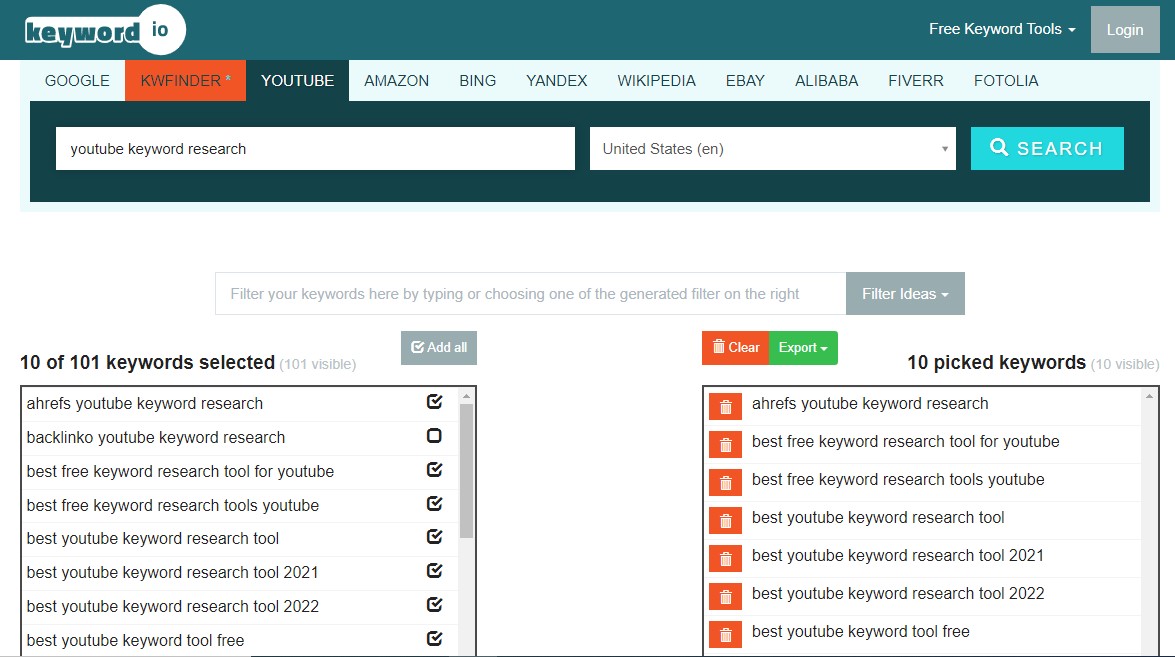
    7. Keyword.io

     Keyword.io is a helpful premium tool for keyword research. It makes it easy to compile a list of useful YouTube tags and export them for further evaluation.

    You can only get search volume statistics from the premium edition of the tool. The paid version has more bells and whistles, the free one is still a valuable tool for ideation and dissemination.

    Check Your Competitors’ Videos

    Investigating the channels of your rivals will reveal what approaches really work. They provide suggestions for popular search terms. Here’s a guide to mining competitor videos for the most sought-after search terms:

    1. Navigate to the Videos tab on the channel of the selected rival.

    2. By selecting “most popular,” you’ll get a collection of the clips with the highest views and rankings.

    3. Look at the title of the video and the words used in the description to get a general idea of well-known keywords for your target audience.

    4. Simply right-click the video and select “View page source” to get the raw data.

    5. You will notice a detailed HTML page. To find specific terms, use the Control + F shortcut and type “keywords” into the search box. There you will be able to find a the competitor’s specific keywords.

    YouTube Traffic Sources Report

    The only way you can receive official Google search statistics for YouTube is in the “YouTube search” data. It is found in the “traffic sources” section of YouTube Analytics.

    The keywords that are actively generating traffic to your existing videos are visible there. You can also find out more about the exposure that each individual keyword is generating.

    This is an excellent method for discovering unique avenues.

    Let’s assume you see that a certain phrase is bringing in a lot of traffic, but you haven’t yet made a video tailored to that term. You now have a good opportunity to make a video on that keyword and maximize your channel’s visibility.

    Google Video Result Keywords

    Having a high ranking in a YouTube search is good. What’s even better is having your videos appear high in search results on both Google and YouTube.

     Searching for “video result keywords” will help you accomplish this.

    You need to understand that not every search query will return a video result from Google. Rather, Google only displays video results for specificsearch terms.

    “Video result keywords” are search terms that lead to a video. Search terms leading to videos typically revolve around categories like “sports,” “how-tos,” and “cute cats,” or any other context where a video result would make more sense.

    So, before you settle on a term, Google it. If there isn’t a video associated with your search, it’s because Google has determined that your query isn’t a good candidate for a video result.

    If a Google search does return videos in the search results, congratulations. You have found your video result keyword. Save it.

    Continue finding and optimizing your YouTube content with video result keywords so you can find exposure beyond YouTube as well.

    Conclusion

    Keyword research is essential if you want your YouTube video to be visible to the right audience. Using the appropriate keywords can increase your video’s discoverability, which in turn can increase its number of views.

    In a nutshell, you can do the following to up your YouTube keyword research game and enhance your YouTube SEO efforts:

    1. Use a YouTube keyword tool to generate some topic ideas.

    2. Take advantage of YouTube’s autocomplete feature when entering a search term.

    3. Perform a Google search on your topic and see what comes up.

    4.Google Trends can be used to discover what’s trending and what keywords are being searched for.

    5. Check your competitor’s keywords to get an idea of how they are ranking in search engine result pages.

    We ensure that the time and effort you are going to put into your keyword research will pay off in spades when you upload your upcoming video, which we believe will receive the right exposure.

  • 6 Unique Case Studies on Chatbots

    No customer service rep wants to answer the same question a hundred times a day. No sales rep wants to talk to people who aren’t going to buy. And if you’re leading an organization, you can’t afford to let either of those scenarios be the norm.

    Chatbots (more affectionately known as virtual assistants) provide a solution to both of these problems. Their infinite capacity helps free up your employees and scale your organization’s efforts. Whether you use chatbots for customer service, sales, or something else, their artificial intelligence ensures that your human resources are only used when they’re needed, and that your organization communicates with the most people possible.

    But the fear many organizations have is that chatbots are heavy on the artificial and light on the intelligence. Few things are more infuriating when you need help than having to repeatedly rephrase your question or jump through hoops to talk to a real person. Most of us prefer talking to humans, and that’s OK. That’s why chatbots are most-suited for highly specialized tasks.

    The best chatbots interact with more people faster than humans will ever be able to. The trick is knowing when and how to use them. In many cases, you’ll find that chatbots are basically a more informal way for people to navigate your website.

    To help you see if there are opportunities for your organization to use chatbots, we found 10 case studies of companies that used them successfully. We’ll show you what they did, how they did it, and where you can go to see the full case study.

    Some of these organizations started with live chat systems before switching to chatbots. Some used chatbots conservatively, and others used them for everything.

    Check out these 5 case studies on chatbots.

    Amtrak: 5 million questions answered by chatbots annually

    Chatbot system: Next IT
    Industry: Public transportation
    Key stats:

    • 800% return on investment.
    • Increased bookings by 25%.
    • Saved $1,000,000 in customer service expenses in a single year.
    • Over 5,000,000 questions answered every year.
    • Bookings through chatbots generate 30% more revenue.

    Major takeaways:

    • Chatbots with advanced AI provide site visitors with a “self-service” option.

    Where the study came from: Next IT shared this chatbot case study on their website about Amtrak’s experience with “Julie”, which began in 2012.

    Amtrak is the largest organization you’ll find in our list of case studies. They have 20,000 employees and serve 30 million passengers per year. At the time Next IT published this case study, Amtrak.com was getting 375,000 visitors every day.

    Using Next IT’s advanced AI chat platform, they created “Ask Julie” to help visitors find what they needed without having to call or email customer service.

    Here’s what Next IT says she’s capable of:

    “Travelers can book rail travel by simply stating where and when they’d like to travel. Julie assists them by pre-filling forms on Amtrak’s scheduling tool and providing guidance through the rest of the booking process. And, of course, she’s easily capable of providing information on what items can be carried on trains or helping make hotel and rental-car reservations.”

    Instead of making a phone call or waiting for customer service to email them back, more and more visitors are turning to Julie. In fact, Next IT reported a 50% growth in Julie’s usage year over year.

    Julie “was designed to function like Amtrak’s best customer service representative,” and with 5 million answered questions per year, it’s hard to argue that she isn’t their best customer service rep.

    Not to mention, when Julie answers questions, she tacks on subtle upsells like these:

    So in addition to answering more questions and increasing the number of bookings, Julie actually increased the value of bookings. Bookings made through Julie resulted in an average of 30% more revenue than bookings made through other means.

    Clearly, the self-serve model is working for Amtrak. What’s interesting about Julie is that despite the smiling face, you know you’re talking to a robot. It doesn’t feel like AI that they’re trying to pass off as a real person. It’s almost like she’s a more advanced search feature of the website. When visitors ask questions, she pulls in only the relevant information, and it’s all contextualized to fit their specific question.

    Maybe it’s just me, but that could be the difference between a helpful tool and a frustrating conversation.

    Anymail finder: 90% of “big customers” chat before buying

    Chatbot system: Intercom
    Industry: Email verification software (SAAS)
    Key stats:

    • 1 in 3 buyers used the chat system before making a purchase.
    • 9 out of 10 “big buyers” used the chat system before making a purchase.
    • Estimated 60% of revenue comes from chatbots.
    • Average response time was three minutes in their first 30 days of using Intercom.

    Major takeaways:

    • Chatbots allowed a two-person team to stay on top of support and sales.
    • Popular customer questions provided content ideas, and eventually prewritten responses.

    Where the study came from: Pardeep Kullar published this case study on the Upscope blog in 2017.

    As a two-person marketing startup, Anymail finder was stretched thin between sales, marketing, and support. They were answering the same few questions over and over via email.

    Intercom’s operator bot helped this two-person team look and feel like they had a full-fledged support department.

    Pardeep Kullar of Anymail finder says that the same handful of questions kept popping up in the chat window. They were usually questions like “how are you different from your competitor?” or “how do I upload this file?”

    So Pardeep and his colleague wrote detailed articles that answered these popular questions and any related ones, then incorporated the articles in readymade responses and automated messages. Website visitors encountered one of 10 automated chat messages, depending on the page they arrived at.

    It’s like putting multiple fishing lines in the water at once, waiting for potential customers or users to bite. When a visitor replied to an automated message, employees got a push notification so they could promptly respond to every inquiry. Anymail finder’s prewritten responses to popular questions let them reply to some inquiries within seconds.

    Intercom’s messaging metrics let Anymail finder gauge which automated messages were producing the best results:

    One of the primary benefits of chatbot services is that they can answer most questions customers have and qualify your leads without eating up valuable time from your customer service or sales staff.

    But Intercom is pretty anti-AI, and their chatbots serve a more limited role. For Anymail finder, real people were waiting behind every automated message, but chatbots still helped them provide superior customer service with a limited team.

    MongoDB: increased new leads by 70% in three months

    Chatbot system: Drift
    Industry: database/development platform
    Key stats:

    • Increased net new leads by 70%
    • Increased total messaging response by 100%

    Major takeaways:

    • Chatbots are more scalable than live chat services.
    • Chatbots can help your customer service and sales teams by scheduling meetings and screening inquiries

    Where the study came from: Drift published this case study on their website.

    MongoDB was having a lot of success with live chat, but like all humans, their salespeople were limited by things like “time” and “space.” They couldn’t significantly increase the number of conversations they were having without significantly increasing the size of their team.

    As their director of demand generation puts it:

    “We needed a messaging tool that could scale with our business and increase the volume of our conversations, leading to the increase of our pipeline and Sales Accepted Leads (SALs)—the metrics my Demand Generation team are measured on.”

    Like RapidMiner, MongoDB let Drift’s Leadbot ensure that their sales reps only talked to the people who were most likely to buy. And with Drift’s meeting scheduler, people didn’t have to play phone tag to make an appointment:

    For MongoDB, automating lead-qualifying conversations allowed them to have more conversations, and automating the scheduling process let them turn more of those conversations into leads.

    Charter Communications: 500% ROI in six months

    Chatbot system: Next IT
    Industry: Cable/Internet provider
    Key stats:

    • 500% ROI within six months.
    • Reduced live chat volume by 83%.
    • Decreased time it took customers to reset passwords by 50%.

    Major takeaways:

    • Common customer service questions are now handled completely through the chatbot.
    • Chatbots can resolve issues faster by reducing handoffs.

    Where the study came from: Charter Communications implemented Next IT’s chatbot in 2012. Next IT published this case study on their website.

    Charter Communications is the second largest cable provider and the fifth largest phone providers in the U.S. They have 16,000 employees and 25 million customers.

    Before switching to a chatbot service, Charter Communications had 200,000 live chats per month. 38% of these live chat conversations were for forgotten usernames and passwords. That’s 76,000 ridiculously simple requests that had to be handled by a real person every month.

    Obviously, all of those conversations take up a lot of customer service time. Since so many people were accustomed to resolving issues through chat, Charter didn’t wanted to pull the plug on the entire chat system, but they needed a self-serve option to save their customer service reps for more complex problems.

    When they switched to a chatbot, it didn’t just take over those basic password and username questions. 83% of all of chat communications were handled by the bot. That’s 166,000 chat requests per month that Charter no longer had to worry about.

    But Charter’s chatbot wasn’t just bumbling its way through these conversations, either. Part of their goal was to increase first-contact resolution rates, so customers wouldn’t need to be relayed through several people to get what they needed. The chatbot could also handle those tedious password and username requests 50% faster than a real person.

    Ultimately, chatbots delivered a solid win for Charter and for their customers.

    Facebook Messenger bot case studies

    Since Facebook opened up its Messenger app for developers to create their own bots, a lot of brands have seized the opportunity to interact with their audience this way. The case studies you’ll see below are a little lighter than the ones we’ve looked at so far, but they showcase a few ways organizations are successfully using Facebook Messenger bots. Some ecommerce sites have had a lot of success with Messenger bots, but the three examples we’re going to look at are all primarily content-focused brands.

    Something to think about: while the other chatbots we’ve looked at live on your website, this one lives in an app people are already using, and they can find your bot there. Facebook shares Messenger bots in the discover tab, and if you open Messenger right now and search, you’ll find “bots” right below “people.” In other words, a Facebook Messenger bot could grow your audience.

    BabyCenter: 53% click through rate from Facebook Messenger

    Chatbot system: Facebook messenger
    Industry: baby products
    Key stats:

    • 84% read rate on automated messages.
    • 53% click through rate from Facebook Messenger to BabyCenter.com.

    Major takeaways:

    • Used a Messenger bot to drive traffic to the website.
    • Facebook messages were opened more than emails.

    Where the study came from: BabyCenter asked ubisend to design a Facebook Messenger bot in 2016. Ubisend published this case study on their website.

    BabyCenter is one of the most trusted pregnancy websites out there (seriously, I’ve seen my wife’s OBGYN check this site during appointments). One of their biggest draws is a sequential email campaign that follows you every step of the way through pregnancy, and their revenue model is based on advertisements and a strong affiliate sales program.

    Through ubisend, BabyCenter created a bot on Facebook Messenger to do two things:

    1. Drive traffic to their website.
    2. Provide an alternative content delivery system.

    As you can see in the GIF below, the bot also provided a more interactive way for people to consume BabyCenter’s content.

    The new bot accomplished both objectives, with some impressive results. On average, 84% of people read the message, and 53% of those who opened also clicked through to the website. Ubisend compares that to MailChimp’s open and click-through rates, and with some unstated math determined that the Messenger bot had a 1,428% higher engagement rate. I can’t speak to the validity of that claim, but here are a couple of reasons why the bot may have had better open and click-through rates than email:

    • The floating messenger icon and that little red number is a lot harder to ignore than an email.
    • People are used to glancing at a subject line without opening the email.
    • Far fewer brands are on Messenger, so a notification is more likely to be from someone you know. (And unless you’re avoiding someone, you’re probably going to open it.)
    • The load time for a Facebook message is almost instant. Email? Not so much.
    • It only takes two taps to open a message and click through. Email takes a little more navigation.

    Whatever the reason, a Messenger bot was clearly a viable content delivery system for BabyCenter. If enough people adopt it, the Messenger bot may even rival their well-established sequential email campaign.

    Good Spa Guide: 29% increase in website traffic

    Chatbot system: Facebook Messenger
    Industry: Spa reviews
    Key stats:

    • 47% click through rate on automated messages.
    • 29% increase in website traffic in six weeks.
    • 13% increase in spa bookings.

    Major takeaways:

    • Messenger bots can help consumers navigate the website before they even get there.

    Where the study came from: Good Spa Guide solicited ubisend’s services in 2016. Ubisend published this case study on their website.

    As the name implies, Good Spa Guide reviews spas. They make money when people use the site to book a spa, so not surprisingly, they really value website traffic.

    Like BabyCenter, Good Spa Guide was looking for an alternative to their email list. They used ubisend to design a Messenger bot that functions a lot like Amtrak’s “Ask Julie” bot. It basically provides a more conversational way to navigate the website—but without actually being on the website.

    Check it out:

    After a short conversation with the bot, people can go to the exact spa review page they need, and continue their hunt on the website.

    With a 29% increase in traffic and a 13% increase in spa bookings, it looks like a Facebook Messenger bot helped Good Spa Guide either tap into a new audience, or engage their existing audience in a better way.

    What do these chatbots all have in common?

    In most cases, chatbots aren’t going to fool anyone. The chatbots we’ve looked at here are obviously not real people. The brands that use them and the companies that make them might be excited about how human they seem, but that’s not the point.

    In the right situations, chatbots can provide customers and users with a better experience because they process your request instantly, and it doesn’t matter how many other conversations they’re having. And if you’re waiting around for basic help (like, say, password reset), you’re really not going to care if the person who’s helping you is a Bob or a bot.

    Unless you’re looking for something gimmicky (like a chatbot monkey that tells dad jokes), most chatbots simply provide a more conversational way for your audience to consume the information on your website. It’s certainly not for everyone—some people (myself included) would rather navigate websites the old fashioned way and read blog posts on a blog—but for many people, chatbots provide a helpful shortcut to the information they’re looking for. And that’s something you should probably care about.

    One clear takeaway: if you’re using a live chat service right now, a chatbot can either outright replace it or vastly improve it. Ask your customer service reps what questions they get the most and how often they get them. Go ahead, ask them.

    But even if you’re not already using some sort of chat service, chatbots can:

    • Automate the lead generation process.
    • Deliver your content in new ways (maybe even to new people).
    • Drive traffic to key pages of your website.
    • Save your customer service and sales reps a boatload of time.

    Still, chatbots are just one tool you can use to grow your organization. We hope these case studies have helped you envision how they might work for you, but there might be better ways to reach your goals. (We’d love to help you find out.)

  • Improved Customer Experience helped to grow 40% hotel re-bookings – Case study

    By implementing AI based data analytics solution, a leading global hospitality brand was able to capture the digital conversation at each hotel location and leverage it to deliver exceptional customer experience.

    With almost 3,000 properties globally, ranging from luxury hotels to budget accommodation, brand was able to track global conversations across all media platforms.

    In an environment where hospitality is becoming increasingly commoditised, the brand was aiming to to deliver quality service and to deliver top level of service required ongoing feedback and insight into the guest experience.

    Whilst formal feedback mechanisms and post stay reviews are helpful, unsolicited feedback can often capture the most useful insights and if that feedback can be captured during stay when it can be actioned, it becomes extremely valuable.

    This type of unsolicited guest feedback is readily available in the digital conversations taking place on property on the digital devices such as phones and the tablets. The challenge is to find and tap into them in because most guests (80%) don’t directly refer to the hotel in their digital posts. To address this challenge we choose to use location based technology using GEO Fencing and advanced user tracking, to keep the track of location the guest is staying.

    Our solution captures all the public content posted on social media within the geographic location of each hotel adding the location attribute in the backend system, regardless of the hashtags or keywords contained in the text, ensuring the data analysts see the full picture.

    At the time of onboarding, nearly 330 properties worldwide participated, and begain stamping the location specific information to the reviews. Using this technology, hotels are able to find the information they need to help them to address location specific service issues or to understand more about their guests so they can tailor their experiences accordingly. Hotels particularly value the ability to see and reply to all the public social media content posted about the property in a single and easy to use interface. They can learn more about their guests and engage with them in one place. Finding advocates, influencers or detractors and building relationships with them becomes very easy.

    Publishing the User Generated Content (UGC) collected by us also allows them to showcase their hotels through the eyes of guests and drive online bookings on all their digital channels.

    Our solution was flexible enough to be adapted to suit the resources and features of each hotel. At basic level filters can be set-up to send automated alerts when key criteria are triggered, for example if a guest with high social influence is present, or there is a service issue. Beyond receiving alerts hotels may chose to check the content daily or more frequently to identify and engage with posts of interest.  Depending on the facilities available it might make sense to set-up rules specific to the restaurant, to identify if a food blogger is present or if it is someone’s birthday for example.

    And the results of the implementation can be seen both at Hotel and group level.

    Let’s take the example of the 5-Star property located in New Delhi who started to use the platform this summer. Aware of the potential of acting on the digital conversations taking place at the hotel. The General Manager of the property and the Guest Experience Manager identified new creative ways leverage the guest experience signals. Few months after the implementation, the results are already there.

    Using this brand new solution, we are able to interact easily with only one click with every guest publishing content localized at the hotel. The first positive effect is to raise awareness among our guests that we have an Instagram account. Within 3 months, we have seen a fast increase of fans on Instagram, this number has more than doubled. On average, system automatically extracts 5 publications localized at the hotel per day. This increases the chances to personalize the stay of our guests by offering them interactive experience.

    At a the backend level, system analysed the behaviour of 56,000 hotel guests over a 12 month period at 100 properties globally to assess what was the impact of the platform. The results showed that when there had been digital engagement with the hotel during stay guests were 40% more likely to re-book, recommend to their peer group and to leave a positive post stay review.

    In another study, we discovered that over the 6-month period, brands reach in responding to guests nearly doubled i.e is 36% response rate in comparison to 19% response rate in past.

    Meanwhile, the volume of posts sourced also surged due to the addition of geolocation data which surfaced over 300% more content from guests. The additional details and accuracy of the provided by unique solution, helped brand to respond to guests on social media 4 times faster than before of what it had been originally and providing more timely assistance to their guests.

    As a result of their increased customer engagement strategy, we were able to reach over 11 million people via social media per month. Engaging with highly influential visitors and encouraging them to post has helped boost loyalty and expand the hotels’ reach to a wider audience.

  • Complete Guide for Great Customer Service With Facts and Statistics for 2022

    Your customer experience is the main differentiator between you and your competitors, and all of the customer service statistics back it up.

    Below, we’ve collected 111 key statistics exploring the relevance and importance of good customer service — and expanding on the cost and impacts of poor customer service.

    Rather than view these statistics in a vacuum, layer them over your own experiences and the services you are currently offering. There’s a little something in the following chapters for everyone — whether you’re new and just trying to chart the way for your team or have been doing it for years.

    The ROI of great customer service

    “We see our customers as invited guests to a party, and we are the hosts. It’s our job every day to make every important aspect of the customer experience a little bit better.” –Jeff Bezos

    Everyone wants to be known for providing excellent customer service. Not only does it feel good to be helpful, but it is a key differentiator, as the following customer service statistics show.

    Customer service, when done well, has just as much impact as a strong sales funnel or excellent marketing efforts. Not only that, but if your customer service team does a fantastic job, it may help boost your other teams’ effectiveness.

    It’s easier to make a sale when your customers feel supported, and word-of-mouth marketing after an extraordinary experience is one of the best pitches on the market.

    Not convinced? Here are a few customer service statistics that serve to emphasize just how paramount excellent customer service can be for your bottom line:

    • 68% of consumers say they are willing to pay more for products and services from a brand known to offer good customer service experiences. (HubSpot)
    • For 86%, good customer service turns one-time clients into long-term brand champions. (Khoros)
    • An NPS Promoter score has a customer lifetime value that’s 600%-1,400% higher than a Detractor. (Bain & Company)
    • 89% of consumers are more likely to make another purchase after a positive customer service experience. (Salesforce Research)
    • 93% of customers are likely to make repeat purchases with companies who offer excellent customer service. (HubSpot Research)
    • If the company’s customer service is excellent, 78% of consumers will do business with them again after a mistake. (Salesforce Research)
    • Increasing customer retention rates by just 5% can increase profits by between 25% and 95%. (Bain and Company)
    • Nearly three out of five consumers report that good customer service is vital for them to feel loyalty toward a brand. (Zendesk)
    • A good customer service experience heavily impacts recommendations. Consumers who rate a company’s service as “good” are 38% more likely to recommend that company. (Qualtrics XM Institute)
    • Investing in new customers is between 5 and 25 times more expensive than retaining existing ones. (Invesp)
    • 83% of customers agree that they feel more loyal to brands that respond and resolve their complaints. (Khoros)
    • Businesses can grow revenues between 4% and 8% above their market when prioritizing better customer service experiences. (Bain & Company)
    • 80% of companies use customer satisfaction scores to analyze customer experience and improve it. (Harvard Business Review)
    • 72% of companies believe they can use analytics reports to improve the customer experience. (Deloitte)
    • The customer experience management market worldwide is worth as much as $7.6 billion in 2020. This is a 16.9% year-over-year increase from its value of $6.5 billion in 2019. (Grand View Research)

    As you can tell, excellent customer service is a name maker, no matter what your industry. It helps grow revenue, maintain customer loyalty, and improve your overall business strategy.

    Key customer insights like customer satisfaction score and NPS help your customer service team improve and grow their impact. Beyond that, though, they also help your other customer-facing teams understand where they could be making improvements. Who wouldn’t want to give everyone else a leg up?

    The cost of bad customer service

    Now that we know how important good customer service can be for your business, it’s time to get a handle on the impact it can have when things go badly.

    Just like good customer service leads to your team’s success, poor customer service sets them back. A good experience means that customers are much more inclined to go easy if another experience goes awry. The following customer service statistics help to illustrate this:

    • It takes 12 positive customer experiences to make up for one negative experience. (Ruby Newell-Legner’s “Understanding Customers“)
    • 58% of American consumers will switch companies because of poor customer service. (Microsoft)
    • 65% of customers said they have changed to a different brand because of a poor experience. (Khoros)
    • After more than one bad experience, around 80% of consumers say they would rather do business with a competitor. (Zendesk)
    • Only one in five consumers will forgive a bad experience at a company whose customer service they rate as “very poor.” (Nearly 80% will forgive a bad experience if they rate the service team as “very good.”) (Qualtrics XM Institute)
    • 78% of customers have backed out of a purchase due to a poor customer experience. (Glance)

    Look at that last one! More than three-quarters of customers surveyed have backed out of a purchase because the customer service wasn’t as good as expected. If you showed that metric to your sales team, they would advocate for your customer service team to get as many resources as they need.

    Beyond that, customer service sets the stage for the rest of your company to succeed. Your customer service’s impact is more widely felt than that of any other team. When they fail, everyone does — and your customers know it.

    Caring about what customers think

    It’s an ill-founded but common misconception that your customers don’t know as much as you do. While they certainly aren’t always right, they are very often at least thinking in the right direction. Similarly, they usually know when something has gone sideways or isn’t behaving the way it should be.

    Your customers’ thoughts and opinions matter. They can help you build a better product, help improve your internal processes, and give you a good heads-up that they’re thinking about churning.

    Here are some customer service statistics that will help you understand just what your average customer feels during or after an interaction:

    • 90% of customers rate an “immediate” response as essential or very important when they have a customer service question. 60% of customers define “immediate” as 10 minutes or less. (HubSpot Research)
    • More than 70% of consumers believe that companies should collaborate on their behalf so they don’t have to repeat information to different representatives. (Zendesk)
    • 90% of consumers worldwide consider issue resolution as their most crucial customer service concern. (KPMG)
    • 70% of customers report that technology makes it simple to take their business to a competitor if needed. (Salesforce)
    • 90% of Americans use customer service as a factor in deciding whether or not to do business with a company. (Microsoft)
    • 71% of consumers (age 16-24) believe that a quick response from a service team can drastically improve their customer experience. (Comm100)
    • Almost 90% of customers report trusting a company whose service they rate as “very good.” On the other hand, only 16% of those who give an “inferior” rating trust companies to the same degree. (Qualtrics XM Institute)
    • 70% of the customer’s journey is based on how the customer feels they are being treated. (McKinsey)
    • 53% of shoppers believe their feedback doesn’t go to anyone who can act on it. (Microsoft)
    • A customer is four times more likely to switch to a competitor if the problem they’re having is service-based. (Bain and Company)
    • Nearly 90% of consumers trust a company whose service they’ve rated as “very good” to take care of their needs. (Qualtrics XM Institute)

    There are a few metrics that stand out. The first is that most customers indicate that getting a response within 10 minutes of their request is essential or very important — that is a hugely impactful metric.

    In a world where first response and resolution times are critical, how close are you to that 10-minute mark? With this level of response rate, 71% of younger consumers believe that their experience is drastically improved — and it snowballs from there.

    When you’ve created an excellent customer service experience, you gain trust, protect yourself from customers going to your competitors, and prioritize making your customers’ journeys good ones.

    The second exciting statistic is that more than 70% of consumers believe that companies should collaborate on their behalf. So if a customer reaches out about an issue with an integration that they are using with your product, rather than advising them to reach out to the other product’s support team, you respond directly instead.

    This level of personalization and attention to detail can significantly impact your customers, as you’ll see in the next section.

    The power of a personal touch

    Everyone wants to feel known. They want to believe that the people in their lives are thinking about them, considering them, and understanding their wants and needs.

    This extends to your customers, too. If you go a bit above and beyond to make your customers feel seen, heard, and cared about, it can have a massive impact on their experience and your company’s bottom line.

    If you can educate yourself on the user’s background and history before a call, integrate that into the customer service session. If you’re not diving deep and reviewing things like sales history or personal information, at least take the time to ask the customer’s name.

    Read on to find some jaw-dropping customer service statistics around personalization:

    • 70% of customers say service agents’ awareness of sales interactions is fundamental to keeping their business. (Salesforce)
    • 80% of customers say the experience a company provides is just as necessary as its products or services. (Salesforce)
    • 63% of consumers expect businesses to know their unique needs and expectations, while 76% of B2B buyers expect the same thing. (Salesforce Research)
    • 59% of customers believe that companies need to provide cutting-edge digital experiences to keep their business. (Salesforce)
    • 90% of people are more likely to trust a company if they have a firm privacy policy. (Salesforce)
    • Your online conversion rate can improve by roughly 8% when you include personalized consumer experiences. (Trust Pilot)
    • 88% of people trust companies that vow not to share their personal information without permission. (Salesforce)
    • 92% of customers appreciate companies giving them control over what information is collected about them. (Salesforce)
    • 23% of businesses use social media as a tool to collect and analyze data. (Gartner)
    • 79% of customers are willing to share relevant information about themselves in exchange for contextualized interactions in which they’re immediately known and understood. (Salesforce)
    • 56% of customers don’t mind sharing their personal information in exchange for better service. (Salesforce)
    • On average, customer service agents only ask for a customer’s name 21% of the time. (Glance)

    As you can see, it’s not just about how you use a customer’s personal information, although that’s important. Many customers care about how you’re aggregating data and what you do with it after you have it.

    More than half of customers are comfortable sharing personal information in exchange for excellent service, but you still need to use that data carefully. After all, about 90% of customers are more likely to trust you if you’ve got a stellar privacy policy.

    Personalization helps to build deeper relationships, but only if it’s done correctly. If it isn’t done correctly, you can expect your customers to talk about it.

    The importance of word-of-mouth

    Customers love to talk. They’ll share their good experiences, bad experiences, and everything in between. Similarly, customers like to listen.

    As you’ll see in the following customer service statistics, many users trust reviews from other customers or social media responses more than they trust the marketing of your actual company.

    Providing an excellent customer service experience, especially within the public eye of social media, is a massive boon to your company’s marketing efforts.

    While 50% of customers don’t share their experiences on social media, 72% will talk about them in person. That number gets even higher when considering how customers talk socially about poor experiences.

    Read on for some pretty impressive and shocking customer service statistics around when people do or don’t share:

    • 36% of consumers will share their customer service experience, whether good or bad. More than one-third report posting on Facebook, followed closely by Instagram. (CFI Group)
    • 87% of consumers read online reviews for local businesses in 2020. (Bright Local)
    • 72% of customers will share their good experiences with others. (Salesforce)
    • 72% of customers will tell six or more people if they have a satisfying experience. (Esteban Kolsky)
    • 94% of American customers will recommend a company whose service they rate as “very good.” (Qualtrics XM Institute)
    • 67% of customers report a terrible customer experience as the reason for switching businesses. (Esteban Kolsky)
    • Only 13% of consumers will recommend a company whose customer service they’ve rated as “very poor.” (Qualtrics XM Institute)
    • 50% of customers say they don’t share their bad or good service experiences through social media. (CFI Group)
    • 33% of consumers would recommend a brand that provides a quick but ineffective response. (Nielsen-McKinsey)
    • 78% of customers who complain to a brand on Twitter expect a response within an hour. (Lithium)
    • 13% of customers tell 15 or more people if they have a negative experience. (Esteban Kolsky)
    • 79% of customers who share their complaints online see their complaints ignored. (RightNow)
    • Only 17% of consumers would recommend a brand that provides a slow but effective solution. (Nielsen-McKinsey)
    • Only 1 in 26 customers will tell a business about their negative experience; according to customer service facts, the rest simply leave. (Esteban Kolsky)

    That statistic about customers leaving without a word horrifies us every time! Consider how many negative responses you’ve had to CSAT or NPS surveys, then multiply it by 26 — scary, right?

    Luckily, some pretty great current technologies make it a bit more straightforward to provide an excellent customer support experience and mine for nuggets of valuable insights as you do it.

    Choosing the right support channels

    Both phone and email are the tried and true channels of customer service. Back in the 1960s, when call banks first came about, customers started getting comfortable with having a direct line to support. Then came email, providing either a single address or a group email to reach customer service teams.

    Now there’s live chat, co-browsing, virtual video calls, social media mentions, and tons of newly arriving methods for customers to reach out. Which one is best for your company? Take a look at the chart below to see different channels and how often each is used by support teams and customers:

    Each channel has pros and cons. Here are some customer service statistics to help illuminate the positives and negatives for each and to help with your decision-making.

    Omnichannel support

    Omnichannel support is a continuous connection for customers between all of your channels. It effectively means that what someone does with a team on any channel can travel seamlessly to other channels with full context. For instance, your customer can start with a live chat and then transition seamlessly to a phone call as needed.

    Omnichannel support provides an excellent experience for customers because it means that they never have to re-explain something they already told another member of your team. When done correctly, it can seem like magic:

    • 75% of customers desire a consistent experience, regardless of how they engage a company (through social media, in person, by phone, etc.). (Salesforce)
    • The effectiveness of bots in resolving issues has fallen to 28%. American consumers do not find bots effective, with 40% relying on other channels to reach out to service teams. (Microsoft)
    • 64% of customers want to shop with companies that can meet their needs in real-time. (Salesforce)
    • 64% of customer service teams use customer portals, compared to 84% of customers who use customer portals. (Salesforce)

    As you can tell, timeliness, the ability to use multiple channels, and consistency are the main benefits of omnichannel.

    Phone support

    Phone support is one of the oldest forms of assistance. Since the invention of the rotary phone, companies and customers alike have depended on this valuable, reliable technology. Let’s take a look at some customer service statistics around teams using phones:

    • A study has shown that more than 76% of all consumers prefer the traditional medium of phone calls to reach customer support representatives. (CFI Group)
    • More than 50% of customers across all age groups typically use the phone to reach out to a service team, making it the most-used channel for customer service. (Zendesk)
    • 63% of customer service teams use text messaging, compared to 78% of customers who use text messaging for communicating with a company. (Salesforce)
    • 51% of customer service teams use mobile apps, compared to 82% of customers who use mobile apps for communicating with a company. (Salesforce)

    Although support teams heavily use traditional phone support, it seems that there are still some tools they could use more. For instance, the number of customers who prefer text messaging and mobile apps compared with the number of customer service teams that use them leaves something to be desired.

    Phone support is tried and true, but the opportunities available through mobile phones seems to still be a new frontier.

    Self-service support

    Documentation is beneficial for assisting customers without the need for your customer services team’s intervention. For example, a customer can search in your knowledge base and find answers within minutes which, in the long run, is a much better experience than having to wait for a response in an email or live chat queue.

    Unfortunately, though, when documentation isn’t done well, it can do more harm than good. Here are some customer service statistics exploring both the good and bad sides of your help docs:

    • 28% of consumers say the most frustrating issue is information that is simple but hard to find. (Drift)
    • 69% of consumers first try to resolve their issue independently, but less than one-third of companies offer self-service options such as a knowledge base. (Zendesk)
    • Customers prefer knowledge bases over all other self-service channels. (Forrester)
    • 66% of customer service teams use knowledge bases, compared to 82% of customers who use knowledge bases. (Salesforce)

    As you can see, most customers would rather use a knowledge base/documentation to resolve their issues, but they aren’t always able to find them. Few companies have made efforts to create documentation, knowledge bases, or other options with which customers can serve themselves.

    Social media support

    Despite social media’s role as a place to connect with friends and coworkers, many businesses and consumers are using it to connect as well.

    Functionality like Facebook and Instagram messaging have made it easy for users to connect directly with brands in a more meaningful and authentic way than they used to. Because of that, many companies are striving to create more presence in those environments.

    These two customer service statistics around social media make it easy to understand why:

    • 79% of American internet users are on Facebook, making it the most popular social media platform. (Lyfe Marketing)
    • 95% of adults between the ages of 18-34 are likely to follow a brand through social media channels. (MarketingSherpa)

    Think about all of the people your brand could connect with if you were to make the switch to providing customer service via social media channels?

    Chat support

    Chat is primarily considered to be the fastest way for consumers to get support. It feels immediate, can often be fielded by automation, and doesn’t always require a lot of bandwidth to staff. Similarly, many younger consumers prefer it over more traditional technology like phones.

    If you haven’t already implemented chat within your team, here are two customer service statistics that may help you understand if it would be a good move:

    • Millennials prefer live chat for customer service over every other communication channel. (Comm100)
    • 52% of customer service teams use online chat or live support, compared to 81% of customers who use online chat or live support for communicating with a company. (Salesforce)

    There are many more customers who prefer to use live chat than companies who offer it! If you have the resources to implement it, chat may be an excellent opportunity to meet your customers where they are. Note that if your customers are searching for live chat and you don’t offer it, it may frustrate them even more.

    Dealing with angry customers

    “Our attitude towards others determines their attitude towards us.” –Earl Nightingale

    Anger is a widespread and extremely difficult emotion to control. For example, one-third of people who responded to a survey about anger noted that they or someone they knew had a severe problem controlling their anger.

    It may come as no surprise, then, that many of your customers, who are already in a stressful situation and need help, may become angry during an interaction.

    Anger can be scary, but when you understand where it’s coming from and why it’s happening, it can be easier to handle. For example, many customer service team members could benefit from reminding themselves that the customer is angry about the situation that led them to the interaction, rather than the interaction itself.

    For a few more reminders about anger within the context of customer service and how certain behaviors can lead to more profound customer anger, check out these customer service statistics:

    • 21% of people waiting at a hospital pharmacy decided to fill their prescription elsewhere because they had to wait too long. (Sage Journals)
    • Nearly 70% of customers are irritated when their call is transferred from one department to another. (Zendesk)
    • Feeling unappreciated is the #1 reason customers switch products and services. (New Voice Media)
    • 33% of customers are most frustrated by having to wait on hold, and 33% are most frustrated by having to repeat themselves to multiple support reps. (HubSpot Research)
    • 70% of unhappy customers whose problems are resolved are willing to shop with a business again. (Glance)
    • Nearly 60% of customers feel that long holds and wait times are the most frustrating parts of a service experience. (Zendesk)
    • 62% of customers would prefer to “hand out parking tickets” than wait in an automated phone tree for service or have to repeat themselves multiple times to different team members. (HubSpot)
    • 35% of customers have become angry when talking to customer service. (American Express)
    • 27% of Americans report that ineffective service is their number one customer service frustration. (Statista)
    • 12% of Americans rate their number one service frustration as “lack of speed.” (Statista)
    • 72% of customers say that explaining their problems to multiple people is poor customer service. (Dimensional Research)
    • 79% of consumers who used online feedback to complain about a poor customer experience were ignored. (Harris Interactive)
    • 84% of customers report that their expectations had not been exceeded in their last interaction with customer service. (Harvard Business Review)
    • 78% of customers have given up on a transaction because of a negative customer experience. (American Express)
    • 67% of customers end a call in frustration when they cannot reach a customer service representative. (Glance)

    Most customer frustration seems to stem from waiting or having to repeat themselves. What are some ways you might be able to speed up support interactions or provide additional context for team members to work against these two common issues?

    Putting some processes in place may help you work on these customer service statistics in the future. Preemptively addressing customer concerns and frustrations before they occur is a mark of a truly high-performing customer service organization.

    Building a world-class support team

    “In an era when companies see online support as a way to shield themselves from ‘costly’ interactions with their customers, it’s time to consider an entirely different approach: building human-centric customer service through great people and clever technology. So, get to know your customers. Humanize them. Humanize yourself. It’s worth it.” –Kristin Smoby

    No matter how much we talk about anger, frustration, or disappointment, the fact remains that customer service teams do the brunt of the work to ensure your customers are happy and successful.

    Unfortunately, customer service is often considered last when thinking about company policies, sharing information, or empowering teams. However, if these statistics have shown anything, it’s that customer service is essential and valuable to your customers.

    Here are some of the best practices that top-of-their-class customer service people put into practice and how it makes their customers feel:

    • 75% of consumers will still choose to interact with a real person even as the technology for automated solutions improves. (PwC)
    • One-third of all consumers consider the most critical aspect of good customer service experiences to be having their problem solved in one single interaction, regardless of the amount of time spent. (Statista)
    • 88% of high-performing service decision-makers are investing significantly in agent training compared to only 57% of underperformers. (Salesforce)
    • 83% of high-performing service agents say they get the training they need to do their job well compared to only 52% of underperformers. (Salesforce)
    • 69% of high-performing service agents actively look for situations to use artificial intelligence (AI) compared to only 39% of underperformers. (Salesforce)
    • A whopping 95% of consumers say that customer service is essential for brand loyalty, and 60% of consumers report having deserted a brand and switching to a rival company because of poor customer service. (Microsoft Dynamics 365)

    It seems like the main differentiator for performance is appropriate training and company trust — and consumers notice the difference. When you take care of your employees and ensure that they have the tools they need, they can better care for your customers.

    Taking care of your support team

    “Here is a simple but powerful rule: always give people more than what they expect to get.” –Nelson Boswell

    The tide is shifting in business. Many companies realize that their best employees could be poached and go elsewhere for more pay and perhaps a better employee experience. Therefore, it’s essential to prioritize your customer service team members’ needs and address their priorities.

    Below are a few customer service statistics that emphasize just how important the level of care that you provide is:

    • The customer service industry has the highest employee turnover rate of all businesses. Call center statistics have placed it as high as 45%! (QATC)
    • The Human Resource Institute estimates that turnover costs about $10k-$15k for a frontline employee. (QATC)
    • Most customer service reps don’t plan on staying in that job forever, as there are often poor growth opportunities. 31% of consumers consider a knowledgeable agent to be the most crucial factor for a positive customer experience. (Thomasnet)
    • Since 77% of consumers consider the difficulty of reaching an agent to be the biggest issue with customer service today, it’s worth investing in resolving it. (Review42)
    • 89% of companies with “significantly above average” customer experiences perform better financially than their competitors. (Qualtrics XM Institute)
    • Great client support yields long-lasting results, too. 24% of consumers keep doing business with vendors for two or more years after a positive encounter. (Zendesk)
    • 64% of U.S. consumers contacted customer service in 2017. (Aspect)
    • 73% of customers say they stay loyal to brands because of friendly customer service agents. (HubSpot)
    • 73% of customers fall in love with a brand because of friendly customer service representatives. (RightNow)

    Consider those statistics, and imagine that you have six employees at the start of the year. By the end of the year, two or three of them will likely have left. That’s between $30k and $45k in expenses for losing employees who were likely doing an excellent job.

    As we know, good customer service representatives can make or break customer relationships, so prioritizing the people who do good work is extremely important.

    Consider what your customer service team needs more of, and try to find ways to offer it. Then speak directly to your team members about changes that you’ve made and the impact it has had on their quality of life. Ask them for their opinions, listen carefully, and then implement what you can.

    Making a better working environment for your agents will create an excellent environment for your customers.

    Hopefully all of those customer service statistics have given you a lot to consider and process. There are many different perspectives to consider and options to evaluate, but no matter what you’ve taken away from this post, we’re sure you’ll agree with this: Customer service is essential.

    Not only is it essential, but it’s valuable to your bottom line and serves as a critical differentiator of your company against others.

    If you treat every interaction as a way to get to know and love your customers, your team will be providing excellent customer service in no time.

  • Case Study : How clothing brand drove 6x engagement by combining SMS marketing with ecommerce strategy.

    US Based clothing brand used SMS marketing alongside email to their customer journey and generated thousands of dollars in a single weekend using GetResponse SMS Platform.

    With their anticipation for SMS building, The ecommerce brand wanted to get started quickly, so we worked closely with them to enable a fast and painless experience.

    With SMS, email, and analytics all in place from using GetResponse, brand saved time, resources, and the human resources it takes to manage multiple platforms.

    To collect more phone numbers, we modified their footer footer to collect phone numbers using their custom html marker form.  Along side we added the custom popups, that were shown to collect phone numbers during different weekend offers where we asked people to subscribe to text messages for exclusive updates.

    With such strategy, clothing brand was able to collect thousands of phone numbers in two weeks.

    We also helped them to creat a specific Cyber Weekend workflow and sent message those new subscribers and drive them to exclusive sales and promotions through SMS automation. One of the main drivers of success was use of personalization for each customer. Each text included data that’s stored on the customer’s profile—it took just two clicks to add this information to the message.

    Challenge

    After scaling up their organic traffic footprint through e-commerce seo over the past two years, clothing was looking for a new owned marketing channel to help them accomplish their primary goals: removing friction for shoppers and expanding their online presence.

    The 2020 e-commerce boom encouraged leadership to rethink their online and in-store experiences, placing customer ease and strategic fulfillment at the forefront.

    To understand their customers better, brand conducted surveys and selected handful of the customers to conduct interviews, and it was revealled that customers loved their brand but unable to shop easily online and even some times, they find it harder to discover online promotions.

    Retailer needed to tap into their physical locations as fulfillment centers to create seamless customer experiences. Then, they needed to translate the best elements of their in-store experience—product discovery and creative inspiration—into equally memorable digital ones. 

    In nutshell, the brand identified their goal was to make it easy and delightful for consumers to shop, no matter weather they choose to visit store inperson or online.

    Solution

    We worked closely with the IT and Engineering team and launched their SMS marketing channel to expand, engage, and nurture their community of customers. The retailer agreed to invest on paid social media ads, in 2019 to create highly personalized experiences that foster discovery and drive immediate traffic to their website and physical locations.

    We also planned along side to integrated SMS channel through GetResponse with a lot of our tech stack—from integrating with their existing loyalty program to collecting opt-ins at point of sale.

    According the company’s Executive Director. “Majority of the work was understanding the business, and creating the personalized experiences that required collaboration and lots of brainstroming with innovative ideas between the partners.

    Brand is focused on delivering personalized experiences to their online subscribers but there needs to be strong testing system in place to conduct A/B testing on different messages. So we used our propritory message testing system to find right blend of messages at right time aligned with geo-targeting, and segmentation capabilities.

    System automatically tailors text messages to shoppers’ preferences. “Consumers have become used to receiving impersonal updates,” said CEO. “Unique Text messaging gave opportunity to tell quick, focused stories that resonate with different sent of audience groups. With the use of automation and segmentation capabilities, we’re able to tell multiple stories to multiple audiences, driving increased engagement.

    Strategy

    Over the years clothing brand has built their community of loyal brand followers. All they needed is to ignite their inspirations by offering creative ideas at every step of the journey. They’ve replicated their signature in-store clienteling and discovery experiences on their text channel, helping shoppers feel supported and understood.

    Nurturing loyal shoppers

    We worked closely with brand to built a sophisticated welcome journey to nurture shoppers as soon as they sign up for texts. The series of welcome messages were—sent over period of 2 weeks—is designed to amplify other marketing and company-wide initiatives. Different promotions were featured during the 2 week time along with unique brand messaging was also sent.

    We heavily used SMS to drive engagement through personalization combined with inspiration through creative ideas.”

    Combining online and in-person store experiences

    Earlier brand used to ship all of their online orders, through fulfillment centers as a result there was less customer foot-print on the physical stores at local locations. Since brand already had nationwide presence with more than 600 across US and Canada and to utilize the benefit of physical stores, they also focused on turning stores into fulfillment centers as well. This improved customer experiences, and helped brand to introduce – Buy online, pick up in-store (BOPIS) and curbside pick up shopping options have removed friction for shoppers. They don’t have to enter their address details or wait for their order to ship and then wait for many days to get the order shipped from central wherehouse. Instead, they can pick up their items from their nearest store location.

    With the location-specific events and promotions, we send geo-targeted messages personalized to subscribers’ locations. Subscribers can simply click through to find directions to their closest store. Location specific offers, has huge oppourtunity to drive foot traffic to the stores.

    Results

    Over the past year, we have seen a steady increase in SMS-attributed traffic to their e-commerce site. With the introduction to SMS Marketing combined with ecommerce SEO, paid social media ads, we were able to deliver 6x increased engagement with 190x ROI to the overall spend.

    By tailoring their SMS campaigns to subscribers’ interests, we were able to drive engagement around branding goals through inspirational and educational content. With 61% increase in customer growth through new registrations within the period of 2 years.

  • Hotel SEO : Case study on how reviews impacted hotel bookings

    How many of us have reached for our smartphone or tablet after choosing a location to look up online reviews for hotels in the area? Travellers check review sites to get a broader perspective of your hotel; and they not only read them in ever increasing numbers (research suggests the average person reads about seven reviews before making a decision) but they trust them; a study by Search Engine Land found that 88% of people trust online reviews as much as personal recommendations.

    Background Information

    Not only that but 81% of travelers find online reviews important for a hotel and 49% will not make a reservation for a hotel that has zero reviews. So, what hotel guests say (or don’t say!) about your property in the form of text, photos or videos influences the minds of the potential guests.

    Every month, 456 million people – about one in every 16 people on earth – visit some tentacle of TripAdvisor.com to plan or assess a trip and at present, more than 200 new posts are uploaded to TripAdvisor every minute. Research firm Oxford Economics found that TripAdvisor’s reviews and scores influenced around $546 billion of travel spending during 2017 – now that’s quite a bit of influence.

    On the flip side, positive reviews can transform an establishment’s fortunes. Consumers tend to shortlist hotels with better ratings and researchers studying Yelp, one of TripAdvisor’s main competitors, found that even a one-star increase meant a 5-9% increase in revenue. In short, opinions of previous guests influence the minds of the reader and bad reviews are definitely bad for business. A hotel’s online reputation holds value for travelers and your rating will dictate the kind of revenue that can subsequently flow in for your hotel.

    Results

    Initially they hotel chain in Spain, was loosing near about 30 reservations against every bad review because they were not giving enough weightage to their customer service. Later hotel chain, made the decision to utilize guest feedback to improve guest experiences, increase the number of returning visitors, and boost the number of direct bookings. In late 2013, they partnered with the world’s enterprise feedback platform, and the results have been nothing short of remarkable.

    To start, some of their properties, increased revenue up to 200% with increased reputation scores and visibility. To achieve this success, the hotels integrated guest feedback into every stage of the guest journey with the ultimate goal to increase bookings on scale.

    First, in order to attract more traveler attention during the search-shop-buy process, they sought to respond to more online reviews – both negative and positive. With the implementation of online reputation management features, they were able to increase their response rate from 28% to 95%. Thoughtful response management has proven to be a successful tactic to increasing bookings and hotel revenue.

    To continue to increase their online reputation, Petit Palace Hoteles also started soliciting feedback from hotel guests via a guest satisfaction survey. Within two years of changing their strategy to give emphasis on hotel surveys abd reviews, it became the hotel group’s most important feedback source, accounting for 44% of all reviews. And with an average score of 4-7% higher than other online review sources, the increase of solicited reviews also impacted the overall ratings for the hotels.

    In fact, the impact of the solicited reviews even went a few steps further. With the option for guests to post their survey response directly to Google as a new hotel review, they added over 1,800 new reviews to their hotels’ Google profiles. This enhanced review content helps increase visibility to travelers searching for accommodations and leads to higher click through rates on the hotels’ websites.

    Additionally, the insights gathered in the collected reviews was equally helpful in understanding customers needs and thus for in improving the on-site guest experience.They implemented a “Reputation Culture” and the criteria for investments came directly from the voice of the customer.

    With the use of AI and semantic analysis, the hotel group identified common customer complaints and made hotel improvements as a direct impact of the guest feedback. For example, the hotel chain is now renovating the hotels’ digital solutions including brand new Smart TVs, premium TV contents, and state-of-the-art Wifi systems, which were previously some of their more poorly valued hotel features.

    By leveraging guest feedback during each stage of the guest journey, Hotel chain has created an effective strategy for improving the guest experience and driving direct bookings. As discussed in previous blog posts in this series, these methods can be applied by hotels seeking to lessen their dependency on OTAs.

  • Top insurance company gained growth at 20% lower cost per acquisition with Bing Ads

    Google’s search engine and Bing’s search engine are two different search engines.

    When we talk about SEO, Google comes to our mind first. And it makes sense. Google currently has majority of the US’s search market share with Bing holding up the second position in search engine space. This brings thought of Bing having solid SEO strategy needs to be taken into account as well.

    Presently, Bing is growing grabbing the attention of those looking to reach a wider audience and rank higher on search platform.

    In this case study, you’ll see the similarities & difference between marketing for both Bing and Google and also see benifits about each other you can see to incorporate both Organic and Paid into your marketing strategy to make the most of both searches.

    In this case study we discuss how we used Microsoft Advertising since its announcement of a new ad format for Bing Search named health insurance ads. Microsoft said advertisers are already seeing a 2X increase in return on ad spend (ROAS) and 20% lower costs per acquisition (CPAs) with this new format.

    As we know, Health insurance ads are dynamically generated based on the data you specify in your feed file, such as your plan type, the organization category, federal registration status, and URLs. The more details you provide in the feed file, the more information Microsoft can include in your ads.

    Organic keywords doubled the ROI with 36% web traffic increase

    Expansion of Bing strategy to include organic SEO helped a insurance brand reach a larger market of qualified traffic previously untapped by their high-ranking organic visibility.
    Google’s algorithm identifies synonyms and context around a keyword. This allows a little liberty and creativity within your content as a result it was time consuming to rank on Google, so majority of keywords in Bing had lower competion as compared to Google and ranking on Bing was much quicker for informational queries with decent amount of traffic it bought to website in comparison to cost/resource spending on Google over the duration.

    Power of Bing search with multimedia ads

    During the third quarter of the fiscal year insurance company saw 30% downfall. Spurred by the drive to keep the momentum going during the non-peak months of the year, Insurance company aimed to upscale the demand for insurance among the high-intent audiences. The idea to drive higher brand visibility and better performance among search audiences helped the brand identify untapped opportunities on the Microsoft Advertising (MSA) platform.

    Microsoft Advertising delivered the scalability for Insurance brand to reach exclusive, high-interest audiences to generate a higher lead score. However, driving discovery among audiences in a highly crowded insurance market needed a compelling solution to grab audiences’ attention at first glance. To amplify brand visibility, we leveraged ‘Multimedia ads,’ designed to combine brand-native assets such as images, headlines, and descriptions powered by machine-learning technology. Adding to the visual elements of the ads, these are prominently placed on the search engine result page (SERP) to aid discovery. Furthermore, these ads provided exclusivity by displaying only one brand ad per page.

    Thriving conversions with lowered costs

    As a result of the campaign, the brand could consistently drive 2x conversions even during the non-peak quarter in India. With thoughtfully delivered multimedia ads, Insurance company could drive these conversions at a massive 20% lowered cost per acquisition. Additionally, with multimedia ads, the brand saw a 68% increase in the lead score ratio compared to other ad formats.