Blog

  • 5 Secret Techniques to Improve Your Google Search Operations

    The Internet made us live virtual and shift our businesses from a physical location to a virtual one. Nowadays, everyone (either big or small) has a website. Of course, their niche can be different, but we are making our virtual presence more and more compelling at the end of the day. 

    Hold on a minute. Is this one of those articles where fancy complex terminologies are used? Oh please, if you people that bringing customers to a website is an easy task, then my friend, that’s wrong. 

    Though this might seem to be a techy kind of article, hey, you have me to make it easy for you to understand. 

    Let me tell you the harsh reality. Onboarding new customer, spreading your business footprint, and the need to be known requires a lot of work. 

    If you are not up for that, then this article will not do any magic for you. 

    If you are still reading this, it means you are interested, and you are ready to get your hands dirty to attract new customers. So without wasting your time, let’s get started and understand what else you can do and ranking first to be known/ famous around. 

    There are many ways, and being ranked at number is not the only option. So yes, ranking and SEO help, but what else we can do. 

    SEO is a tool that enables you to let your business be found by people interested in products and services provided by you specifically. 

    But what if I tell you that SEO can do more than that? Curious, aren’t you? It can still help you even when your site is not being ranked. 

    How you ask. And I present you Google Search Options. In layman terms, these are targeted words that can also be referred to as specialized characters. 

    These targeted words, specialized characters, or advanced operators help you extending your virtual presence to highly sophisticated clients who prefer specific searches than roaming around on the Internet. 

    These specific, highly target-oriented people are your actual buyers. They come in waste no time and choose the product, pay, and leave. Easy peasy. 

    Let me amuse you by quoting some statistics about using search operators. 37%of e-commerce businesses reported in 2014 that they were using search operators to increase sales. 

    By now, you are familiar with the working mechanics of Search Operations. But to implement it on your website, we need to dig a little deeper. 

    Types of Search Operators

    Search operators can be divided into two types. Basic and Advance. Let’s see the basic search operators first and see how we can use them.

    Basic search operators

    Basic search operators help in modifying default standard search. They consist of words and symbols, i.e., “, OR, |, (), -, *, .., in, $, €. Google has predefined all these symbols and purposes. These basic search operators generate highly optimized targeted results when used. 

    In short, these basic search operators help the user to filter and get the results as they want to from your website.

    And now, we will be discussing relatively complex but highly targeted search operators. These are called advanced search operators.

    Advanced search operators

    There are 11 types of advance search operators, which we are going to talk about today. Google has designed these operators to make your website easy to find by the customers.

    This increased SEO with the help of advanced search operators will make you do wonders in your business. 

    Following is the list of 11 advance search operators, and then we will be discussing each one of them with examples for your understanding.

    • site
    • source
    • intext
    • allintext
    • Title
    • allintitle
    • inurl
    • allinurl
    • Related
    • Around

    Please remember this; these operators should be used as written. Any change in syntax will result in invalid or incorrect feedback. So you have to use these advanced search operators as they have been mentioned above. 

    The first identifier we will be talking about is site. 

    • Site: This crazy operator restricts or limits your search spectrum to only one site. 
      1. When used as mentioned in the following example, it doesn’t let you roam around all over the Internet. 
      2. When you allow this operator in SEO of your website, it lets your customer move in your website and shows all your indexed pages
      3. It helps you find one type of product from a specific website only and don’t have to look for other similar products. 
    • Source: This is the second, advanced search operator. It is almost the same as Site Operator with only one difference: it works for news only.

    It means that if you want to look for some product and you want to see if there is any news related to that product specifications, then go to the google news tab and use the source operator as used in the following example. 

    1. It is used for specific news searching.
    2. Check up on quotes mentioned about that product
    3. Let’s read any gossip available related to that product. 
    https://www.spyfu.com/blog/content/images/2019/04/apple_source_nytimes_-_Google_Search.jpg
    • Intext: This search operator allows Google to understand the specific text you want to find published on the Internet. This operator skips headings and quotations, but if it finds the text you have entered anywhere on the Internet, it will load that source page. 
    • allintext: allintext is similar to intext, with only one difference. allintext finds the exact match of your query in web pages and publishes only those results with the same text as searched by you. allintexthelps you to find:
    • Exact quotes
    • Exact examples
    • 100% accurate results.
    • Title: Just like intext, we can use intitle to ensure only those results which contain pages including the words you are searching in Meta title tags. Intitle advanced search operation effectively makes you understand the number of pages this specific search will come up with.

    The title helps you find:

    • Quality check of keywords
    • And competitiveness of keywords
    • Opportunity of backlink
    • allintitle: allintitle ensures that every word in the query is available in the Meta tag of all the pages shown in the query result. Following is the classic example of searching for air pods. 

    Imagine that you sell air pods; in this case, the allintitle operator helps you find all the websites with air pods in their Meta tags. allintitle helps you find: 

    • This will let you find your competitor and change your marketing strategy. 
    • Let’s evaluate long-tail keywords.
    • inurl: Following the functionality mechanics of intitle &intext, Google further helps you with the inurl advance search option, which returns results where query phrases exist in the website address. This will often drastically reduce search volume and can be handy for finding potential direct competitors.

    inurl helps you find 

    • Selective search results and your query response is faster.
    • Let’s find your competitor quickly.
    • Find any 404 errors and backlink failures. 
    • allinurl: Similar to the Inurl, the allinurlsearch includes all the words from the search that should come in the result. However, this is not suitable for long phrases as it fails to match them and returns zero or very few results. 

    allinurl helps you find 

    • Specific websites with the exact search phrase.
    • It helps you find the broken links.
    • Filetype: By simply add the required file extension type pdf, Docx, xlsx, you will get to find the exact research published or papers written or documents uploaded on the Internet. 
    • Related: This operator helps you look up websites related to a specified URL you have pasted for search. If you want to see Google has ranked your website compared to your competitor, you should be using this search option a little more often.
    • AROUND(X): if you saw some website and don’t remember the exact web link, around(), a search operator can help you find it. However, it returns not exactly what weblink contains similar information as you are looking for. 

    Bottom line

    I hope I have elaborated on the advance search operators in the simplest ways and made learning advance search operators easy for you. In continuation of SEO, you need to work on Advance Search Operators to be searchable and identifiable for those users who like to target shopping. 

    These search operators result in the sale increase for most of the e-commerce websites. Therefore, I am sure that now you are convinced to use advanced search operators. Furthermore, I am sure you will be shifting your emphasis on search operators as much as you do on top-ranking SERP.

    What are you waiting for? Let’s go and check your web performance? 

  • Video Search Engine Optimization Strategies Every Website Owner Should Know

    Videos are a form of content that you’ll find on almost every single website, be it an e-commerce or an educational one. Videos are not just a form of high-quality content that keep viewers engaged, but it is also a great tool to increase your search engine rankings and website traffic.

    According to research done by Hubspot, “The most preferred form of media used in the content strategy of a website are videos.” Video content is more engaging than text-based content and images.

    Video Search Engine Optimization, also known as VSEO, is a very powerful but underrated tool for optimizing a website. Many of us have heard about content optimization and image optimization, but when it comes to VSEO, most people still have no idea that such a thing exists.

    This by no means implies that website owners should start stuffing their websites with irrelevant videos in the hope of increasing organic traffic to their websites.

    Rumor has it that Google prioritizes websites with some form of video content over the rest. However, there is no statement from Google implying that this rumor is true. Many SEO experts, based on their experience, think that it is.

    Most brands include video content to their website as a part of their marketing strategy and not as a part of their SEO strategy. 

    There is more to videos than just high-quality content that is shot professionally. Like image optimization, there are a few other ways to improve the visibility of this content for search engines.

    When search engines crawl a website and find some sort of video content on it, they try to understand what the video is about, using a couple of procedures. 

    Since search engines are not as intuitive as humans and cannot decipher what an image or a video is about just by looking at it.

    They use some specific methods to gather this information. No matter how eye-catchy a video is, if search engines can’t classify it in a category, it won’t get indexed properly and will never show up in search results, no matter how relevant it is.

    If you want to gain maximum benefits out of the video content on your website, you’ll have to learn the basics of VSEO.

    Defining VSEO

    VSEO or, in simpler terms, video SEO is the process of optimizing your video content so it can get indexed and ranked in the search results whenever a relevant search query is made.

    According to Marketing Week,” videos appear in seventy percent of the top 100 listings in Google.”

    Videos can get ranked in both universal and video search; having said that, ranking a video in universal search is quite hard. If you are just beginning your VSEO journey, it is better to focus on getting ranked in the video search solely.

    Video Transcript

    Video transcription is the procedure of converting your video’s audio into text. Video transcripts are also known as captions; these captions are helpful for people who are not native speakers of a language and have a hard time keeping up with words spoken in the audio.

    Video transcripts are not only helpful to the viewers, but they also help search engine crawlers identify what kind of content is present in the video. 

    Since captions are a form of text, there is a great chance that your video will get ranked for more keywords when a transcript is added.

    Eye-catchy Thumbnail

    The thumbnail of a video is the first thing a viewer sees about any video. Whether a visitor will click on a video or not depends mainly upon the thumbnail of that video.

    You surely would have heard the saying,” Don’t judge a book by its cover.” It is because that is what many people do. They judge the contents of a book by its cover, and it impacts their purchasing decision. Similarly, people judge a video by its thumbnail, and this judgment will help them decide whether they want to watch that particular video or not.

    A thumbnail must be relevant, informational, and, most importantly, it should be visually appealing.

    It is better to photograph a thumbnail separately instead of auto-generating it from the video. A carefully chosen thumbnail can aid in increasing the views of a video.

    Thumbnails should also be relevant to the keywords you are trying to rank for. It will reassure viewers that your video is relevant to their search query.

    For a search query” how to make easy thumbnails,” the thumbnail of the video shown in the image above is relevant, informational, and eye-catchy; these attributes of this thumbnail will compel the users to click on the video.

    Video Title and Description

    The title tag and meta description are as important for a video as they are for an article or a blog. Relevant keywords should be added in both title and meta description to increase the chances of being ranked in relevant search results.

    The video title and description should be well thought out and precise.

    Relevance with the content present on the rest of that web page

    A video must be relevant to the content present on its webpage. Search engines collect information about a video with the help of any text or images present on that webpage. The search engine assumes that If the text present on a web page is about cake recipes. The video presentation on it must also be related to cake recipes or baking.

    If you want a good ranking for your video in relevant search results, make sure that the rest of the webpage is optimized as well.

    If the rest of your website has low-quality content, there is a very low chance that your video will get ranked well in the video search.

    One video per page

    Google only ranks the video that is embedded on top of a page. The videos embedded after the first one can be valuable for users, but they can not be ranked in search results.

    If you are focusing on optimizing a specific video, it is better not to add more than one video to a single web page. Adding a lot of videos can also slow that web page down, which can lead to traffic loss.

    Public Access

    Search engines will only be able to access a video if it is available publicly. The URL of that video should be accessible by Google and other search engines. A video should be added with simple controls rather than complex mechanisms to play it. It should also be easily visible on a web page.

    Video Sitemap

    A video sitemap is a sitemap that contains information about a video present on a web page. Google recommends adding sitemaps for videos because it aids search engines in finding a video present on a website.

    Avoid Duplicate videos

    Adding the same video on more than one web page is not recommended. You don’t want your web pages to compete against each other because it is nothing more than a waste of time. Instead of adding the same video to multiple pages, consider adding unique videos to all of them.

    Bottom Line

    SEO optimization of a website is more than just text and image optimization. Every single element that you add to your website can be optimized in one way or another.

    If you are spending precious resources on creating video content for your website. Make sure to optimize it to get the maximum return on your investment. 

    Optimizing videos will improve the user experience, which in turn will increase your website’s ranking.

    Along with global search, you should also focus your attention on getting ranked in image and video search. It will be tremendously helpful in increasing traffic to your website.

    In your opinion, which form of media is more engaging, videos or blogs?

  • About websites: What are types of web pages?

    When it comes to search engine optimization of a website, all of its crawlable web pages should be optimized to their full potential. No web page should be treated like it is insignificant. Not optimizing a webpage can lead to a low SEO ranking for the whole website.

    Search Engine Optimization of some web pages can generate comparatively better results for the website. This doesn’t entail that you should leave the rest of your web pages the way they are. Every single webpage on a website should be treated and optimized like a landing/splash page.

    If there are some web pages present on your website that you don’t want the search engine bots to crawl. Make sure that you de-index these web pages from search engines.

    How to de-index a Web page

    A de-indexed web page is not crawlable for search engine robots. Since these web pages are not indexed, they don’t impact the search rankings of a website.

    There are a couple of techniques that you can use to de-index a specific web page from the search engine. Let’s explore some of them.

    • By Including a “noindex” metatag in your web page’s HTML code.
    • By returning a “noindex” header in the HTTP response.
    • By using a ROBOTS.TXT file.
    • By wrapping up the web page.
    • By using Google webmaster tools.

    Web pages you should consider de-indexing

    De-cluttering your website by removing duplicate and low-quality web pages can boost its rankings. You should consider cleaning up your website and getting rid of web pages with low-quality content or are simply not helpful to you anymore. 

    According to Britney muller, she de-indexed 75 percent of MOZ’s website and saw a 13.7 percent increase in the website’s organic traffic.

    Following are the kinds of web pages that should be de-indexed from search engines

    • Advertisement landing page.
    • Out-dated web page.
    • Web page with low-quality content.
    • Duplicate web pages.
    • Web pages for website admin.
    • Web pages featuring the privacy policy of the website.

    Now that you have learned how to de-index a web page, Let’s move onto the different kinds of web pages and how they should be optimized.

    Types of webpages

    You’ll learn about different types of web pages and what roles they have in structuring a website.

    1.Home Page

    The home page is the main page of a website. It is the starting point of a website. Whenever you search a website through its URL address, the homepage of that website is opened by default.

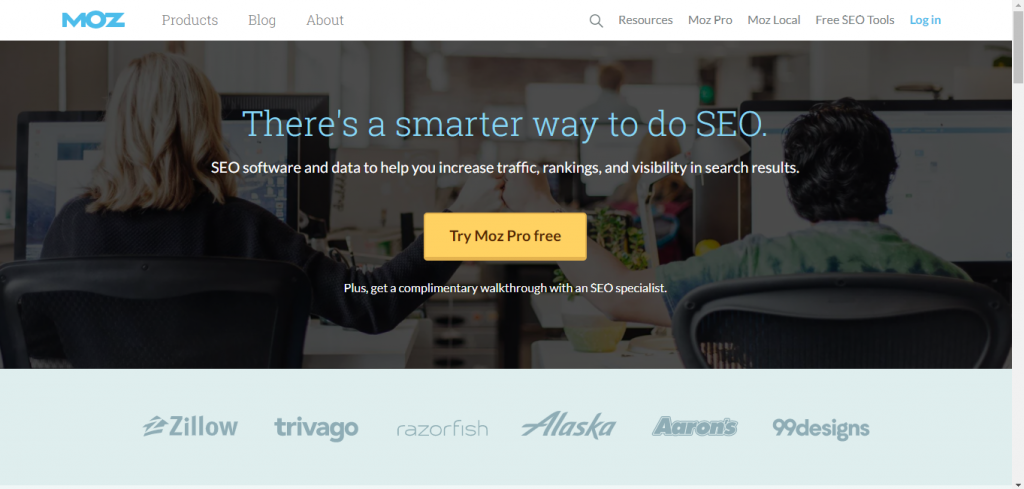
    If you type in https://moz.com/ in your search bar and press enter

    This is the home page that loads up.

    The Root directory of a website contains its home page.

    A home page is generally named index.html  because a browser considers any HTML file called index.html, the starting point of a website.

    The file name of the home page can be skipped from the URL of a home page because It loads automatically from the root directory.

    2.Menu Page

    In basic terms, a menu page contains a list of important links. It is used to navigate the website.  Many website developers do not create a separate menu web page for their website; they integrate the menu controls within the home page. If you have a website that is divided into several sections. You should consider adding a separate menu web page so the homepage is not slowed down due to cluttering.

    3.About Page

    The About web page of a website contains information about it. For example, it can have some personal information about the owner of the brand, and It can also include the story of the website’s origin. About pages are present so brands can connect to their audience on a personal level. About pages can also contain product descriptions and the benefits of those products. The about page can usually be accessed through the navigation bar of a website.

    If you got to https://neilpatel.com/about/

    This is the about page you’ll land on.

    3. News Feed Page

    If you upload content very frequently on your website. The feed page should be the way forward. Users can scroll through all the content that is being uploaded via the news feed page. The news feed of an informational website will differ from a social platform. The newsfeed should have consistency in fonts, text sizes, and color scheme.

    4. Search page

    Many websites provide a separate search page for users to easily search what they want from the sea of the content present on a website. You can insert the search functionality within other web pages of your website as well. For example, websites like ahrefs contain a separate search page for keyword-related searches.

    5. Blog Page

    Blog web pages are present in almost all websites in various categories such as e-commerce, corporate, and education. Therefore, incorporating a blog page into a website can help drive more traffic to it.

    Blog pages can contain information about the usage of a product, its reviews, and customer testimonials.

    Some websites pay bloggers to write sponsored blog posts for them, and then they upload these blogs on their website’s blog page.

    Here is an example of Neil Patel’s blog page.

    https://neilpatel.com/blog/

    6. Article Page

    An article page typically features informational content with a more formal tone than a blog page. This page is created so visitors can view an entire article on a page. These kinds of web pages are usually added to a text-based website. An article page should have an eye-catchy design to keep its visitors engaged.

    These pages feature bigger text sizes and fonts for better readability. On any article page, the content hierarchy is very important and should be organized according to its relevance.

    Article pages also contain attractive and informational images for a good viewer experience.

    These article pages can prompt website visitors to take some action by using the call-to-action technique.

    7.Portfolio pages

    Websites that are selling some product or service must have a portfolio web page. These web pages contain information about the products and services being offered to the visitors. In addition, compelling product images are added to this portfolio.

    If a website sells a service such as photography, the portfolio web page should include photos that the service provider had recently captured of an event.

    If a website sells t-shirts, its portfolio should include high-quality t-shirt images. Furthermore, these images should be professionally photographed for maximum benefit.

    Many platforms also provide an option for their users to create and publish their portfolios free of cost. These portfolios are made with the intent of finding clients or customers.

    8. Product web page

    E-commerce websites use this kind of web page to provide users with information related to their products. It contains all images of products that have many variations like colors and sizes. This page also includes product reviews. An add to cart and add to wishlist option is a must.

    This page should have a simple and aesthetically pleasing layout.  Carefully choose fonts and colors for the product web page because a boring design can cause loss of website traffic.

    A functional, readable, and beautiful product page can compel users to take action, so don’t forget to add a “Call to action” to this web page.

    9. Landing page

    A landing web page contains an answer to a specific query, and It presents clear and focused content. The visitors will land right on this web page when they click on the search results provided to answer their search query.

    Most of the time, it is used for advertisements. However, these pages are handy for big e-commerce websites so potential customers can land directly on the landing page of a product they are interested in.

    Landing pages are designed in a way that they urge customers to take action.

    Order of Web pages from most to least important for SEO of a Website

    1. Home Page
    2. About Page
    3. Product Page
    4. Portfolio Page
    5. Blog Page 
    6. Article Page
    7. Landing Page

    Bottom Line

    Remember, your main focus should be the people who visit your website and not the search engine robots. If you skip optimizing a particular web page just because the search engine rankings will remain unaffected, your website users may have a bad experience while they are on that page.

    Every website page that is visible to the visitors should provide some form of value to them. Therefore, no web page should be considered insignificant when it comes to website optimization. Learning about the role of specific web pages in your website’s search engine rankings can help you organize them accordingly. 

    Have you ever considered de-cluttering your website by removing extra web pages? If not, then this may be the right time to start.

    What kind of web pages do you prefer to use on your website and why?

  • Measuring success on Social Media by using UTM Parameters

    For some time now, I have been building my business online. It’s a new experience to me but sometimes managing my online marketing campaigns is tiresome. This is because online marketing entails so much to its name. 

    To plan effective marketing campaigns, I have to calculate my Customer acquisition cost. 

    It was easy for me to manage my marketing strategy when I was starting my business. There is only one social media platform where I was marketing my products. 

    The moment I started to expand my business across multiple social media platforms, it became difficult. I failed to understand which marketing strategy on which marketing platform performed well or needs improvement. 

    I was stuck and needed an easy way out of it to understand the marketing dynamics on all the social media marketing platforms. 

    I never knew that it would be very easy for me to manage my marketing campaigns on all the social media platforms, and here is how I did it. 

    I started using UTM Parameters. Yeah, that’s it. Nothing more than what you just read. Are you asking yourself, how can marketing be this easy?

    This article will break it down to understand how UTM parameters work for you with analytics to decide your future strategies. 

    But first thing first. What is the UTM parameter? UTM parameters can be defined as a unique identifier in your weblink built to track your marketing source’s performance. 

    A famous Peter Drucker quote states, “what gets measured gets managed.” So be it Facebook, Instagram, or any other social media platform to measure your marketing campaign performance. 

    You can create as many as you want based on your marketing strategies. Now let’s dig into the science of UTM Parameters.

    Components of UTM Code

    So by now, you already understand that UTM Parameters helps in meaning performance and track clicks, leading to sales of ad campaigns running on different social media platforms. 

    UTM parameter looks like as mentioned in the following example:

    UTM parameter is a subsection of UTM Code which consists of two key components:

    • UTM parameter
      • In your weblink, UTM parameter starts with utm_.
      • There are five types of UTM Parameters used for analytics.

    We will be discussing the UTM parameter types in more detail later on.

    • Tracking variable
      • It consists of the traffic source.
      • In your weblink, the tracking variable starts with =.

    Tracking variable serves only one purpose and, i.e., to help analytics understand and record your user’s source. 

    Types of UTM parameter

    As mentioned earlier, UTM parameters can be divided into five categories. Following is the pictorial representation of subcategories in UTM parameters.

    Let’s get you some understanding of these subcategories. For me, these categories are all I do while evaluating marketing campaigns.

    Here is how they work. First, you have to run a campaign. To do so, you need a platform that will act as your source. Source requires a medium. The medium is how you approach your customers. 

    So for unpaid marketing, you need a source, a medium, and a campaign. So confused, no problem, let’s get a little deeper into these categories and look for what they mean with examples.

    • Source

    The first and the most important category for the UTM parameter is called Source. To have a fixed investment, you need to know your customer acquisition cost. 

    To know your customer acquisition cost, you need to know where the customer approached you. In other words, which source was used by the customer?

    To identify the source, you simply need to add the parameter “utm_source” in your web URL. This new URL with source extension helps you identify and track which social media platform was used by the customer.

    • Medium

    To have a perfect marketing performance analysis, you also need to know the medium to which the customer has approached. The medium can be a referred customer coming to you via email. 

    It can be your social media platforms or advertisements on other websites. To identify the medium used by the customer to reach you, you need to add the parameter utm_medium in your URL. 

    • Campaign

    Last but not least, Google suggests you have a campaign characteristic as well. It helps you with the very basic and simple analysis of how your campaigns are working. Irrespective of how many campaigns you have, these tools help you analyze all of them.

    To separate all campaigns, you need to give specific names to remember the campaigns on all social media, email, and ads. 

    For paid marketing, you get to have two additional categories. You don’t need to use these two components. As these are for paid marketing only, you get to choose to use either of them, both of them or none of them, depending on your needs.

    Let’s dig in and see what these are and whether you should be using them or not:

    • Content

    Before getting into these optional UTM parameter characteristics, I have to tell you that this additional characteristic comes with detailed tracking inside. 

    It is made to be used in conditions where you suggest multiple links of either one product or multiple products on place, ad, or email. 

    In this case, the content code from your URL will help you identify which link has been clicked for your analysis of further effective marketing. It is very simple to add in URL, which can be done by adding “utm_content” in your URL. 

    • Keyword 

    I very highly doubt that you already don’t know about keywords. Everyone, literally everyone living a virtual life on the Internet, uses this term “keyword.” 

    Like others, you can optimize your marketing by looking into the keywords which are being searched on your website. Isn’t that great? All you need is to add “utm_term” in your URL, and that’s it. 

    It will give you all the insights based on the words or terms searched on your website for better social media marketing. 

    Three of these categories (source, medium, and campaign) need to be used per Google analytics requirements. Using the remaining 2 (content and keywords) depends on you. 

    Everything has advantages and some disadvantages. Nothing comes without drawbacks. Let’s gossip a little about the advantages and disadvantages of using UTM parameters. 

    Advantages of using UTM Parameter

    • Save customer acquisition cost:
      • It helps you to minimize customer acquisition costs.
      • It helps you to maximize customer-centric marketing for increased sales.
    • Channel performance optimization:
      • It allows you to review a holistic view of all your channels that are being used for marketing your product. 
      • If any channel is not performing well, then you can discontinue or stop campaigns on that channel.
      • If any channel performs more than your expectations, you need to put more resources and focus on that.
    • Content performance optimization:
      • It allows you to see how well the content brings more and more user interaction to your website leading to increased sales. 
      • It allows you to reshuffle content and sees the results.
      • It is flexible with options, and you can choose any of them to adjust your content for user ease. 
    • Team performance optimization:
      • It helps you create healthy competition between your sales teams.
      • It helps you come up with a new strategy almost immediately.

    Bottom line

    Let’s have a quick recap about UTM parameters. They are the key source of information to optimize your marketing strategy. To get the full benefit from UTM Parameters, you need to follow the following instructions:

    • Clearly define product-wise UTM parameter naming convention
    • Please choose and use names for customers to understand
    • Don’t forget to shrink your URLs with link shorteners
    • Plan everything from the start

    What are you waiting for? Let’s go and design your campaign!

  • Essential SEO components you should start focusing on today

    Many of us are well aware of SEO. There are many, who are still unsure about it. 

    Despite its popularity among website owners and content creators. Many people think SEO is too hard to learn and it’s not worth the time and effort it requires to be implemented correctly.

    If you own an affiliate blog, an e-commerce website, a lifestyle blog, or any other kind of website. You should at least learn the basics of SEO.

    Why is SEO vital for any website’s success?

    According to Google’s organic search stats, Almost 57.80%of traffic on a website is sourced from Google’s organic search results.

    Learning SEO is just like learning any other new skill. You start from the very basics and build up from there.

    Start with learning and implementing the most basic of concepts, and your skills will get polished over time.

    With time you’ll learn what works best for your website and what doesn’t.

    What is SEO

    Search Engine Optimization is the process of optimizing your website according to search engine guidelines.

    Search engines are not like human beings; they can not determine what a website is about by going through the junk of information dumped on that website.

    The content of your website must be organized in a specific way so that the search engines can understand the purpose of your website and web pages.

    Search engines like Google and Microsoft Bing sent Robots to crawl websites and gather information about them. This information then helps index the contents of a website, which is called website indexing.

    Bots crawl millions of web pages to find the most relevant content. However, the content of your website, despite being relevant to a search, will not pop up in search results if search engine crawlers are unable to understand the content properly.

    To determine the order in which websites will appear if a search is done, pages in the index are analyzed using different algorithms. These algorithms then determine how high up a website should be in a search result.

    To understand SEO, first, you should know how many types of searches are there.

    A search can be LOCAL, IMAGE, VIDEO, or VOICE.

    Now you’ve got the basic SEO knowledge down. Let’s move forward.

    Types of SEO

    There are three main types of SEO

    • On-page SEO
    • Off-page SEO
    • Technical SEO

    On-page SEO

    On-page SEO refers to optimizing content inside your webpage or website to make it more accessible for search engines and visitors.

    On-page SEO will require optimization of the Title tag, Metadata, headings, and much more.

     Off-page SEO

    Off-page SEO refers to any steps taken outside of your website to improve its search engine rankings. It is associated mainly with link building.

    Technical SEO

    For the Technical SEO of a webpage, you need to make sure that you follow all the guidelines provided by search engines so your website is accessible to crawling bots.

    Without getting into too much detail about types of SEO, let’s move onto some Important attributes of websites that can help improve search engine ranking

    Responsiveness OF A Website

    Users don’t always browse websites using a laptop or a desktop, which are known as big screens.

    Nowadays people prefer using smaller screens. Therefore, websites that are not optimized for smaller screens can face problems in search engine rankings.

    Mobile optimization

    The number of mobile users recorded by Statista in 2020 was 4.28 billion. This entails that almost 90% of internet users are browsing the internet on their mobile phones.

    Mobile optimization means making sure your website has been coded so that it responds to mobile screens differently than larger screens.

    Due to the smaller screen size, large images do not load properly on mobiles. Images can be large in terms of their dimensions as well as their file size.

    Due to lesser ROM, Mobile phones are unable to load content with large file sizes.

    It is essential to keep smaller screens in mind when you are choosing content for your website.

    Another important thing to keep in mind is, Google prefers mobile-friendly sites.

    Google has the knowledge that most people browsing the internet are using their mobile devices. Therefore, Google will always prefer showing those websites in search results that cater to most of its users’ needs.

    Making a website responsive is more than just adding a few media queries. First, you’ll have to learn which kind of content appears better on mobile phones and use it on your website.

    Mobile users also don’t like reading paragraphs upon paragraphs to find an answer to one question. So make sure you make are not adding extensively long blogs or articles on your website; it can bore the user, and they’ll move onto another website.

    Content Relevancy

    Google processes approximately 6.8 billion search queries every single day.

    Far gone are the days when search engines ranked keyword-stuffed websites on the top. Instead, search engines have become incredibly advanced, and they now rank websites that provide actual value to the customers or users.

    Keyword stuffed irrelevant content can only achieve one thing for you, and that is A Google penalty.

    To rank well on search engines, your content needs to be audience-centric.

    Audience-centric means your content should reflect your customer’s choice rather than your own.

    Keywords and title tags may help a website get ranked in the short term.

    But to get a loyal customer base that will stick with you in the longer run. Your content must provide some value to the visitors.

    Content optimization

    Keyword stuffing can get your website flagged, and the ratings can drop, but it doesn’t mean that keywords are no longer relevant.

    Keywords help search engines in classifying your content into specific categories.

    Using keywords naturally and inflow is vital for your webpage’s ranking.

    Adding keywords in the title, headings, and a couple of times in the paragraphs will help Google come up with your website in its search results whenever a relevant query is searched for.

    Image optimization

    According to Google, image search has increased almost 60% in the past two years.

    Image optimization is just as important as content optimization.

    From bloggers to article writers to affiliate website owners, everyone uses images to appeal to their content visually. Images breathe life into the content.

    For better optimization of your web page, the images used should be relevant to the content on your website.

    Images should be sized according to the user’s screen.

    The file size of images shouldn’t be very large; large images take a lot of time to load and result in lesser website traffic.

    Relative Alt tags and image captions should be added. It will make your website more inclusive for your blind audience.

    UX

    UX, also known as User design, has similar goals as SEO.

    Both are about maximizing the value provided to the end-user.

    For better UX design. Focus on the following strategies.

    • Use a good layout strategy.
    • Create concise and useful content
    • Create relevant content
    • Maintain consistency on your web pages.
    • Use hyperlinks
    • Include white space
    • Optimize page speed.

    Backlinks

    Backlinks are very important for SEO; they are a component of off-page SEO.

    Backlinks are a link to your website page that is displayed on someone else’s website.

    MOZ defines backlinks as “A vote of confidence” in favor of a website.

    Backlinks assure search engines that your content has some worth. They increase the credibility of a website. Pages with a high number of backlinks are ranked better in search engine results.

    Make sure you upload very valuable content on your website, so other website owners are compelled to mention your website in theirs.

    Bottom line

     Getting started on your SEO journey may require a lot of hard work initially, but all this effort will be very fruitful for you in the long run.

    You don’t have to be an expert in SEO to get started; just learn the basics, and start implementing them. Your strategies will improve with time.

    What important strategies are a part of your SEO plan?

  • Explaining Thin Content: Reasons and solution

    From Finance to healthcare and beauty, the Internet has impacted all industries. As a result, reaching out to customers has never been easier for businesses. But as the number of internet users increases, so does the number of businesses looking for new clients through the Internet.

    According to Forbes, internet users produce 27 quintillion bytes of data every single day.

    In the sea of online businesses, it is essential to provide something valuable. Otherwise, you can get lost in there.

    The number of websites present on the Internet today is between 1.6 to 1.9 billion.

    It is common knowledge that the content on your website is what differentiates you from others. Therefore, it is your” Key to Success.”

    Sadly, just adding content to your website will not make it stand out. Your content has to provide some value to your website visitors for them to stick around.

    Long gone are the days when keyword stuffing was the holy grail for websites competing against each other. Search engines are becoming smarter every single day. Useless content that is only present on a website for better ratings works no more.

    High-quality and useful content is crucial for better ranking in the search results. Unfortunately, the opposite is just as true. Low-quality content can be the sole season of your website’s bad ranking within search results.

    You might have heard of the term “Thin content,” let’s explore its origin, meaning, the reason behind its existence on websites, and helpful tips on how to avoid it.

    Defining Thin Content

    A decade or so ago, search engines were newly learning the concept of ranking websites from most to least relevant for any search query. Search engine crawlers would crawl a website based on individual words present in their content; they indexed these websites.

    These specific words or phrases became the very foundation of rankings and were known as “Keywords.” When website owners came in possession of this knowledge, they started to exploit keywords.

     Websites were being filled with junk and low-quality content, which was made up of hundreds of keywords. These keywords were combined so that the content didn’t make any sense as a whole. This content provided no value to the users, and It was only present for gaining better search engine rankings.

    Search engines like Google caught up to this issue, and in February 2011, Google introduced its algorithm for search rankings. This algorithm was called Google Panda. It was supposed to lower down the ranking of websites with low quality or bad content. 

    This badly written content with almost little to no value for visitors is called “thin content.”

    But with time, Search engines are making their guidelines for quality content stricter and stricter.

    There is no set definition for Good Content. What is good content depends upon the subject matter about which this content is written.

    Search engines view content differently than human eyes. Content that may seem fine to you Can get you flagged for low-quality content by search engines. If you are struggling with increasing search engine rankings for your website. Going through the content present on your website may prove fruitful.

    Good content should be a part of every brand’s overall marketing strategy. According to Neil Patel, content marketing generates three times more leads than all other channels and is 60% cheaper.

    Google penalty for thin content

    According to Google, thin content is low-quality pages on a website that provide little or no value. This content is not beneficial for the users and is vague, incomplete, or copied.

    A google thin content penalty can not only get your website flagged, resulting in low rankings. It can also get your website removed entirely from search results.

    If your website has received a Google penalty of this kind. You might want to look into your practices while creating and uploading content. 

    Examples of thin Content include Pages with little to no content, pages with low-quality affiliate content, doorway pages, pages with duplicate content, pages stuffed with keywords, and pages with vague or incomplete information.

    How to avoid Google penalty

    With the help of its advanced algorithms, google distinguishes between high-quality and low-quality content. So if you want to avoid the Google penalty, you’ll have to produce valuable content for google users.

    Google tries to provide the search result that best matches the user’s search intent. Therefore, to rank high in Google, a website’s content should be valuable enough to convince google about its usefulness for Google users.

    If you are unwilling to spend some amount of time producing quality content for your website, Your website’s rankings will never get better, and you may even receive a google penalty. This is because poorly written content never makes it to the top in a Google search result.

    To avoid a Google penalty, let’s dive a little deeper into the types of thin content.

    Types of Thin Content

    Auto-generated content on pages

    Automatically created or auto-generated content is made with the help of different programs. Its basic purpose is to manipulate and exploit search rankings.

    This content is not produced with the end-user in mind; its only motive is ranking improvement.

    Many websites include content that is translated from another language using translation tools. Since translation tools cannot correct the sentence structure or grammar of this Content, It makes almost no sense to the users. This kind of content is a big red flag for Google, and the website gets flagged for poor quality content.

    The above situation can also occur if the Content present on your website is stuffed with keywords and doesn’t make much sense.

    Scraped content on pages

    Scraped data refers to content stolen from other sites. Some website owners copy content from other websites, specifically, the ones with high rankings. Most of the time, this content is irrelevant and makes little sense in terms of that website.

    If a website is only publishing content that’s stolen from other websites and modified slightly. Google will penalize that website sooner or later.

    Websites that only embed content already present on other websites are also included in this category.

    Uniqueness matters to search engines. If you are only publishing content that is already present somewhere on the web. There’s a high chance that your website will get flagged.

    Low-quality affiliate content on pages

    This content is directly copied from the seller’s site and is pasted on the website. Some affiliate marketers focus more on quantity than quality. It is so much easier for them to copy-paste product descriptions and reviews without making any changes simply.

    This copy-paste strategy aids them in pumping out content very quickly.

    Affiliate websites may also try to deceive the visitors by not disclosing the fact that they are promoting these products to earn commissions. Again, it is against Google’s policy, and you’ll get penalized for deception and unoriginal content.

    Doorway pages

    Doorway pages are only created with the purpose of better search engine rankings when it comes to certain keywords and phrases.

    They are not created to add value for visitors.

    Doorway pages are different from regular landing pages. Mostly these are multiple pages with more or less similar content. These pages contain various keywords and links, and they redirect visitors to some other page.

    Websites also stuff keywords in their HTML documentation and hide this text from users with the help of CSS.

    The only purpose of doorway pages is the exploitation of search engine rankings.

    Google de-ranks websites with doorway pages. So it is better to avoid them.

    Bottom Line

    Search engines are evolving every day, and their main goal is to provide value to their users instead of exploiting them. Instead, use organic ways to generate traffic.

    Using shady tactics may get you ranked well in the short run, but there is an excellent chance that your website can get entirely removed from the search results, and all your hard work can go to waste.

    If you change your priority from rankings to customers. Your website will have a greater chance of doing better in the long run. Your main focus should be on creating a loyal customer base that’ll stick around with you for longer periods.

    At first, creating valuable and unique content will take a lot of hard work and time. But eventually, you’ll start seeing the results of this hard work.

    Keep working relentlessly, and sooner or later, all this work will prove fruitful.

  • Apply these 8 secret tips for WordPress website development

    Being an amateur web developer like me, you are always excited and want to do everything almost immediately. Unfortunately, this hurry or rush you feel (to achieve a target immediately) results in simple basic mistakes. 

    This then leads to being the only reason for a full-fledged disaster. And within seconds, you are at ground zero again. I have my fair share of making mistakes.  

    Being an impatient, overwhelmed person, I have made blunders that resulted in incomplete project failure leaving me in anger, disappointment, and hopelessness.  But you have to continue and learn from your mistakes to avoid disaster. 

    Today I am writing this article to help you understand how important it is for you to plan, design, implement, observe and improve your website and the sections. By the end of this article, I am sure that you have equipped yourself with enough information to avoid any issues related to your website. 

    Believe it or not but this article is going to be your key resource for Website development. Hoping that you will make this article your Bible of web development, let’s begin. So here is the checklist.

    The checklist

    Web hosting and domain name

    Being new to websites, what do you think you would require to start working with? Yes, you are writing a domain name and a hosting plan. Now keeping in mind that we will develop a WordPress-based website, we need to ensure that whichever server hosting we choose, the host has to support WordPress. 

    There is always a smarter way of doing things. Here, for us, the smartest option would be to choose a WordPress engine that comes with a lot of server space. 

    Once the hosting plan has been finalized, we need to check for the domain name availability. Sometimes you get lucky and get to have the name available for your website, and sometimes you have to choose something else. 

    Backups

    No matter how much emphasis I put on this, always ensure to take backups of your website on the hosting servers. Why? Because any configurational change which was intended to make something beautiful ended in some problem, leaving you clueless. 

    How do you fix that? Rollback the website immediately to the last saved backup. 

    Backups might also come in handy when your regular customers inform you that they don’t like the new interface you have just updated. What would you do then? 

    Yes, roll back because, without the customers, your website will be of no use. So you immediately roll back to the last saved version of your website on your hosting website.

    Selecting Permalinks

    Without investment in any business, you will not be able to run it. Similarly, without SEO, your website is not going to be famous. Okay, you can be famous like Facebook and be used by literally everyone on the planet earth, or you can follow me telling you to work on SEO to rank your website in Google searches. 

    The more effort you put into SEO, the higher ranked your website will be, and more and more people will see it. 

    WordPress helps you smartly doing SEO. It gives you the option to use Permalinks. So what, why does it suddenly gets confusing? Why can’t it be simple? Hey, don’t panic; I am here to help. Permalinks give you an option to display your content in certain ways. 

    You can click on the settings tab in your admin portal dashboard to see through the options. All of these will help you with better SEO results. 

    Take backup. Okay, now moving on, we have:

    Avoid 404 errors

    Now assuming that you are a noob like me, we have to be very conscious about 404 errors. Now a good question how does a 404 error happen? Simple, you worked on a section or page and deleted the content on this section or page.

    In this case, if anyone clicks on this section or page, the user will get a 404 error. To avoid 404 errors, please install the Google webmaster tool. It will help you find all the internal links which are causing this problem. 

    Take backup. Okay, now moving on, we have:

    Email address

    Being an entrepreneur, you will need an email address similar to the website name for your business. Some people prefer getting their email hosting from the same hosting website where your domain is hosted. 

    Usually, there is no problem with this technique. However, if you are willing to choose the same web host for your website and email, then here is what you need to know. If your website is facing downtime due to any issue, your email will be down as well. 

    More importantly, you will not be getting any emails until the technical issue is sorted out. 

    If you ask me, I would suggest you use separate hosting for your website and email service. Of course, that will be costly but will make you earn more. But in the end, it’s your decision. 

    Once again, don’t forget to take backup. Okay, now moving on, we have.

    Delete template information

    Discussing deleting template information makes me happy. Because by now, we are halfway through the website development checklist. WordPress gives you an option of many templates to choose from. 

    These templates come with some sample content. 

    Please ensure that you have deleted all the sample content from your website or replaced it with the one you want your customer to see. 

    It is very important to delete the sample content as it will not make any connection or sense to your website and confuse your customer. 

    And believe me, that’s the last thing you want to see, a customer leaving unsatisfied. 

    Create a Site Map

    Once the template has been selected and sample data has been deleted, it is time for you to sit down and finalize your website’s Site Map. Again, you need to be very clear with your website’s look; how many sections will it have? 

    How many pages will each section have? Do you need a subfolder kind of a website, or are you looking forward to a subdirectories kind of website? 

    These are all very crucial questions, and believe me, the sooner you answer them, the better. Avoid mishaps at all costs. And remember, this site map will be your Bible for this website. It can’t be changed no matter what. 

    Once again, don’t forget to take backup. Anything can go wrong. Okay, now moving on, we have:

    Test your website

    Before launching your website, test everything. I mean everything—every single click matters. And you need to be aware of all the functions. Test your website on a mobile phone. Test it on your laptop. Test “what leave a message” does. 

    Test everything. 

    Test your social media integrations. Stress-test your website. Check how much time it is taking to load. Check if it is crashing or not. 

    Fix the errors. Manage SEO with the inbuilt Yoast SEO plugin and Google analytics to check the performance of your website. 

    And now you are all set to commercially launch your website. But first, take backup as this will be your first restore point image of a complete commercial website.

    Bottom line

    Checklists are a blessing. Follow through with the instructions shared in this checklist, and I promise you that you will not end up making the same mistakes I did. Here is a quick revamp of these eight secret tips:

    • Lookup for hosting websites and domain name
    • Backup your website
    • Setting up the permalinks for SEO
    • Avoid 404 errors
    • Email configurations to be done on the separate hosting server
    • Delete the sample information from a template
    • Test your website and its template configurations. 

    I hope this checklist covers all the topics which concern you in a phase of your web development. Unfortunately, it wasn’t this easy for you to go through this checklist and avoid making mistakes.

  • 6 Highly Ranked Social Media Platforms and Websites

    Who will win the fight of being the No. 1 platform in 2021? How to stay on the top of the list in 2021? The honor to win the badge of the best social media site. In the last couple of years, we have seen a significant shift of people from one platform to another. 

    With so many big names in the game nowadays, today, we will be discussing the top-rated social media websites. It will be an exciting read, so buckle up while we roam you around platforms with a new perspective. 

    There will be several factors which we will be discussing against the top highly-rated websites and platforms. This is a never-ending fight. But it’s a good fight that brings out the best of the competition in the tech world.

    We get to make more and more features by the developers working on these sides. People switch from platform to platform in search of new features and stick around if they find anything interesting. Or if not, they simply move on.

    We will be discussing some platforms like Clubhouse, Facebook and its subsidiaries, Twitter, Snapchat, TikTok, YouTube, and WhatsApp. 

    We will be discussing the rise and fall of these platforms. Things that made these platforms unique and updates made people hate the platform and leave it for something new, something crazier than ever.

    The Social Media Hype

    Ari Balogh, the Chief Technology Officer at Yahoo, stated that Social Media is not a destination; it is a dimension (Source: NYT, Bits). Social Media is being used by all the businesses to influence the customer perception and increase the sale.

    Social Media is also being used for maintaining the online presence. These platforms are becoming more and more refined day by day, and their online footprint means business to them.

    Not only businesses but now people of all ages are also using social media platforms to connect with their long-lost friends and relatives.

    With so many languages spoken in the world, these social media platforms are available in all languages and help people to connect in a virtually borderless world. 

    There are no boundaries and no limitations, and you can add and subscribe or follow influential people from anywhere in the world.

    All in all, it is estimated that early 3.6 billion people are now active on social media platforms. And please believe me when I say that 5G will get these numbers to a new height which we might not have imagined. 

    Social media will help the dream of globalization come true. Let’s begin by seeing 

    Who is on the top?

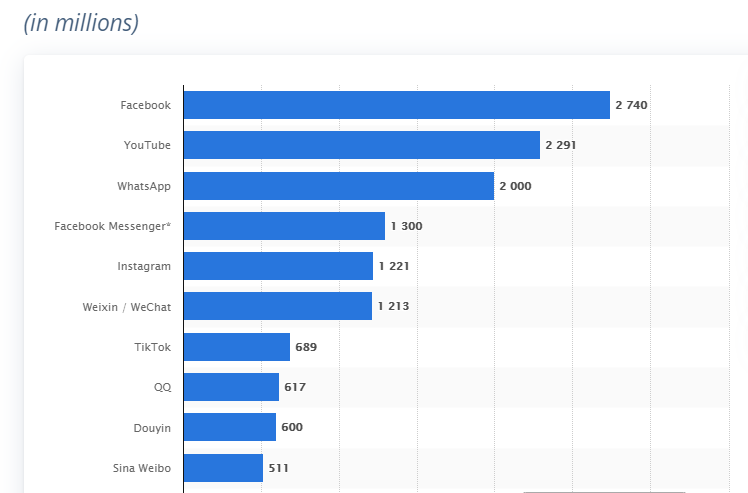
    The survey conducted by H. Tankovska to search for the most active social networks in 2021 declares that Facebook is the most used social platform in 2021. Before getting into the fancy details, here are some of the essential facts:

    • This survey also confirmed that the subsidiaries of Facebook are in the top 10 list of the most used social media platform. 
    • Facebook is the only social media platform with its three subsidiaries to have more than 3 billion active subscribers. 

    • But there was a new player in the industry. This social media platform got wild so fast that this growth is not comparable to any other social media platform. It’s called Tiktok. 
    • A platform that helped many to be famous. This is the platform that helped many to be the stars they always wanted to be. 
    • With a slogan of “become the star, you want to be,” this video content-based social media platform is now going up the ladder at a swift pace. 
    • Since its launch in 2016, the app is now trending in the 7th position with 689 million active users. 

    Facebook

    With a net worth of $86 billion in 2020, Facebook is still on the top of the most used social media platforms. It doesn’t matter what field of life you belong to, and there is always something for you to see and follow on Facebook. 

    Be it an interesting discussion group or a technical page you find interesting. Everything is there for you. There is no limit to what amount of surfing you do. It’s all just out there. 

    Facebook is one of those places which makes you have an online life. The one other than the physical one you have. Facebook is a multipurpose platform that provides you with many services at the same time, such as:

    • Financial services.
    • Brand making and marketing.
    • Entertainment.
    • Live discussions.

    It covers every aspect of your life, and almost every new and old business is trying to start spreading their digital footprint using highly targeted Facebook ads feature.

    YouTube

    With a net worth of $19 billion in 2020, it is the first video social media platform. There was nothing interactive in it other than the comments viewers leave. But it grew fast and now is in the 2nd position in the top 6 most used social media platforms. 

    With its 2 billion subscribers, it is the primary video-oriented social media platform. It is used by everyone of any age living anywhere in the world. 

    YouTube is a video platform that lets you grow yourself in the virtual world by allowing the world to see your content. It can be any of the following:

    • Travel
    • Food 
    • Beauty
    • Teaching
    • Health care
    • Product review
    • Content creation.

    YouTube helps you to make your channel and let it spread out. If a vast majority of people like your content, then YouTube helps you earn as well. It systematically places advertisements between your videos, and you earn through them every time the ad is played.

    WhatsApp

    And here is the most controversial social media platform of 2021. WhatsApp! With a net worth of $5 billion in 2020, it has an active base of 1 billion users. It is way ahead of Facebook messenger, maybe because of its easy usage and user-friendly interface. 

    WhatsApp became controversial when they declared that they had changed their security settings in Jan 2021 and they would be able to read anything and everything. A huge amount of people left immediately and switched to other platforms. 

    But WhatsApp managed to hold its share in the market. It is not an advertisement-based social media marketing platform but still uses it via Facebook page integrator. 

    Instagram

    Instagram, the subsidiary of Facebook. If you have a Facebook account and you are looking for a picture-only social media platform, then Instagram is for you. With its nearly 1 billion active user base, this picture-based social media platform is the new fashion industry.

    With its live sessions, boomerang, and other camera filters, you can enjoy having the best pictures of yourself now and then.

    It is the only picture-based B2B model where you can connect with countless potential buyers. With most of its users under 35 years of age, this platform is a goldmine for marketers if used correctly. 

    WeChat

    With a net worth of $ 1.1 billion, WeChat is trending in 5th place among the most used social media platforms. Owned by a tech giant in China, WeChat is the most popular Chinese application. 

    With its QR scanning feature, it is used by 90% of china’s population. WeChat is one of the ways used by Chinese people to do business with the foreign world.

    TikTok

    Well, it’s the social media platform for Gen Z. It is known for its short video making with its mission to inspire the creative actor in you and bring joy. The slogan Tiktok used was “be the actor you wanted to be.” 

    With a net worth of $35 billion and an active subscriber base of 689 million, Tiktok, with its short video format, got quickly famous among the Gen Z. Multiple attempts were made to ban this app, but it never stopped growing.

    If you want to connect and target Gen Z, Tiktok can use and sell your products. As of January 2021, the time consumed by a user on Tiktok exceeded the time users consume on Facebook. This is alarming for Facebook.

    Bottom Line

    With the stats mentioned above, it is clear that Facebook is the leading platform, but Tiktok is following it, and some social media experts see these two platforms fighting for the first position shortly. 

    Most of these platforms are built in the United States and have more than 100 million users. But there are European, Japanese, and Chinese social media platforms that are spreading fast. 

    With all these fancy statistics and details, I am interested in knowing how you would choose to invest your time and look for ads?

  • Subdomains or Subfolders: What works best for SEO?

    Subdomain vs. subfolders, a debate that has been going on for a while. When structuring a website, you might get confused between the usage of Subdomains and subfolders and their potential impact on your website’s SEO ranking.

    SEO experts still argue the advantage one has over the other when it comes to search engine optimization. However, even Google has weighed in on this argument and given many valuable insights.

    Many of us still struggle to find any concrete difference between subdomains and subfolders. In this blog, you’ll walk through the basic definitions of subdomains and subfolders, and you’ll learn some key differences between subdomains and subfolders and how and when to use either of those. 

    You’ll find answers to these Questions

    • What is a subdomain?
    • How and when to use a subdomain?
    • What is a subfolder?
    • How and when to use a subfolder?
    • Impact of a subdomain on SEO.
    • Impact of a subfolder on SEO.
    • Which one of these better suits your needs?

    Domain Name

    A domain name is an address to your website. Just like your physical address, when people want to visit your house, they enter your home address in their GPS to get directed to your house.

     When people want to visit your website, they type in your website address in the URL bar to get directed to your website.

    A domain name is made up of two things

    1. Your website’s name.
    2. Your website’s domain name extension

    For example, in Google.com

    Google is the website name, and .com represents the extension.

    Subdomain

    A subdomain is used to separate a website into sections logically. It is the particular part of a domain that is shown before the domain name and domain extension. Subdomains aid in the organization of a website. They split portions of your website into their customized hierarchy.

    As you can see in the image above. Subdomain comes before the domain name and extension. 

    In the case shown in the picture, https://support.google.com/ is the domain; support is the subdomain, and google.com is the domain name and extension.

    Subdomains are considered independent and distinct from the main website. Therefore, they are only associated with the domain and not the website.

    Subfolder

    A subfolder, also defined as a subdirectory, is a pathway within a website. It is a child of the parent domain. Therefore, it is linked directly to the website.

    Imagine it as a separate folder inside a website, Just like separate folders on your desktop.

    Take a look at the image above; the subtopic is the subfolder. It comes after the domain name example.com.

    You can also see the clear difference between the placement of a subdomain and a subdirectory.

    A subdomain comes before the domain name and a subfolder after it.

    Using a Subdomain

    You can use a subdomain for hosting a blog within your website, hosting an e-commerce section for your website, hosting a different mobile site for your main website, and even hosting FAQs and QnAs.

    A subdomain is a different website that is linked to the same domain as the main website.

    If you are hosting a website remotely, Subdomains can be very helpful. They can be stored on separate servers.

    The main website and the subdomain are ranked independently for SEO because a subdomain is considered a separate entity.

    Creating a subdomain

    Follow the steps mentioned below to create a subdomain

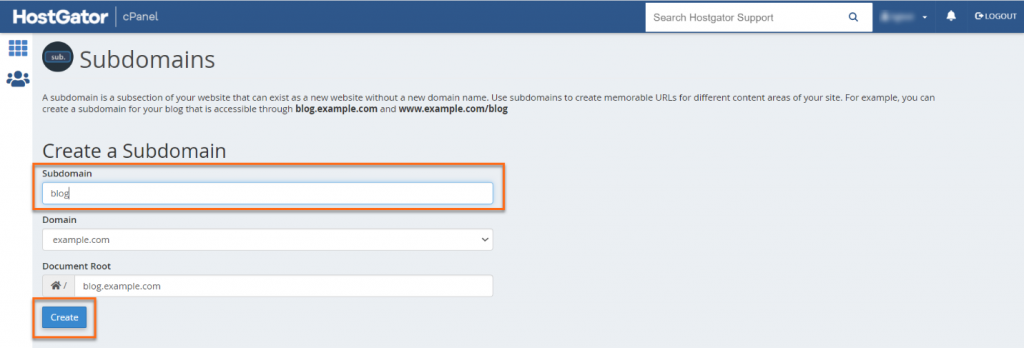
    cPanel dashboard

    Log in to your Name.com account. Click on web hosting. Click the cPanel login button, and you’ll reach your cPanel homepage.

    Click on the Domains section, and you’ll find a subdomains option  inside

     Press subdomains, and a subdomain menu will appear. Fill in the form by adding Your subdomain, domain, and document root.

    After making sure that you have entered all the required information correctly, click on the create button at the bottom left corner of the form.

    What is a Subdomain Name & How to Create One | HostGator Support

    Your subdomain is created and should be available online within a couple of minutes.

    Using a subfolder

    Subfolders are an easy way to structure your website; imagine them as an additional folder in your website. A subfolder is linked directly to your website. The traffic a subfolder may generate will be added to the traffic on your website because there is no server partitioning in n subfolders.

    You can add third-party services to your website by using a subfolder.

    A subdirectory or a subfolder is added when the content it holds is somewhat similar or related to your main website.

    Subdomains are relatively easier to maintain, navigate and organize.

    The SEO ranking of your website and Subdirectory will be interlinked. Subfolder will bring all the link juice to your website.

    Creating a subfolder

    Setting up a subfolder is easy; you’ll learn step by step how to create a subfolder

    cPanel dashboard

    After logging into your Name.com account, press Webhosting and then click on cPanel.

    On the cPanel homepage, scroll to the bottom and click on WordPress.

    select install, Fill in all the required information.

    Click on the install button 

    And your new subfolder is ready.

    Subdomain vs. subfolder

    Which one should you use?

    You have learned all about subdomains and subdirectories from their definitions to their creation.

    Now you’ll get to know which one will work better for you

    Let’s start with an example for subfolder/subdirectory

    Your website is all about cooking and creating new recipes. You upload recipes that you create and your personal experiences in the kitchen while trying out something new. You also upload reviews on different kitchen-related items.

    In this case, all your content is interlinked.

    You should use subdirectories to keep all the traffic on one site.

    Your subdirectories can be

    Cookingmania.com/recipes

    Cookingmania.com/blog

    Cookingmania.com/products

    Now let’s look at an example for a subdomain

    You own a news website, and you upload any latest happenings worldwide on your website.

    You also create food recipes and share them under the same domain.

    In this case, both topics are unrelated, and it is better to create a subdomain for food recipes.

    Creating a subdomain will save you the hassle of buying a new domain and creating a separate website for your food recipes.

    Search engines will treat your recipes domain as a separate entity from your news website.

    Your website will be TheNews.com

    Your subdomain will be Recipes.TheNews.com

    According to Neil Patel’s SEO test

     Roughly 90% of your link juice transfers through a subdomain

    100% of your link juice transfers through a subdirectory.

    Subdomain vs. Subfolder 

    In terms of SEO

    According to John Mueller, who’s senior webmaster trends analyst at Google.

    Google search is fine with using either subdomain or subdirectories. However, he also stated, Learning to crawl subdomains separately is just a formality for few initial days.

    What most people take away from these statements is, subdomains and subfolders can be used interchangeably.

    But what this means is Google wouldn’t penalize you for using either of them but what you should use is up to your requirements.

    Bottom Line

    Both subdomain and subfolder have their pros and cons; choosing which one to use depends on your requirements.

    For interlinked content, subfolders should be used, so anyone visiting a subfolder is linked to the content on the rest of the site as well. Visitors may also scroll the rest of your website, and this will increase your engagement time. As your engagement time increases, so will your SEO ranking.

    For website serving content on two very different topics or niches then a subdomain is preferred because you can use separate keywords in your subdomain , so Google or any other search engine can rank both these sites separately when a relevant keyword is searched.

    For better SEO, it is very necessary to structure your website according to its contents.

    After reading this article, you’re probably ready to start implementing this knowledge about subdomains and subfolders on your website. Here are a few questions for you to answer.

    Do you think search engines treat websites using subdomains differently to websites using subfolders? Which one of these Do you prefer to use?

    Have you changed your mind about using either of them after reading this article?

  • Subfolders vs. Subdirectories: Same but entirely different!!!

    One of the most important things for any website developer is SEO. For a web developer, if a website is not trending and its content is not being looked at, it’s not worth it. It’s not financially beneficial and not making any revenue. In this article, we will be discussing subfolders and subdomains. Both these techniques are used to extend sections of a website. But both have unique functionalities. 

    You need to understand which technique you are going to use on the website. Both subfolders vs. subdomains have specific functions which can be used to achieve specific tasks. One should always clearly understand the reason for using any one of the techniques (subfolder or subdomain) as it directly affects the SEO of your website. One wrong move, and you will lose your Google ranking. 

    Being an owner of a high-ranking SEO website, you need to understand the pros and cons of using subfolders and subdomains. You also need to clearly define your reasons for using any one of these technologies, as Google has its policies related to the SEO of any website. 

    This article is written with only one target in mind. That is to bring clarity to you people by giving awareness about these technologies independently with examples. Then a comparison will be made for scenarios using real-life examples and impact on SEO. All these comparisons and examples will help you understand why to use any technology. Plus, this article will also help you to decide which technology you need to use.

    SEO and website ranking

    First of all, let’s get one thing out of the way: Google doesn’t affect the ranking and SEO of your website either you use subfolders and subdomains. Google works fine with both these techniques, which you use to extend or add new sections or components to your website. Similarly, the SEO and indexing of your website are not affected either you use subfolders or subdomains. This means being an organization owner, and you can use either subfolders or subdomains without affecting the Google ranking of your website. 

    Now that one of the fears has been answered, we can dive into the literature of subfolders and subdomains. No matter how relieved you know that SEO is not affected, any of these techniques is used. So you still got to understand why to use which technique and what benefits you will get out of it. 

    Subfolders or subdirectories

    Let’s begin with subfolders. These are also known as subdirectories. Every page or section in the website is called a subfolder or a subdirectory. It makes you roam around the website from one section or page to another section or page while staying within one website. It is sequenced and structured. Every child section or page of the website has a specific link to the parent website. 

    To make it further easy for you, here is an example. Subfolders or subdirectories are child directories of the main parent website. Subfolders can be compared to the folders stored in your PCs. It is similar to a C drive on your computer. Double Click your C drive to see multiple folders holding specific information. You can put specific things in each folder, and when you open it, certain stored information can be seen. Similarly, each section of a subsite is a subfolder. If you recall the earlier days of HTML language, you would remember developers making folders and folders and store information related to one section in that folder within a folder.

    Hence subfolders or subdomains the subsection of the actual website which is connected to the website. These subfolders or subdomains consist of specific sections of the website containing only one specific thing. Every subfolder or subdomain of any website contains unique information, and usually, developers ensure that the information is interlinked but not overlapping. Overlapping information shows inconsistency and doesn’t leave a good impact on the viewer. 

    Subdomain

    And now, we will discuss subdomains. Subdomains are a completely different concept, and they have nothing in common with subfolders. The simplest definition of subdomains is an entirely new website. These are known as secondary domains to the parent domain of a website. A subdomain is entirely a different website hosted on a completely new domain that is not connected to a website. As it is independent of the main website, you can’t roam around from one section to another section of the website. However, you may roam in subfolders in this subdomain. 

    To make it further easy for you to understand the concept of a subdomain, here is an example. You have your website for marketing. But it would be best if you also had some tweaks which you don’t want the customers to look at but should be available for you to view in a password-protected environment. In this case, the new website that is your testbed is a subdomain that exists but can’t be accessed by customers. Yet, it fulfills your purpose of testing and development without giving any damage to the actual website. 

    Let’s assume that you want to have an independent survey section for your website. Being an independent section, you want this to be indexed and sourced separately. To accomplish this task of the independent section with SEO and Google ranking, you need to give this a new subdomain. This domain will be referring to your original website but will be using a different URL than your official website. Google will, without a problem, index it and rank it as an independent website. 

    All this literature related to subdomains helps in understanding one thing. That is, if you need a separate domain to hold a section of your website, then it is okay to divide one website into two different domain links. These independent subdomains will operate separately and still be indexed, and your SEO remains unaffected. For technical reasons, web developers usually find it convenient to build a new database for each subdomain. They think it hassle-free and easy to treat each subfolder as a subdomain. It helps keep the database intact one section and other files in a separate section without affecting the rest of the main site.

    Ask yourself

    Do you have one product to sell, or are you extending your services? Why do you feel the need to have a subdomain functionality on your website? What is it that you have in your website which requires separate or unique representation? Why is that purpose not fulfilled with subfolders and subdirectories? These are some of the questions you need to answer before finalizing your decision to use one of these techniques. If not completely, then some SEO impact should be expected. Subfolders and keyword optimization have a greater effect than subdomains. Whereas if the new/ additional services you offer are entirely different and have nothing to do, then subdomain is your best shot. 

    Bottom Line

    Subfolders or subdirectories are part of the main website. At the same time, subdomains are independent web addresses and can be related to a specific branch of the website. Subdomains can have as many subfolders as required. Subdomains don’t usually affect your SEO, but still, people believe that SEO depends on your ends and requirements.

    Google never made any preferences out of subdomains or subfolders. And Google has always treated both techniques in similar ways. Some people talk in favor of subdomains, whereas others prefer to use subfolder techniques to grow the website. Both kinds of people are right. It all depends on you and your needs of growing your website or branching out your websites.  

    Last but not least, this selection will also affect your redirection put in place. It will make it very simple and easy for you to revert to subfolders from subdomains. But if the backlinks are not carefully added, then traffic will be lost. And you will be asking for help as your website traffic is dramatically decreasing. So you have to be very clear and conscious while using subfolders and subdomains for increased traffic, good to great SEO, and a good Google ranking.