Blog

  • The Role of Marketing Metrics in the Success of a Marketing Campaign

    A successful marketing campaign always starts with selecting and defining marketing metrics. These metrics are the foundation of all marketing campaigns. These metrics are equally important for beginners as well as experienced marketers.

    Marketing metrics help marketers understand their goals better. For running an effective marketing campaign, you need to track numbers, analyze data, and measure results. Some marketing operations can be successfully completed with the help of only the fundamental metrics, but not all.

    It is essential to focus on these fundamental metrics, but they should never be a marketer’s sole focus. If you focus solely on these metrics, you’ll miss out on crucial insights and opportunities for progress.

    To strengthen your campaigns, you’ll need to focus on all the important marketing metrics.

    In this article, you’ll learn

    1. What are marketing metrics?
    2. Why are marketing metrics important?
    3. Is there any difference between traditional and digital marketing metrics?
    4. How can you set marketing metrics for your marketing campaign?

    What are marketing metrics?

    Marketing metrics are values that can be measured in numbers. Marketers use these metrics to record and calculate their progress over time. Marketing metrics can vary depending upon the platform. 

     There are many marketing metrics that marketers can choose to track their goals. However, every marketing campaign is different, and choosing the right metrics for measuring successes and failures according to the marketing campaign is necessary. 

    Without marketing metrics, marketers would never have a clear picture of whether the strategies they are implementing are working or not.

     These metrics are measured using various tools and reports. The purpose of these metrics is to help marketers optimize their marketing strategies for achieving the best possible results.

    Some of the most commonly used marketing metrics are Social media metrics, Email marketing metrics, website metrics, Leads, and organic search.

    Using metrics for B2B vs. B2C marketing campaigns

    Using marketing metrics for measuring the success of a B2B marketing campaign is a little more complex than using these metrics for B2C marketing campaigns—the reason being that a B2B sale cycle is very long compared to a B2C sale cycle.

    In a B2B marketing campaign, waiting for the right time to measure the return on your investment is necessary.

     According to RadekVanis, seventy-seven percent of B2B marketers measure ROI within the first thirty days of their marketing campaign.

    More than fifty percent admitted that their sale cycle lasts more than ninety days out of all the surveyed marketers.

    Measuring the ROI within the first month will only misguide these marketers.

    Why are marketing metrics important?

    Almost all leading marketers use these metrics to measure the success of their marketing campaigns. According to a study by MIT and Google, Eighty-nine percent of successful marketers use marketing metrics.

    Marketing metrics are essential for any successful campaign because

    • Metrics help marketers in making informed decisions based on data.
    • Metrics help marketers in identifying the channels that have the highest ROI.
    • Marketers can maximize lead conversions with the help of data provided by metrics.
    • Marketers use these metrics to justify the money they have spent on marketing campaigns.

    Marketing metrics help marketers optimize their campaigns and help the marketing department communicate their value to their organization.

    Is there any difference between traditional and digital marketing metrics?

    Marketers can look up digital marketing metrics anytime and anywhere because these metrics are measured using tools accessible almost 24/7. Since marketers are tracking these metrics virtually all the time, the end results are not very surprising.

    As opposed to this, traditional marketing metrics can yield unexpected results because you are not always keeping track of them. 

    A significant difference between digital and traditional marketing is that digital marketing has more marketing channels. New apps are being introduced every single day, and the digital marketing channels keep on increasing.

    It doesn’t entail that digital marketing is more important than traditional marketing. Both conventional and digital marketing are equally important. The critical thing to keep in mind is that you have to keep track of your marketing campaigns.

    How can you set marketing metrics for your marketing campaign?

    There are hundreds of marketing metrics, but a marketer can’t possibly track them all. In addition, every marketing campaign is unique and should be tracked with a different set of metrics. Another thing that comes into play when marketers are choosing metrics is their personal preference and experience.

    You should choose metrics depending upon these two factors.

    • Your goals
    • Your focus

    Goals

    If your goal is to increase your brand’s social media following and engagement, tracking sales generated through email shouldn’t be your focus. Your priority should be monitoring the number of likes, comments, and shares your social media posts generate.

    The marketing metrics you choose should link to your goals and desired outcomes. Your choice should also depend upon your strategy. By strategy, we mean how you’ll pursue your goals.

    Focus

    Always keep your focus on the metrics linking directly to your goals. There are tens and hundreds of metrics, and you can’t possibly keep track of them all. 

    The fewer metrics you choose, the more closely you’ll be able to monitor them. The more metrics you choose, the more divided your focus will be. It is better to track only the most essential metrics and not focus on the unnecessary ones.

    Examples of three most used marketing metrics

    As we have established, every marketing campaign is different and requires a unique set of marketing metrics. Having said that, there are some marketing metrics every marketer should know about.

    CPA

    CPA or cost per acquisition means how much money you spend to get one customer. CPA can vary depending upon the time of the year and marketing channels.

    CPA is one of the most important marketing metrics, especially for digital marketing campaigns. CPA gives you an estimate of how much acquiring a new customer is costing you. According to the data gathered, you can determine if your strategy needs to be improved or not.

    CPA is a financial metric. It helps marketers in measuring the revenue impact of their marketing campaigns.

    marketing metrics

    Measuring CPA

    To measure CPA, you’ll have to divide the cost of your marketing campaign by the number of conversions.

    CPA= Cost of marketing campaign/  No. of conversion

     Here’s a very plain example

    Imagine you have a small online shop, and you have spent $100 on paid Instagram advertisements. At the end of your campaign, you have generated 20 sales. 

    Let’s calculate your CPA

    CPA=100/20

    CPA=$5

    It means that you spent $5 to acquire one customer.

    CLV

    Customer lifetime value is the amount of money one customer is projected to spend on your business. CLV is calculated from a customer’s very first purchase to their very last one.

    CLV calculation depends upon forecasts. It is a prediction of the future. These forecasts are based on the past customer experiences of your business.

    Retaining customers is as if not more important than acquiring new customers. Successful Businesses earn more from recurring customers than they do from new customers.

    Keeping track of CLV is vital for the success of any marketing campaign.

    calculating CLV

    CLV= ( Annual Revenue X Average Customer Lifespan) – Initial cost of acquiring customer

    marketing metrics

    ROI

    ROI stands for return on investment. This term is pretty self-explanatory. ROI is used to compare the amount of money you are spending to the amount of money you are generating.

    For calculating ROI, compare CLV VS Customer acquisition cost.

    Measuring ROI is crucial because no one wants to make an investment that will generate a loss. If your investment is not generating a good return, you need to modify your strategy.

    Bottom Line

    Designing a marketing campaign takes a lot of effort, but a marketer should never stop there. Tracking metrics and modifying campaigns according to the data collected is a tried and tested method of making a campaign successful.

    Marketing metrics can be of many different types, and the metrics you choose to track should depend upon the nature of your campaign.

    Marketing metrics help you in steering your marketing campaign towards success. With the help of these metrics, you can improve your campaign and rectify your failures.

    Closely monitoring metrics can be a little hectic, but in the end, all this effort will prove fruitful.

    Which marketing metrics do you consider the most important for any marketing campaign?

  • Learn How to use Robot.txt file to Increase the SEO of Your Website

    A Robot.txt file is one of the most straightforward files on your website. This file though very basic in nature, can be easily messed up. Here’s a fun fact: many people don’t know a robot.txt even exists

    A small mistake in this file can wreak havoc by making your website inaccessible to search engines. Unfortunately, if your website is inaccessible to search engines, it means that it will be unavailable to the users as well.

    Using a Robot.txt file correctly can help in boosting the search engine rankings of a website. However, to optimize a Robot.txt file, first, you need to learn what a Robot.txt file is and why it is so important.

    What is a Robot.txt file?

    A Robot.txt file is a file that notifies search engines about which part of your website they can and can’t access. Primarily, a Robot.txt file is used for hiding content from search engines and visitors.

    In more technical terms, a Robot.txt file is a text file created to guide web robots on how to crawl the web pages of a website. A Robot.txt is a part of REP. REP is a group of standards that regulate how robots crawl websites.

    A Robot.txt file helps web robots determine what parts of a website they can and can’t access.

    The only downside to using a Robot.txt file is that some search engines ignore the commands provided in this file.

    Why should you learn about a Robot.txt?

    When a search engine is about to crawl a website, the bots visit the Robot.txt before moving to any target page. This Robot.txt file provides instructions to the web bots. 

    Web bots follow these instructions for crawling a website. If the instructions provided in your Robot.txt are not correct, search engines will not be able to crawl and index your website properly.

    To identify any mistakes in your Robot.txt, you first need to learn how a Robot.txt file works.

    Robot.txt file is not equally important for the success of every website. In fact, many SEOs suggest that some websites don’t even need a Robot.txt file. The reason being that search engines like Google can usually index all the crucial web pages on your website.

    Some search engines automatically don’t index web pages with duplicate content or different versions of the same content.

    Having said that, we believe every website should take advantage of the Robot.txt file for the following.

    1. For Blocking web pages that you want to hide from the public eye

    Every website has some web pages that should not be indexed. These web pages can include the staging version of new web pages and a login page for the admin. These pages are important because you can’t run your website without them. You also don’t want these pages to be visible to the public eye.

    You can use a Robot.txt file to prevent random visitors from landing on these web pages. When you block the search engines from crawling these web pages, they will automatically become inaccessible for visitors.

    1. Maximizing the crawl budget

    Crawl budget is the number of web pages crawl bots can index within a time frame. You might have a crawl budget problem if you face trouble getting all your web pages indexed. This problem occurs when a website has a large number of web pages.

    The easiest way to solve this problem is by blocking all the unimportant web pages from getting indexed. When you block all these web pages, search engines like Google will spend your crawl budget on the web pages that matter the most.

    1. Preventing indexing of multimedia resources

    Meta directives work just as well as Robot.txt, and due to this reason, many prefer using Meta directives to prevent certain web pages from getting indexed by the search engines. But you can’t use Meta directives for blocking multimedia resources.

    Robot.txt file is considered superior when it comes to multimedia like PDFs and Images.

    Pro tip: Use the Google search console for looking at the number of indexed web pages your website has. If this number is identical to the number of web pages you wanted the search engine to index, you don’t need to change anything in your Robot.txt file.

    What Does a Robot.txt file look like?

     Here is a very basic version of a Robot.txt file

    robot.txt file

    In this robot.txt file, the ‘*’ after user-agent means that this file applies to all the robots visiting this website.

    The Disallow command prevents robots from indexing the mentioned web pages. In this Robot.txt file, we have commanded the robots to skip crawling and indexing “wp-admin” and “wp-content plugins.”

    This file may seem a little daunting to those who have never seen a Robot.txt file before. But you can easily learn the ins and outs of this file if you dedicate a little time to it.

    Following are the two main components of a Robot.txt file

    1. User-agent
    2. Directives

    User-agent

    All search engines identify themselves with the help of a user agent. Website owners can customize instructions for these search engines using a Robot.txt file. There are tens and hundreds of user agents that can be used. Here are some of the common ones

    • Bingbot
    • Slurp
    • DuckDuckbot
    • Googlebot-image
    • Baiduspider

    You can also use an asterisk for assigning directives to all the user agents.

    If you want to block all bots except the Bingbot, here’s how you can do it

    In this file, user-agent: * is commanding all bots and disallowing them from crawling your website.

    The user-agent: Bingbot command is telling Bingbot that it can crawl your website.

    One thing to keep in mind is that any new user-agent command acts like a clean slate. This statement means that if there are two user-agent commands for the same robot, the robot will follow the one on the bottom.

    You can also see it in the example given above, Bingbot ignored the command given above because the command on the bottom acted like a clean slate.

    There is one exception to this rule, and it is applied when you declare a user-agent more than once. When the same user-agent is declared multiple times, all directives are combined and followed.

    Important note: Some bots, such as the Googlebot, ignores commands that are less specific, for example, the user-agent:* command. Robots like Googlebot only follow commands that are specifically directed towards them.

    Directives

    Directives are the rules and regulations that you want the bots to follow. Different search engines support different directives. Here are the ones that Google supports

    • Disallow
    • Allow
    • Sitemap
    1. Disallow

    This directive is used to instruct search engines not to crawl the mentioned web pages. You can also use this directive to prevent search engines from crawling specific files.

    This Robot.txt file is commanding all search engines not to crawl your blog.

    1. Allow

    The allow directive is used to allow search engines to crawl specific parts of your website, such as the subdirectory. This command is used for an otherwise disallowed directory. 

    If you want to disallow search engines from crawling and indexing all your blog posts except for one, here’s how you can do it

    You can use a similar command for allowing search engines to crawl any part of your website that was otherwise disallowed.

    Both Google and Bing support this directive.

    1. Sitemap

    This directive is used to specify the location of a website’s sitemap to search engines. Sitemaps generally include the web pages that you want the search engines to crawl and index. However, many websites don’t have a sitemap. If your website is one of those, you can use a sitemap generator.

    This is how you can include your sitemap in the Robot.txt file

    Adding a sitemap in your Robot.txt file is a good practice because it helps search engines locate the sitemap. If your sitemap is already submitted through the Google search console, adding it to the Robot.txt file will not help Google, but it will help other search engines such as Bing.

    You don’t need to repeat this directive for every user agent. Instead, just add it at the beginning or end of your robot.txt file.

    1. Finding Robot.txt file on your website

    Follow this method for taking a quick look at your Robot.txt file. This method will work for almost all websites. Using this method, you can also take a look at the Robot.txt files of your competitor websites.

    Start by opening up your browser and type in the URL of your website 

    In this case, we are adding the URL of Ahrefs

    Https://ahrefs.com

    Follow this address by /robot.txt.

    Https://ahrefs.com/robot.txt

    In the first scenario, you’ll find the Robot.txt file

    Just like we did 

     Here take a look at you tube’s Robot.txt file

    In another case, you’ll find a blank page

    Just like we did by typing in 

    Https://Disney.com/robots.txt

    Or in the third case scenario, this method can return a 404

    If you find a blank page or a 404 when searching for your Robot.txt file, you’ll have to resolve this problem.

    If you find a Robot.txt file, it means that your file is set on default settings.

    This method is perfect, especially for comparing your Robot.txt file to your competitors’.

    If you don’t find a valid Robot.txt file, follow the instructions given below.

    Creating your Robot.txt file

    Creating a Robot.txt file is not difficult. Start by opening your text editor and try to avoid using Microsoft word for this purpose.

    Most websites have a default Robot.txt file, and you can find yours in your website’s root directory.

    Once you locate your file, open it for editing and delete all the previously present text.

    For creating a Robot.txt file, you’ll have to learn about some of the basic syntaxes first.

    You can learn about the syntax used in Robot.txt in a few searches. Make sure you are only reading the information provided by reliable sources.

    We’ve discussed most of these terms in this article before, so we’ll move onto making your basic Robot.txt file.

    In this file, we’ve only used the terms that are described in detail above.

    Now is the fun part. Let’s optimize this file for search engines to boost the SEO of your website.

    1. Optimizing your Robot.txt file

    The optimization of your Robot.txt file will depend upon your website’s content. There are a couple of ways in which you can use your Robot.txt file to benefit your website.

    Before we start optimizing your Robot.txt file, one thing you should keep in mind is that your Robot.txt file should never be used for completely blocking web pages from search engines.

    The best way to use your Robot.txt file is to optimize it for maximizing the crawl budget. You can do this by commanding search engines not to crawl the web pages of your website that are hidden from the public eye.

    Disallow all your admin login pages for maximizing your crawl budget. Also, disallow any printer-friendly versions of your web pages. Finally, disallow all the thank you pages if your website has them.

    You should also disallow all the web pages that are not visible to the public. Then, once you are done, you can test everything out.

    You can use your webmaster account for this purpose because Google provides a free Robot.txt tester which you can access via the webmaster.

    And that is all you need to do

    I know this topic seemed a lot complicated at first glance but making and testing a Robot.txt file is really easy. You just need to get the hang of its syntax. 

    Lastly, we will learn about the errors you can face while using a Robot.txt file and how you can remove these errors.

    1. How to solve errors related to your Robot.txt file?

    Many of us have faced the “indexed though blocked by Robot.txt” error. It is one of the most common errors related to a Robot.txt file, and it occurs when Google has indexed URLs that it wasn’t allowed to crawl and index.

    The easiest way to remove this problem is by adding a noindex Meta robots tag in the head of your web page that you don’t want the search engines to crawl.

    Google may accidentally ignore the disallow command in your Robot.txt file, but it can never index a web page containing a noindex tag in its header.

    This method will only be applicable if you don’t want this web page to get indexed. But if you do, you should look at the reasons due to which Google is returning this error. Most likely, you’ll find some crawl blocks, and you’ll have to remove them.

    Follow the below-mentioned steps for finding any crawl blocks.

    1. Check if there are any crawl blocks in your robot.txt file.
    2. Check if there are any intermittent blocks.
    3. Check if there are any user-agent blocks.
    4. Check if there are any IP blocks.

    Once you have found the crawl block remove it, and if you are unable to do it yourself, you can always get help from a professional.

    Bottom Line

    You don’t always have to bend over backward to improve the SEO of your website. There are a couple of tips and tricks that can help improve the SEO of your website with little to no effort. One of these hacks is optimizing your Robot.txt file for gaining maximum benefit from the crawl budget.

    By optimizing your Robot.txt file, you are improving the SEO of your website and helping your visitors navigate your website better.

    An optimized Robot.txt file will help the search engines spend their crawl budget the best way, and, in turn, the search engine rankings of your website will improve.

    Setting up a Robot.txt file is pretty easy, and you can quickly set it up within a few hours. Another great thing about the Robot.txt file is that you’ll only have to set it up once.

    Once you have made your Robot.txt file, you can occasionally revisit it to see if everything is performing well or not.

    The most important thing to remember is that no matter how old or new your website is. An optimized Robot.txt file can make a significant difference in its search engine rankings.

  • Thinking About Evergreen Content? Read This Ultimate Guide First

    Every single piece of content we create is subject to a type of expiration. This is because content exists online and needs to be kept up to date. 

    The problem is that most people don’t know how to produce high-quality content. So sooner or later, people forget about the last piece of content they shared and stop updating.

    The internet is a wonderful thing. It’s constantly updated and evolving. 

    This means that content on your website can also evolve with time. 

    However, if your content doesn’t keep up with your website, it will quickly become outdated. 

    Evergreen content helps businesses retain their audience year after year. Evergreen content is content that creates value as long as your audience needs it. 

    Examples include guides, tutorials, how-to’s, and articles. 

    Because the material is timeless, it is retained by search engines and keeps generating revenue. 

    It is suitable for any industry and can help a company reach its marketing goals.

    So, today I’m breaking down everything you need to know about evergreen content, including how to write an evergreen content article and what to do afterward.

    Did you ever think if your Content is Evergreen?

    If not, let’s dive into knowing about it.

    Types of Evergreen Content

    Evergreen content is, as its name suggests – content that never fades and is therefore always relevant. 

    This content is often part of a campaign in which a team uses it to keep customers and clients informed on a consistent basis. 

    While in one sense it can be considered a form of advertising, it’s still content that you are going to read, browse, or watch even after a promotion or a campaign has finished. We’ve outlined the different types of evergreen content below.

    Ultimate Guides

    As long as your guides are on a trending topic, it’s hard for an ultimate guide to getting expired.

    The reason is, your guide covered the core elements of a topic that are difficult to change suddenly.

    List Posts

    List posts provide value without much updating and editing unless you write about the things that aren’t going to matter in a year (like “Top Apple apps for this year.”

    For example, check the Google Hummingbird List post below.

    Case Studies

    Case studies are about something that happened. So if your case study is on a trending topic, you’re set.

    Videos

    A lot of people underestimate the video content and do not consider it “evergreen.” But videos are actually one of the best evergreen content.

    In fact, I have seen lots of YouTube videos that continue to rank and generate revenue up to 10 years after they’re made.

    But you can’t edit your video after you upload it on YouTube, which is its downside. So if you wish your videos to get more views over the long term, you need to plan and outline what you’re going to cover in the videos.

    Checklists

    Checklists are also the ultimate evergreen content format. For example, ehow have built their entire website on evergreen checklists.

    How-to Guides

    Content like “ultimate guides” and “how-to posts” rarely get outdated.

    For example, the “How to Draw” post on eHow “has tested simple strategies that can be followed forever.

    What Type of Content is Not Evergreen?

    There is constant confusion about the evergreen content. 

    You must plan and follow a content strategy to effectively determine the content type you need to produce to drive long-term success. 

    Let’s have a look at the content which is not in the evergreen content category:

    • News Articles
    • Seasonal content such as “Easter,” “Christmas,” and any specific sports event, etc.
    • Trends and Statistics
    • Product Descriptions
    • Trendy stories

    It is definitely not an evergreen write-up when you see a decline or lack of interest in content after a set time period, such as after any mega sports event. 

    Like I said before, evergreen content covers topics that do not have an expiry date. Therefore, readers’ interest will never drop off.

    But, that does not mean that seasonal write-ups do not have importance. On the contrary, they serve a different objective than an evergreen piece.

    Top 5 Benefits of Evergreen content

    Evergreen content has been around for years, but it’s been highlighted in recent years. And now, it serves as a base of great opportunities for writers and publishers. 

    But how exactly does a writer know if they’re creating an evergreen article? And what would be the future benefits of this?

    Evergreen content is continually updated, and it never goes out of date. So obviously, it doesn’t make sense to keep producing outdated and stale content, right?

    In the book “Knowing Your Costs,” Tom Schmid discussed the whole concept of such marketing campaigns that never go out of date or style. 

    So, we can say that “Evergreen content” is a branch of the evergreen marketing strategy. That’s how the term “evergreen marketing” has continued to be used for decades.

    1. Drives traffic

    Whether through keywords or higher rankings, the major benefit of evergreen content is that it brings constant visitors and conversions to your website.

    Evergreen posts stand out and rank in site traffic statistics (Google Analytics). 

    2. Act as a Backlink magnet

    These posts are super helpful to your site’s SEO as they drive traffic and gain backlinks over time. In addition, backlinks act as a sign of confidence for Google and other search engines. 

    3. Cost-effective

    By maintaining its relevance, evergreen content keeps working for your industry, so with their cost-effective answers and evergreen marketing, the ROI of your content is increased. It is a one-time investment that’s going to bring in big results.

    When you produce new blog posts every time, you will lose traction, relevance, and time.

    4. You can share evergreen content forever

    Like I said earlier, evergreen content stays relevant and fresh forever. So if you regularly update it, you can keep sharing it with your audience as they will find value in it.

    5. Allows time for smarter reporting

    When you’re constantly writing and promoting new content, then you don’t have time to analyze progress.

    On the other hand, if you’re consistently promoting something, you can keep a check on results by continuously experimenting with distribution strategies.

    For example, you might discover a specific post performs exceptionally well on Twitter and Reddit, so you can change your distribution tactics accordingly.

    Or you might experiment with CTAs or lead magnets within your post to optimize the middle of the funnel.

    When you have more time to experiment and analyze your post, then your insights will be more knowledgeable.

    How to write Ever Green content?

    Before you start producing evergreen content, here are some tips to help you write effective and better content:

    Keywords Research

    The most important part of producing evergreen content is “keyword research.”  A strong focus on keywords in the article title, subheadings, and body text will give you a better chance of driving traffic to your site.

    To help, you can use a free keyword research tool, such as Answer the Public.  It helps you discover all of the different questions that people Google.

    Magnify and dissect specific topics

    As you know, how-to guides are comprehensive, so you can focus on many subtopics or questions within your main topic of evergreen content.

    For instance, you might be selling educational software. Instead of creating long-form guides on that educational tool as a whole, you can produce many short articles based on a particular frequent question that your target audience might have searched. 

    Let’s take an example: For example, a list of “People also ask” questions pops up. This gives you an idea to cover as many topics as you can have related to “What is SEO”:

    Short and Concise Paragraphs

    It is no surprise that now digital natives prefer 2 or 3 lines paragraphs and easy-to-understand language.

    Because modern searchers prefer to consume content on their mobiles, small screens make it hard to focus, read, and concentrate on long paragraphs.

    By making it easy for your target, you can easily rank high in search engines. 

    How to do that? 

    • Highlight instructions and key points in bold
    • Use short paragraphs
    • Add bullet points, 
    • Include keywords in sub-headings
    • Use lots of relevant imagery

    Examples of Evergreen Content Types

    1. Guides & FAQs

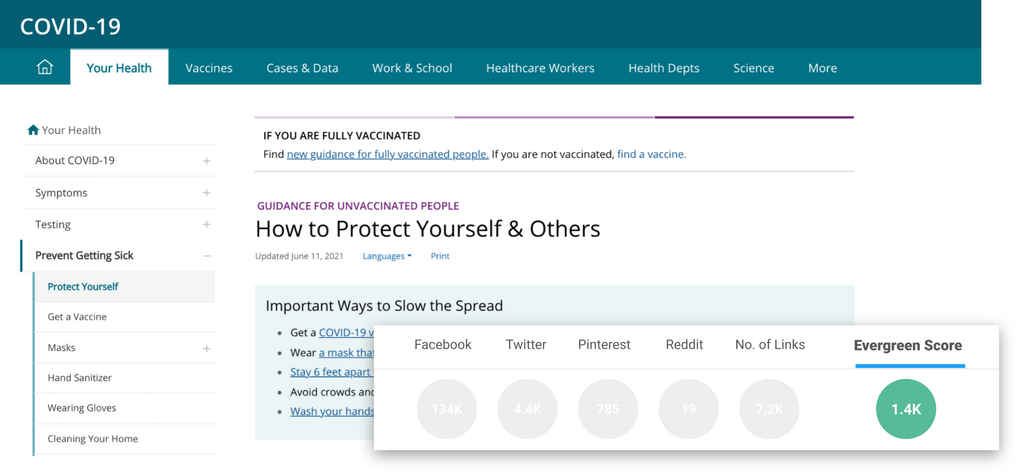
     FAQ and Guidelines performed extremely well in Evergreen Score, for instance, covid-19 guidelines and FAQS.

    2. Self-improvement

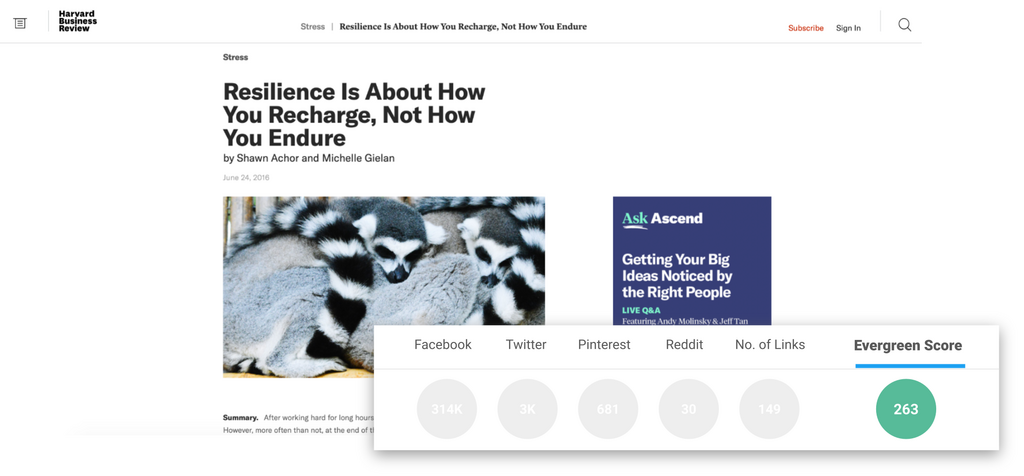
     Content that offers life improvement or advice stays engaging forever. For example, “Resilience Is About How You Recharge, Not How You Endure.”

    3. Social commentary

     Content that tapped into ideology, culture, and sociology generates high Evergreen Scores. Likewise, subjects like social injustice and technology lead to big discussions and shares over time.

    Following are 2 examples of such content:

    4.  Psychology-related articles

    Content focused on “Human behavior” will always manifest in many ways, regardless of trends and time. For example, “Why Facts Don’t Change Our Minds ” and “Are You A Giver Or A Taker?“

    Evergreen Article Ideas

    If you are a blogger who likes to write on different topics related to lifestyle or general areas, there are multiple subjects that never get old. 

     For example:

    • Topics of romance and love
    • Food Articles
    • Finance/Saving Money Tips and tricks
    • Parenting Articles
    • Weight Loss hacks
    • Jobs and Careers articles
    • Pet Care blogs

    However, the most important thing while writing evergreen content is that you address topics that are relevant to your industry. If you are an office supplier, relevant evergreen topics might include “how to keep your files and folders organized” or “different writing tools to use.” 

    The problem with crafting unique evergreen ideas is that you often feel as if the popular topics have already been written, maybe even ranked in search engines. 

    So, how can you deal with this issue?

    Now, the key will be to dissect and add unique subtopics or queries to a popular or main topic.

    You can easily do that by finding and targeting long-tail keywords with high search volume but less competition.

    Popular Evergreen Sites

    You can find some interesting insperational ideas from the following sites who are the major creators of evergreen content related to many areas:

    • ehow.com
    • wikipedia.com
    • imdb.com
    • answers.com
    • about.com

    These sites publish a wide variety of evergreen articles on many topics. For example, you can find Wikipedia for almost half of the Google searches, ranking on the first page. 

    However, to create some of your evergreen blogs, you must visit these sites to see examples and gaps to fill.

    List of Evergreen Article Ideas

    There are multiple subjects that never get old. 

     For example:

    • Topics of romance and love
    • Food Articles
    • Finance/Saving Money Tips and tricks
    • Parenting Articles
    • Weight Loss hacks
    • Jobs and Careers articles
    • Pet Care blogs
    • Original Researches 
    • Case Studies
    • How-to Blogs and Checklists
    • How to guides to choose best products
    • Articles of Paid and Free Tools
    • Best Books Ideas/summaries
    • Mistakes in a specific Industry
    • History related topics
    • Everything you need to know about something

    Bottom Line

    Regardless of their conversion goals, size, industry, and budget, all businesses can benefit from creating quality evergreen content. 

    Always focus on crafting unique and value-adding content to readers instead of writing content just for the sake of it.

     In the long run, your evergreen content piece will help you generate more positive results than any “regular” content. For instance, you can have more traffic, more leads, more conversions, and better SEO.

    But for that lead, you need to figure out what content is evergreen to your specific industry. 

    It is also good to find some questions about evergreen content in your industry and write blogs to answer those queries or searches.

    Let us know if you have more evergreen content ideas to share.

  • Best Duplicate content-why does it matter for SEO

    There was a time when websites were filled with similar content in order to manipulate search rankings. Websites published the same content on multiple pages to increase their chances of ranking for a specific topic.

    Search engines like Google caught onto this, and they started using algorithms for identifying pages with similar content. In the language of SEO, we call this content “duplicate content.”

    In this article you’ll find answers to the following

    • What is duplicate content?
    • How duplicate content is created?
    • How to find duplicate content?
    • How to fix duplicate content?

    What is duplicate content?

    Duplicate content is content that is published more than once on the web. Every webpage has a unique URL, and duplicate content is present in multiple URLs.

    Essentially, if the same content is present on more than one URL, this content will be referred to as “duplicate content.”

    Can this content result in a penalty?

    Usually, duplicate content will not result in a penalty unless your website is filled with duplicate or copied content. This content can rarely earn you a penalty, but it can affect your website’s search engine rankings. 

    When the same content is present on multiple locations on the web, search engines find it difficult to rank these pages in search results of a query. Deciding which web page to rank and which to leave can get tricky for search engines, and it can affect a web page’s chances of getting ranked.

    Google defines this content as “appreciably similar.”

    Why is learning about duplicate content essential?

    Duplicate content can cause issues for both search engines and website owners. Learning about duplicate content is essential to prevent these issues. This article will cover all the possible problems this content can cause for website owners and search engines.

    Problems for search engines

    There are three main issues that duplicate content can cause for search engines.

    1. Search engines find it difficult to choose between different web pages for the purpose of indexing.
    2. They have difficulty in deciding which page to rank in the search results.
    3. They are confused about whether to direct link metrics to one of these web pages or all of them separately.

    duplicate content

    Problems for website owners

    Duplicate content causes website owners to lose traffic and rankings. These problems are caused because

    1. Search engines avoid ranking multiple pages with the same web content in a search result. Which forces the search engines to choose between different web pages with similar content, decreasing the probability of these web pages ranking in search results.
    2. The link equity of these web pages is diluted even more because websites also have to choose between these web pages. The inbound links point to multiple pages instead of one, causing the link equity to get divided among various web pages.

    Inbound links play a vital role in the ranking of a web page, division of the link equity can adversely affect the search engine rankings of a web page.

    A web page will never reach its full potential if its content is marked as “duplicate content.”

    How duplicate content is created?

    Why content gets marked as being “duplicate content.”

    Typically, website owners don’t have an intent of creating duplicate content. But this lack of intention doesn’t mean that the internet is free of duplicate content.

    According to some reports, close to 28.9 percent of the content present on the internet is duplicate. Here are some of the common ways in which duplicate content is unintentionally created.

    Scraped content

    Scraped content not only refers to articles and blogs that are word to word copied with malicious intent. But it also refers to similar product descriptions published on multiple web pages. Many e-commerce websites source products from the same manufacturer, and they use the product description provided by the manufacturer. 

    duplicate content

    You may think that scraped content is the content stolen from other websites, but it is not always stolen content that gets categorized as scraped content, as you may have noticed in the example above.

    Separate versions of a website (HTTPS, HTTP, WWW)

    Many websites have different versions, for example, www.yourwebsite.com and Yourwebsite.com. The only difference between these two versions is the www prefix. Both these versions of a website host the same content. It means that both these versions are duplicates of each other.

    Some websites hold different versions for HTTP and HTTPS. When both these versions are indexable for search engines, these engines will mark this content as duplicate content.

    Variations in URL

    Some URL parameters can cause the content to be marked as duplicate. One of these parameters is click tracking. The nature of these parameters is not the sole reason for the duplicate content issue, but the order in which these parameters are arranged can also cause this issue.

    Here’s an example

    www.yourwebsite.com/shoes?type=sneakers   will be considered a duplicate of www.yourwebsite.com/shoes?type=sneakers&sortprice 

    The same goes for

    www.yourwebsite.com/widgets?color=blue and www.yourwebsite.com/widgets?color=blue&sort=newest

    Sessions IDs can also be regarded as duplicate content. It mostly happens when a visitor is assigned a unique session ID stored in the URL.

    Your website may also have print-only versions of multiple web pages. Most big websites have these print-only versions. These print-only versions can also cause a duplicate content error if they are indexed.

    According to SEOs, URL parameters should be avoided when possible. Alternate versions of URLs should also be avoided to save our web pages from duplicate content errors.

    Now that we have learned enough about duplicate content and the causes of its presence, let’s move onto identifying duplicate content.

    How to find duplicate content

    Identifying duplicate content

    The most common reason why duplicate content problem pops up is the automatic creation of different URLs holding the same content.

    Typically, this problem occurs with e-commerce websites.

     In the best-case scenario, all the variations of a product are present on the same web page. These can include variations in color, design, and size.

    Sometimes, a website automatically creates different web pages for each of these variations. A product can come in several different colors and styles, and this automatic web page creation can create thousands of duplicate pages.

    Search result pages can also get indexed for the websites with a search function. It can also generate thousands of web pages containing duplicate content.

    Going through indexed pages

    The easiest way of finding these automatically generated web pages is to go through the indexed web pages of your website.

    Just search for site:yourwebsite.com

    Google search console also contains a list of indexed pages. You can also use it for checking out your indexed pages.

    This number should match the number of web pages you have manually created for your website. If you find that indexed web pages are considerably higher than the original number, your website automatically generates web pages. 

    For example

    You have manually created 1200 web pages. The Google console search results show that your website has a total of 13000 web pages. It is an indicator that your website contains a lot of duplicate content. Automatically generated pages are vastly composed of similar/same content.

    How to fix duplicate content?

    Canonicalizing web pages containing similar content is the only way of avoiding a duplicate content problem.

    There are two commonly used methods of doing this. The first one is

    301 redirect

    You can set up a 301 redirect to redirect to the original content from pages containing duplicate content. It means that you should combine different pages into one page. It increases the chances of a better ranking for the original page.

    A rel=canonical tag

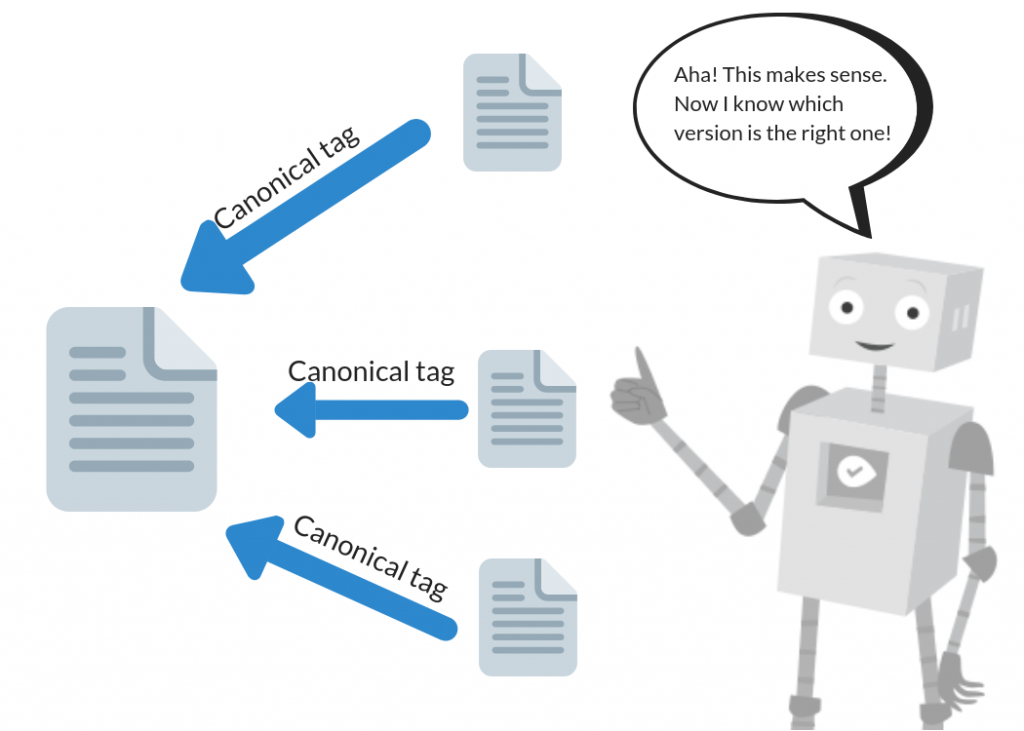
    A rel=caonical tag helps search engines identify the pages that should be considered a copy of the original content. It means that all the ranking power of this page will be credited to the original URL.

    This tag is added in the Head of the HTML document of duplicate page. Adding this tag is reasonably straightforward, and you can do it within a couple of minutes.

    Bottom Line

    The duplicate content error can be very annoying for many website owners. Still, this error is caused by the same algorithm that prevents other websites from earning money through stolen or scraped content. 

    Some website owners intentionally create duplicate content, but most of us do not. Duplicate content can be created due to several reasons, and we’ve covered them all in this article. Search engines like Google also provide many ways in which website owners can avoid duplicate content errors.

    The most common methods of avoiding this error are using a 301 redirect or a rel=canonicalize tag.

    Is there a difference between the number of web pages you have manually created on your website and the number of web pages that are indexed by search engines?

  • What is a reverse image search, and how to perform it

    You love a picture of a cute cat you downloaded years ago, but its quality is not good enough to share on your social media. You want to find this picture online to download it again in high quality, but you are unsure how to search for it. Don’t worry! We have all been there.

    Just searching for a “cute Persian cat image” will generate thousands of results, and the chances of you finding the exact same image will be slim.

    What if I told you that you could perform a search using this very image to increase your chances of finding an exact match. This kind of search is called reverse image search

    What is a reverse image search

    In a reverse image search, an image is used in place of text for performing a search. Reverse Image Search can be used for finding the original source of an image. Other pages that have published this image will also show up in the search results.

     You can utilize reverse Image search for finding the image in different sizes and image quality. A reverse Image search generates results similar to a text-based search.

    As you can see in the search results, all the Web pages that have published this picture are showing up. You can also use the image search filter to look for similar images. A possible related search is also a part of the search results. 

    In this case, the possible related search is “one mansion Los Angeles.”

    Reverse Image search was first introduced in June 2011 by Google. But many people are still unaware that such a feature exists.

    Google calls it “Search by image.” A reverse image search can be performed in various ways. Search engines like Google and Bing support this feature. Many other websites also let you perform a search using Images.

    Google reverse image search

    Google’s search by image feature is exclusively available for desktop users. You cannot use this feature using a cell phone, but there are many other ways to perform a reverse image search with a mobile phone.

    For performing a reverse image search on Google, Simply open your browser on your desktop or laptop. Type in https://images.google.com/ in the search bar and press enter.

    Click on the camera icon, and you can upload the image directly from your desktop, or you can add a link to the picture.

    If you want to use a downloaded image, select “upload an image.” Google will automatically perform the search after you upload the image.

    If you are using Google Chrome as your browser and want to search for an Image present on the web. You don’t have to follow the steps mentioned above.

    Simply right-click the image and select “search Google for Image.” 

    Search results will be displayed within a fraction of a second. 

    This method is strictly limited to the Images present on the web. If you want to search for a photo present on your desktop, you’ll have to use the previous method.

    Google has 1.9 billion active users, which makes it the most used browser in the world.

    But many people prefer to use other browsers such as Bing. Big accounts for an almost 6.15 percent market share globally.

     For Bing users, here’s a guide to performing reverse image search using bing

    Reverse image search in Bing

    Bing is a popular search engine, especially in countries where Google is not accessible. Bing also allows its users to perform a search using an image. Bing’s reverse image search is called “Visual search.”

    For using Bing’s visual search feature, follow the steps given bellow

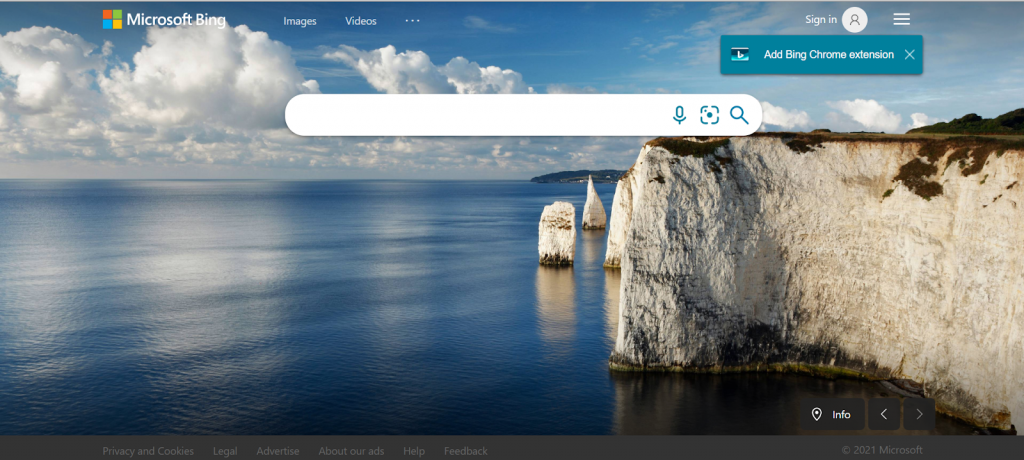
    1. Go to https://www.bing.com/

    In the search bar, select the second icon, the one with a dot in the center.

    The visual search feature will open up. You’ll notice a new option in the visual search that was missing in Google’s Image Search, which is the take photo option.

    The other options are pretty similar to Google’s. You can either upload a photo or add an URL. If you want to upload the image, select “Browse.”  Then drag and drop the image you wish to search.

    As soon as you drop the image, Microsoft Bing will perform the search

    There is a significant difference between Goggle’s image-based search results and Bing’s image-based search results.

    Bing’s search results are image-focused as opposed to Google’s search results. Bing pulls out any text from the image and also gives suggestions in the form of related searches.

    Next up, we’ll cover reverse image search using Yandex.

    Yandex’s reverse image search

    Yandex is a very popular search engine, and you can efficiently perform a reverse image search using Yandex.

    Go to https://yandex.com/

     Then select Images from the icons above.

    After this window opens up. Select the camera icon that is present in the search bar.

    You are given three options to choose from.

    • Select file
    • Paste from clipboard
    • Enter image URL

    As soon as you upload an image, results will be displayed.

    Yandex’s image search is primarily focused on the attributes of the image itself. In search results, information about the image is displayed, such as its size and related searches.

    Further down the search page, web pages with similar images are displayed.

    Other than Google, Bing, and Yandex, many third-party websites allow users to perform reverse image searches.

    Third-party websites for reverse image search

    There are many third-party websites on which you can perform a reverse image search. Most of these websites only work for desktop users. Some websites are excellent in this regard, others not so much.

    Some famous ones are

    • Pinterest visual search
    • Getty Images
    • Picsearch
    • TinEye reverse image search
    • Prepostseo

    Out of all of these, TinEye is the easiest to use. The reverse image search in TinEye is similar to the reverse image search in Google.

    For using TinEye, go to https://tineye.com/

    You’ll be given two options. You can choose between “upload” or “enter URL.”

    Search results will be displayed after you enter a URL or upload an image.

    Search results provided by TinEye are very similar to the search results of other search engines.

    TinEye also offers many paid features if you want more accurate search results.

    All of the methods we have covered so far are for Desktop users, but it doesn’t mean that you can’t perform a reverse image search using a mobile device.

    Reverse image search on a smartphone

    You can perform a reverse image search with a smartphone, but the process will be a little different.

    The easiest way to do it is through a Google Chrome app. Install it from the play or app store if you don’t have it installed on your device.

    Google’s reverse image search will not work on opera, safari, or any other browsers. There are two methods for performing this search

    • Using the desktop version on mobile
    • Using the right-click method

    For using the desktop version, Go to images.google.com and select the menu from the right corner. From the drop-down options, select “request the desktop version.”

    After the desktop version opens up, follow the instructions provided for reverse image search on the desktop.

    To use the “right-click” method on mobile, open up the image you want to search. Press and hold the picture, and after a menu appears, select “search Google for this image.”

    This method is restricted to the images found on the internet.

    For mobile users, certain apps can be used to perform a reverse engine search. One of the most-used ones is the “Google lens.”  Google lens can perform several tasks, and reverse image search is one of them. You can download this app from the Google play store or ios store and use it for reverse image search.

    Bottom line

    Reverse image search is a handy feature provided by many search engines. You can quickly get information regarding any image by performing a reverse image search. This feature was initially introduced a decade ago, but many people are still unaware of its existence.

    A reverse image search can be used to find similar images, find dimensions of an image, find metadata of an image, pull text from an image to translate it, discover how many sites have published this image, check if the image is royalty-free or not and find the original source of an image.

    In your opinion, which search engine has the best reverse image search?

  • What is content audit and How to perform it?

    The content on your website affects its performance no matter how old it is.  An article sitting on your website can be 5-10 years old, but search engines like Google will still index it. Think about all the content present on your website. Some of it has performed well, and some is not performing much.

    Going through all this content manually and categorizing it is no easy feat. Nor should you try to do it unless your website is just a few months old. Of course, old website content is just as vital as the new one, but how do you keep track of all this content?

    The best way to do this is through a timely content audit. 

    What is a content audit?

    A content audit enables us to review all the content present on our website thoroughly. A content audit will provide you with the results of your efforts. It will evaluate how far you have come in terms of your goals.

    There are many ways to perform a content audit, and if you do it correctly, you’ll be able to improve your content to better fit your audience’s needs.

    The data collected via a content audit will help you in identifying the gaps in your content. Using this data, you’ll be able to make informed decisions about the content present on your website.

    Why is a content audit useful?

    There is no doubt that creating and uploading new content is important. But what about all that content that is already present on your website? Are you regularly reviewing and improving it?

    Reasons why a content audit is vital for a website’s success

    Evaluating performance

    Is your content achieving its intended goals? Are you getting any return on your investment or not?

    Unless you evaluate the performance of your content, you’ll never know the answers to these questions. Tracking the performance with a timely content audit will help you in evaluating and improving your content.

    Identifying outdated content

    The content you wrote years ago will be considered outdated unless you keep updating it. Outdated content is not your fault. Like all other things, content becomes outdated over time. Ignoring this content can adversely affect your website’s rankings.

    A content audit will help you identify outdated content so you can tweak it a little to keep it up-to-date.

    Identifying what worked and what didn’t?

    You can’t monitor all the content present on your website, so how will you know what performs well over time and what doesn’t? Auditing your content is the sole way of knowing what worked well and what didn’t. Maybe all this new content you are focusing on is just tiring you out and not actually generating any positive results. You’ll never get to the bottom of this unless you carry out a content audit.

    Identifying misinformation

    Facts keep changing as the world evolves. In 2005 there were 2157 million mobile users, and in 2021, 7.1 billion people are using mobile phones. Any blog or article written in 2015 mentioning the current number of mobile users will be considered outdated because this number has evolved over the years.

    To protect your brand from losing visitor’s trust, you must update this kind of information. A content audit will help you in identifying misinformation so you can correct it accordingly.

    How to do a content audit?

    You will base your decisions on the data provided by the content audit, and if the content audit is not done properly, the decisions based on this data can be disastrous. For example, if you remove URLs with external links just because link metrics weren’t a part of your audit, it will be a big mistake.

    Another mistake that is made rather commonly is mixing up removal from search engine index with removal from your website.

    The first step in a content audit is collecting data from your website. All the content that is indexed by search engines will be analyzed during this process. Any non-index pages will not be a part of your content audit.

    This content is analyzed against various marketing metrics. After the completion of this process, you’ll receive an audit report.

    Three phases of a content audit

    Data collection phase

    All the indexable content on your website will be crawled, and data will be collected. All indexable URLs will be considered as well. You can use a crawler for this purpose, but you shouldn’t solely rely on it for all indexable URLs on your website.

    You should collect URLs via XML sitemap and Google analytics. If your website doesn’t have a sitemap, use a sitemap generator. You can also use your internal base for collecting a detailed list of all indexable URLs.

    A mobile version of a website will be crawled separately from the desktop one. This type of website has a single URL but content can vary depending upon the device used. In cases like these, two separate content audits will be performed. The regular method will work for the desktop version, but for the mobile version, this process can be a bit different.

    You’ll also have to gather additional metrics. Of course, crawlers will gather the most important metrics, but for a better content audit, you’ll have to collect some additional metrics.

    These metrics will include external links, internal links, content uniqueness, and website traffic.

    We recommend using Screaming Frog for the initial scan. For collecting additional metrics, you can use URL profiler because it can work really well with Screaming Frog.

    After using Screaming Frog combined with the URL profiler, you won’t need to collect any further metrics.

    If you find that any data is unnecessary, remove it to improve the performance of your machine.

    Data analysis phase

    After you have removed all the unnecessary data, use Excel sheets for storing and filtering this data. Google sheets work great with small data samples. However, for better speed optimization, using Excel is recommended.

    If your website has a lot of content, you can split up the URLs through a directory. Then, store all your data in the Excel sheet. The action column should not have more than three categories. Fewer categories will help you in sorting data quickly.

    After all the data is stored and filtered properly, you can use your own experience to conclude. This data will help you in determining what to do with the content present on your website.

    You should start by looking at the content that can cause a Google penalty, thus bringing down your rankings.

    What matters the most is what action you’ll take after the content audit is complete.

    For big websites, instructions provided by the data analyst or the SEO expert should be very clear if some content on a website needs improvement. The excel sheet should openly suggest that this content must be improved.

    Reporting

    Your content audit dashboard will be your key to making informed decisions. You can always use this spreadsheet to gain more insights, as long as the spreadsheet is not outdated.

    Your audit report must contain your findings and suggestions. Your report should start with a summary so that anyone who uses this report can understand the context of data.

    Divide the content pages into three categories.

    • The pages that need improvement.
    • The pages needing no change.
    • The pages that must be removed.

    You can also mention why some pages must be improved or removed.

    For example

    “This content needs to be improved or removed to prevent a Google penalty.”

    Or

    “This content contains outdated facts that need to be updated.”

    The data generated from a content audit is just as important as making the right decisions based on this data. If any of these processes is not done correctly, the whole content audit will be in vain.

    Bottom Line

    Uploading new content is important, but you must remember that your website is made up of new as well as old content. All the indexable content present on your website is vital for its success. 

    Keeping track of all this content manually is not possible, especially for big websites. That is why all SEOs suggest that you carry out a content audit after a certain amount of time.

    A content audit will help you in analyzing your old as well as new content. The data provided in this audit report will help you make informed decisions for the betterment of your website.

    After how much time do you generate a content audit report for your website?


  • What is GA4, and How do you set it up?

    Google Launched GA4 in the October of 2020. Google Analytics is a software that collects data from websites and turns it into valuable insights.

     It is estimated that almost 28 million live websites use Google analytics.

    Google Analytics 4 is the latest version of Google analytics. It is the go-to tool of many businesses for tracking website traffic. Many also use it for monitoring KPIs and monitoring marketing channels. Google analytics has millions of users across the world. Many of them are shying away from updating to the newest version because of the fear of the unknown. 

    Google analytics 4 is a little different from the standard version of GA. However, it comes with a lot of new and improved features.

    GA4 features the use of AI for filling in data. As a result, the user interface of GA4 is considerably different from standard GA.

    Describing GA4

    GA4 is a significant Google Analytics update, and Google introduced it in October 2020. Initially, users were a bit worried about the impact of GA4 on their existing models. 

    Google analytics 4 has a different data structure and collection logic than traditional Google Analytics.

    In this update, users are the main focus. In the traditional version, everything was built around sessions.

    Its model is based on events, and each user interaction is a separate event. Traditionally user interactions within a time frame were grouped. Traditional GA used a session-based model.

    An event-based model will provide improved predictions of user behavior.

    GA4 provides a new and modern approach to data collection and analysis for websites and apps.

    Switching from GA to GA4

    Shifting from GA to GA4 is a giant leap, but it is worth it. If you still haven’t updated GA to GA4, now is the time for you to do so.

    You’ll have to set up GA4 property to run parallel with universal analytics.

    You don’t have to start using GA4 right away, but this update will make your future analysis more meaningful.

    Better data collection means better data-based decisions.

    You can Set-up GA4 within a few clicks. First, Log in to your account. Then, select the gear icon present in the bottom left corner. Next, confirm your desired account and property. Select GA4 setup assistant. Inside Wizard, click on the get started button. Lastly, click on create property button.

    Viola! You have updated your Universal Google analytics to GA4.

    If you are using a website builder, you’ll have to add the analytics tags manually.

    Basic event tracking will automatically start after the update. You’ll need custom code for tracking third-party elements.

    What’s New?

    GA4 comes with many new features. Let’s take a look at the most noteworthy ones.

    • GA4 records each event individually, unlike Universal GA. As a result, GA4 will help Google understand user activity a little better.
    • Universal GA uses a session-based system for collecting data.
    • Only top-level reports are built-in in GA4. For specifics reports, you will have to go to the analytics tab.
    • GA4 allows users to mix data from their app and website, and universal Google Analytics uses property and view setup.
    • With GA4, the tracking ID will look like G-XXXXXXX.

    Is Google Analytics 4 just an update of GA?

    If you analyze closely, you’ll realize that GA4  is not just a slight upgrade of GA. Nor is it a redesign, as is the case with many software updates. Instead, GA4 is an entirely different product, with a more holistic approach to analyzing apps and websites.

    After updating to GA4, you’ll immediately start noticing the differences between it and the universal GA. One of the first differences that you’ll see will be the Navbar.

    But don’t be scared you’ll get used to the new Navbar after only a couple of uses. First, GA4 is event-driven, unlike the traditional GA. Second, it uses machine learning for predictive modeling.

    How is GA4 better?

    GA4 has many benefits, one of them being that it makes things significantly easier for businesses with both apps and websites. It gives a harmonized view within a single property. With the use of GA4, companies won’t have to look at two separate analytics views.

    GA4 will make analysis and reporting easier for many organizations. This is because GA4 focuses on user engagement that matters most. So with GA4, gone are the days where analytics reports were based on sessions and page views.

    1. Types of events in GA4

    There are four main types of events in this update

    1. Automatically collected
    2. Enhanced measurement
    3. Collected
    4. Custom

    You can directly set up Automatically collected events and Enhanced measurement events in this update. It will also lessen your work in google tag manager instead of traditional GA, which requires additional tags.

    GA4 includes some premium features from the GA 360. GA4 combines your mobile’s and desktop’s data so that you can view it on a single screen.

    GA4 contains a lot of exciting features for marketers, such as improved UI and debugging.

    Ways in which you can use Google Analytics 4

    It has been almost eight months since Google analytics four was released, which is not a lot of time to explore its features and benefits. But here are some ways in which you can use this update

    1. Combining your app and web analysis

    Combining your web and app analysis will save a lot of your time. It will also make finding any overlaps easier. This feature of GA4 is called full-funnel reporting. GA4 is very beneficial for businesses whose customer journey begins on the website, but the purchases happen on the app. Google analytics 4 connects the dots between these two properties seamlessly.

    2. Understanding User behavior

    GA4 is very helpful in tracking customer journeys and user behavior. You can take advantage of its advanced behavior flow reports to create plans focused on your users. GA4 pieces all this data, so you don’t have to do it yourself. It provides more accuracy and saves a lot of time.

    For custom events, GA4 provides you a free range over the customization of parameters. The event editing and synthetic features of GA4 are pretty handy.

    1. Custom Funnels

    With GA4, you can create customized funnels to analyze data. Analysis hub, available within GA4, was only present in GA 360 before this update.

    With this feature, you can customize your path analysis. For example, you can choose your desired starting and ending points for this path analysis.

    To get information about the steps a user follows before making a purchase, you can choose purchase event as the ending point of your path analysis.

    1. Engaged sessions

    One of the most valuable features of GA4 is that it has replaced “bounce rates” with “engaged sessions.”

    Bounce rate was no doubt an important metric, but it failed to account for users who quickly found answers on your website and didn’t take any further action.

    “Engaged sessions” will help you better understand the difference between satisfied and unsatisfied users. Just because a user leaves your website early doesn’t mean that they were unsatisfied with your website. It can also tell that they found the answer to their query in no time.

    1. Targeting audience

    You can refine your audience targeting campaigns with the help of GA4. Insights provided by GA4 will allow you to identify your audience better. In addition, its advanced capabilities enable it to record which activities are caused by which user.

    GA4’s identity space features allow us to understand user behavior better than ever. After GA4 becomes more mainstream, the consumer add experience will considerably improve, which will result in a healthier consumer business relationship.

    Bottom Line

    If you have read the whole article and are still skeptical about updating to GA4, use it as a backup. Many users are hesitant about this change, and you are not alone in your fears. You don’t have to update to GA4, but you should set it up as separate property. 

    In case universal GA goes away, you’ll need backup in the form of GA4.

    For more experienced marketers, Learning the features of GA4 and transitioning to them won’t be a big feat. However, its advanced features will help these marketers in gaining better insights and making informed decisions.

    All in all, GA4 is not a redesign of universal GA. It redefines the way websites are analyzed.

    In your opinion, which feature of GA4 is the most useful?

  • 12 Shopify SEO Tips For Your E-commerce Store

    Shopify, with over 58 million page visits, is one of the top e-commerce platforms in the market for online retail businesses. For many e-commerce business owners around the globe, using e-commerce platform needs strong e-commerce SEO to drive traffic to their site. In this guide, I will share Shopify SEO tips to increase in organic traffic and growth has led to increased revenue, helping them to expand their online retail businesses exponentially.

    Following are the reasons that why you should choose the Shopify E-commerce platform for your online business.

    • It is highly flexible as it can tailor to your requirements.
    • With its easy backend administration, you must have your Shopify store.
    • It has lots of built-in tools.
    • It is an advanced e-commerce platform with awesome SEO features.
    • You don’t need to have extreme coding skills to manage and run your online store; you automatically save money and time.

    Once you have your Shopify store, to perform to the best of its ability in search results, there’s still some Search Engine Optimization (SEO) legwork.

    The below SEO guide tips are fundamental for attaining good search visibility for your Shopify e-commerce business. 

    Follow these easy guidelines to discover all the essentials for improving the SEO of your Shopify store.

    After you set up Shopify, your online store, now you must be looking to implement SEO techniques. 

    Shopify is an advanced e-commerce shopping cart and content management system with built-in SEO elements. 

    But, let me tell you that e-commerce SEO is a little different than optimizing your websites. 

    For Shopify SEO, it is important to pay attention to site structure, structured data and see how SEO factors work when using Shopify.

    By following these SEO tips, you can enhance the likelihood of getting organic sales and traffic to your Shopify store from search engines such as Yahoo, Bing, and Google.

    You must follow these 12 points for improving the SEO of your SHOPIFY.

    • Remove duplicate content.
    • Create 100%  unique “page title” and Meta descriptions for your pages.
    • Optimize your images.
    • Link your products page to the home page.
    • Technical SEO of SHOPIFY store.
    • Domain Canonicalization and Canonical tag.
    • Submit Sitemap.xml to Google Search Console.
    • Integration of Google Analytics.
    • High-quality backlinks to your Shopify.
    • Set up 301 redirects for Your old product pages
    • Free Product Review App installation.

    Duplicate Content Removal

    Duplicate content means the text that appears on more than one web page. That page could either be on someone else’s or on your own site. 

    For any website, duplicate content is a complete disaster if identified by a search engine, such as Yahoo, Bing, Google, or others, and the same is the case with your Shopify store.

    When search engines identify that you’ve copied content on your Shopify store from another site, your store could be penalized by search engines. 

    The bad news is, many Shopify stores have copied content, so if you fix the problem, you have a chance to increase your search performance.

    To check duplicate content, there are tools like Copyscape plagiarism checker.

    Perform tests and checks as often as possible to make sure all of your content is 100% unique.

    As per Google Content Guidelines, duplicate content is defined  as:

    “Duplicate content means substantive blocks of content across or within domains that is either exact copy of other content or are appreciably similar.”

    How to Fix External Duplicate Content?

    If you have set 301 redirects and canonicals, but there’s some duplicate content on your Shopify store, you have 2 options: 

    • If you think the other site owners copied you, contact the owner and ask them to change their text.
    • But if you think you both used the same text (product description) from somewhere else, then edit and revise your text.

    Unique Page Title & Meta Descriptions

    Page titles and Meta descriptions are vital elements of a website for search engine rankings. 

    Your title tag and the Meta description tags must include the keywords relevant to your site’s content, whether it’s an article about fashion trends or a product page for a pair of shoes. 

    This unique metadata helps Google and other search engines understand about the page. The better search engines understand your page, the better it might rank your store in search engines.

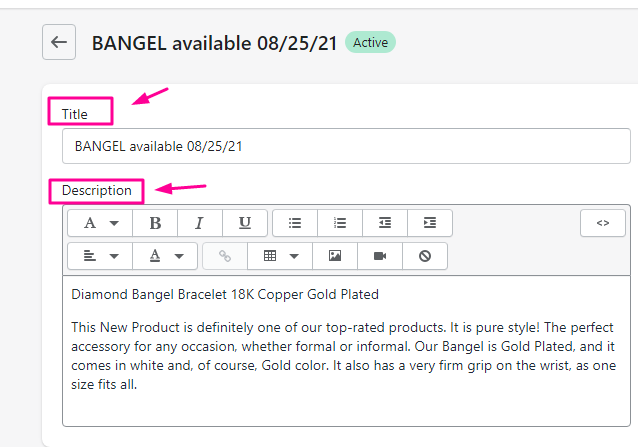
    Title & description must be written according to the SEO best practices; the ideal word count for the title should not be more than be 60 characters, while the description tag shouldn’t exceed more than 160 characters.

    If you have many pages that need titles or keywords and descriptions, this is a lengthy process. 

    But for the optimization purpose,  you should definitely do it. 

    Now let’s see how to edit Meta Titles And Descriptions of your Shopify store.

    First of all, go to your Shopify store, tap on “Online Store”/Preferences. Here you can easily change your “Title and Description.”

    Tip: Never use stop words, for example,  “a”, “an,” “the”,” if”, “but” and “thus”.

    Follow the format: 

    • Primary Keyword – Secondary Keyword | Brand Name 

    Image Optimization on Your Shopify Store:

    For your Shopify store, Image optimization is another means of improving your store presence in search engines. 

    For years, it is of no surprise that “alt tags” have been used by search engines for understanding what the images on a site are about.

    All your images must include the relevant keywords with proper alt tags. 


    For example, when someone is searching for images of red shoes, and if your images of “red shoes” have alt tags with good description,” then chances are that images from your site will also appear in search results. 

    Another thing to consider is, your customers/buyers with vision trouble might use a screen reader to check your site. 

    Now, if you have “alt tags,” they can verbally describe to the buyer about each image. The better your alt tag, the better you’ve chances to push the visitor to put something in their shopping cart. 

    Alt tags with good descriptions could be among many other ranking factors search engines use to assess your store. 

    So, my recommendation is to optimize every single image on your Shopify website.

    Now let me share some key points to consider while creating alt-tags for your images.

    • Use a unique and original “alt tag.” 
    • Add a proper description but do not stuff your keywords.
    • Alt-tags must be short and concisely describe the image.
    • For smaller images and buttons, do not add alt tags.

    Steps to add alt text to Shopify:

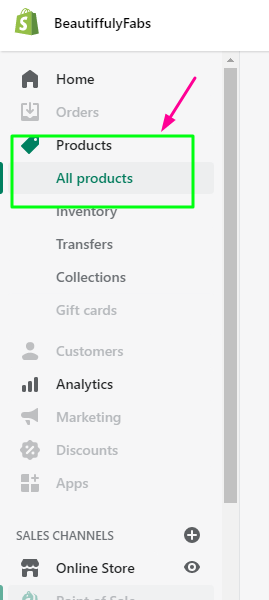
    1. Go to your Shopify admin; now click Products/ All Products.
    1. Tap on the name of the product you want to edit.
    1. To edit alt text, hover over a product image and click on the 3 dots to add “alt text.”
    1. Once you are done, now click Save.

    Link your Products Page to the Home Page

    Your home page is the main and most powerful page of your website, among all others. Creating navigation links of your products on your homepage gives a clear path to your site visitors so they can check around your Shopify store.

    If you are a store owner and don’t link your collection or category pages to your home page, your product pages may be hidden deep in the store, and visitors won’t find them easily.

    Tip: Ensure your entire important product and collection pages are reachable at the top of the homepage. By doing this, these pages are in easy reach of your customers. Don’t forget to include a search box also.

    Technical seo for shopify

    In technical SEO, your webmaster needs to ensure the followings guidelines:

    1. Check a robots.txt file to crawl your site easily.
    2. Make sure your Shopify store has a sitemap.xml file. 
    3. After creating a Google Search Console account, add the sitemap.xml to Google Search Console.
    4. Create and install Google Analytics.
    5. Validating CSS and HTML. 
    6. Correct redirect issues and crawl errors.
    7. Ensure the proper use of heading tags (H1, H2, H3, H4).
    8. Correct application of domain canonicalization and canonical tags.
    9. Use Google’s Page Speed Insights to analyze your Shopify store’s speed on all devices. 

    Domain Canonicalization and Canonical Tag

    When there are multiples of the same things, “Canonicalization” means to declare that one page or domain is the primary version.

    For instance, if one style of “red shoes” comes in different shades and you have pages for each color, you might want to canonical to a single version. The reason is, all of the product descriptions will be the same. 

    This way, you are clearly sending a message to search engines, “ignore all the identical pages and focus on this single URL.”

    It will keep search engines away from thinking that you have duplicate content on your site. But, overall, duplicate content is really bad for the SEO of your Shopify store.

    Shopify Domain-Level Canonicalization:

    Any Shopify store, on a domain level can have 3-4 versions:

    Now, you need to understand that all of the above pages will display identical content to users, but in search engines, they appear to be different websites with the same text. 

    Log in to your Shopify store; now go to “Online Store” and click on “Domains.” 

    Choose your domain from the dropdown box, now tick “Redirect all traffic to this domain.”

    Shopify Page-Level Canonicalization:

    It involves setting canonical tags but don’t worry, as it’s not too complicated. But on Shopify, it can work a little differently than it does on other sites.

    In simple words, a “canonical tag” is a way of telling Google that a particular URL is the preferred version to appear in search results. 

    To overcome the duplicate content issues of search engines, you must use a proper canonical tag.

    For example, these dynamic URLs refer to a single(same) product. 

    • https://xyz.com/dresses/cocktail?gclid=ABCD
    • https://www.xyz.com/dresses/green-dresses-are-awesome
    • https://www.xyz.com/products?category=dresses&color=green

    Among the above-shared URLs, the second should be the main version. 

    How to add a canonical tag?

    Step 1. Go to your Shopify admin, click “Online Store,” and then go to “Themes.”

    Step 2. Choose the theme you want to edit, now click “Actions,” and then “Edit code.”

    Step 3. Under “Layout,” press “theme liquid.”

    Step 4. Copy and paste the following code on the </head> tag and click save.

    Add Sitemap.xml to Google Search Console

    To tell search engines, what to index or crawl on the website, you need a sitemap where you can submit all the pages of your website.

    Shopify sites automatically generate a sitemap.xml file that contains all the pages and products of your website, providing an excellent overview of your Shopify site structure.

    But for picture-perfect SEO, submit your sitemap to Google Search Console, so your site can be easily indexed and crawled.

    You can find the sitemap at the root directory of the Shopify store, For example, xyz.com/sitemap.xml.

     Steps to submit Sitemap to Google Search Console

    1. Sign in to Google Search Console and click on your website URL.
    2. On the left menu bar, press on the sitemap and “Add Sitemap.”

    It can take a few days to complete your request.

    Google Analytics Integration

    To track and report your Shopify store’s traffic, Google Analytics integration is a must to have. It is Google’s free tool with many features to help you analyze the following;

    • See how people are behaving on your site. 
    • Keep an eye on your paid and organic traffic numbers. 
    • Know how long visitors spend time on your store or products. 

    Go to your Shopify store and now choose the “Admin” option. Now go to “Online Store” and then click “Preferences.” 

    Once there, paste your tracking ID code into the Google Analytics account.

    High-Quality Backlinks to Your Shopify Store

    If you want to increase the number of buyers to your Shopify store, along with on-page and off-page SEO, quality backlinks are an integral part of SEO.

    An easy and quick way to get targeted and quality traffic to your Shopify is by creating your store profile on Amazon and other similar websites. 

    This will help you get strong backlinks and traffic in return as well, which will be a booster for your store.

    Set Up 301 Redirects for Old Product Pages

    In Shopify, when your product is out of stock, you need to tell Google and other search engines that a page is permanently moved to a new page or doesn’t exist; here, 301 redirects are the best possible solution.

    What is a 301 redirect? 

    A 301 redirect is taking search engines and users away from one page and sending them onto another automatically. 

    301 redirect is also used when you don’t want people to visit a URL that no longer exists. 

    What happens when search engines or users go to such pages that don’t exist? They will get a ‘404 Error” page, potentially dropping or ending your visitors’ journey with you. 

    Without setting up a 301 redirect, if you’ve deleted pages for items that are not going to be in stock again, chances are you might lose your customers. 

    If you want to take the visitor to a new page, the best way is to create a URL redirect.

    Let me tell you how to add 301 redirects in your Shopify store?

    1. Go to “Online Store” and then to “Navigation.” Now go to “URL Redirects” and click “Add URL redirect.”
    2. Replace the old URL in Redirect with the new URL and click add.

    Install the Free Product Review App

    One of the main benefits of using product reviews Shopify app is to increase sales of your products. 

    But the question is, what are some different types of Shopify Apps to optimize your store?

    The answer is simple, 

    • Paid and free apps options are available, and you can check that out on the Shopify help center. 

    To add product reviews to your store and engage with your potential customers, Shopify Product Reviews is one of the best free apps.

    Blog Feature of Your Shopify store

    With a built-in blog feature, now writing blog posts is an incredible way to build your audience in your Shopify store, drive more traffic, earn more exposure & sales for your online store. 

    Regular and quality content is recommended because:

    • Search engines send users to frequently updated sites. 
    • Good content makes your site more useful for visitors if they are looking for answers to their queries. 
    • Your blog content helps Google and other search engines understand the category of your store or the topic of your site.
    • If your content is SEO optimized, you also can rank your post, driving more traffic to your store.

    If you want to know how to add to and edit your blog on the Shopify platform, then Shopify explains it very well. It also covers how to use Android and iOS apps.

    If you are unsure what to write about, then keyword research might be useful.  When you write content on what people are typing into search engines, It gives you a clear idea of questions around your sell products. 

    Bottom Line

    To be ahead of your competitors, all of the 12 steps mentioned above may be everything you should know about Shopify SEO.

    These Shopify SEO guide tips will help you to drive more organic traffic from search engines.ide

    I hope you enjoyed this article; now I’d like to hear from you. Which strategy from this blog do you want to use instantly?

    Are you going to launch your Shopify blog or fix your duplicate content? Let me know in the comments section.

  • 7 Steps to Design and Develop an AI Chatbot

    Are mobile apps as appealing as a chatbot? Well, voice-based communication is far used than mobile apps. Here are some of the statistics to make you believe that chatbot technology is booming. 

    More than 50% of the businesses will focus on chatbot development as compared to mobile apps.

    Chatbots will be the source of the $112 billion e-commerce industry by the year 2023. Social distancing played a major role in the growth of Chatbots.

    It is now being predicted that by the year 2026, global the chatbot industry will reach $10.08 billion.

    What is a chatbot? A chatbot is a collaboration of messaging services with an interactive AI-trained robot, a digitized conversation platform between a human being and a trained bot. This makes it Chatbot. 

    Chatbots work as virtual agents between the business and a potential future customer. Nowadays, Chatbots are everywhere and on all platforms (web or mobile). 

    They can be found practically on any platform, including web and mobile, but messengers are the place where they operate. 

    One of the most astonishing facts about Chatbots is that, more than 300,000 active bots on Facebook Messenger in 2018. Now that’s huge. 

    300k active bots mean that there are around 300k businesses that are continuously interacting with customers. Wahoo, that’s massive. And assuming that this count was from back in 2018, imagine the increase in this number. 

    Here is a survey result from 2020. A survey conducted in December 2020surveyed the use of Chatbots in the travel and hospitality industry. According to the study, 25% of respondents confirmed that their organizations were using Chatbots.

    However, 46%of the developers claimed that their companies started working on introducing chatbot services in the future.

    Why should we use Chatbots?

    Here is a list of the top 4 reasons I have collected for you to use and start making a chatbot for your business. 

    • It is a machine learning tool that helps you collect customer data.
    • To have a virtual assistant conduct a preliminary conversation with your customer.
    • To make your business or product available for a discussion round the clock. 
    • Collect data and train your Bot with this real-life data.

    How to design and develop a Chatbot?

    In order to understand the chatbots and their technology, it is important to get answer to the some of the questions. Lets get started

    What type of Chatbot do you want?

    Before starting to design and develop your Chatbot, you should answer two simple questions. 

    • What is your reason behind building a chatbot?
    • And what help do you think your customers will get from your Bot? 

    The answers to these two questions will help you understand and decide your first step. Then, the answers will guide you through finalizing your decision about your Bot. 

    There are two categories in which bots can be divided, a rule-based chatbot or an advanced AI-enabled bot.

    Rule-based bots are restricted with predefined scripted conversations, whereas AI-enabled bots are built on learning and improve the model. 

    An example of a rule-based chatbot is an FAQ bot that can answer queries from a potential customer. 

    However, AI-based Chatbots will help in data gathering, possible consultation to a customer related to a sale, and handing over the customer to a human salesperson (handoff).

    Where do you need your Chatbot 

    You need to decide either you need your Bot deployed in your mobile app or website. Next, you need to figure out where this Bot will help your customers most. 

    This needs to be decided by you after analyzing your mobile app and website performance. 

    You can also decide to have this Bot deployed everywhere on all platforms. 

    This will help you entertain your customers on all platforms across multiple virtual world platforms and social media platforms. 

    Select the technology stack to use

    When you answer what services this Bot provides to your customers, you limit your options to finalize the technology needed to build the Bot. 

    You can select a framework and hire a developer to work on it. Or you can do it yourself, but that’s not recommended. 

    Keeping the future growth of voice-based interactions, you should also think of the following expansion options.

    • Where to find a developer who is skilled enough to build the Chatbot and also give a futuristic approach to the Bot. 
    • Will you be able to use the selected framework to use voice-driven chatting?
    • Is the framework with voice-driven chatting options proprietary or open-source?

    Design the conversation

    With the selection of tech stack to build your Bot on, you can now work on your chatbot conversation flow. 

    If you are looking to do it on your own, there is an inbuilt program wizard that helps you step of the way and gives you simple drag and drops conversation options. 

    However, if you have decided to build on an AI-Based, I would request you to hire a professional developer to help you develop and integrate an AI-based chatbot. 

    Train the bot

    Okay, so this step is only for AI-based bots. If you are not making an AI Bot, then please skip to the next step. 

    But if you are building an AI-Based Bot, then you need to understand how does AI works? Artificial intelligence collects and stores the actions and reactions of every customer who used the Chatbot. 

    With an AI-based chatbot, you want your Bot to understand the customer with which it is communicating. This can only be done by training your Bot with data, which in your case will you a huge set of customer communications. 

    Test the chatbot

    Once your Bot is built, test it. Test it again and again. Test it with multiple scenarios. See how it responds to queries and interact when asked questions. 

    As for your AI-Based Bot, continuously train your Bot with updated sample conversations. Only then will you be able to achieve maximum performance of your Bot. 

    Deploy and maintain the bot

    And now, with the completion of the Bot’s development, the final step of deployment is at hand. Deploying doesn’t take much of your time. Connect your Bot with a CRM tool to analyze its performance, and that’s all about it. 

    The skill level and Examples of Chatbots

    While developing your Bot, you have tested a couple of Chatbots, some on the web platforms, some on the social media platforms, and some which are voice-based. 

    There as three types of bots currently we are using in our daily life. One of them is an inbuilt voice-based chatbot on our mobiles. 

    Let’s see what types of bots we have and what purpose do they serve: 

    INTELLIGENCE

    Intelligence is the first skill element a chatbot is dependent on. We have just discussed the rule-based and AI-based Chatbots. 

    Both of these chatbot types are ranked differently on intelligence level. 

    Rule-based chatbots are usually marked as stagnant and dumb. Whereas AI-based Chatbots are constantly evolving. 

    AREA OF APPLICATION

    Chatbots can be used in multiple businesses. Nowadays, we see Chatbots serving customers and helping them with window shopping. Chatbots are a unique way of having Virtual sales representatives for your customers. 

    Chatbots can be your customer support representatives. They can also act as personal assistants. Examples of virtual and personal assistant chatbots, consider the following chatbots. 

    Apple’s Siri or Google’s Meena, and many more. 

    You will see people always arguing about these Chatbots and saying that they are not, but think of it like this. They let you interact with the world and help you manage your day-to-day actions. 

    PLATFORM

    Finally, you can have your Chatbots deployed on any one of the following, or all of the following:

    • Web
    • Mobile apps
    • Messengers

    Some of these Chatbotsare deployed only in the form of standalone mobile apps functioning to collect customer or user information. 

    But why limit your options to only collect options? 

    Why not use these Chatbots for your websites and social media messengers? Because that’s where your customer is.

    In the end, I am interested in sharing a fact with you. To have a better customer experience, you need to have your bots deployed everywhere (website, messenger, and mobile app). 

    The following picture contains an example of a conversation between an AI-based chatbot and a human being. 

    Bottom Line

    At the start of this article, I shared statistics related to Chatbots and their contribution to our daily lives. The numbers are growing. Chatbots are evolving, and even rule-based bots are being optimized for more natural and effective communication.  

    I used those statistics to convince you to develop and design your Chatbot. The Chatbot is an opportunity for progressive individuals like you and organizations to have conversational interactions with customers. 

    You can build your Bot yourself, or you can hire a professional. But if you are doing it yourself, then you will be working on your Bot a few hours every day. Or maybe a day in and day out. 

    This article contains all the basics you need to build your Chatbot. Share your idea with me if you are thinking otherwise to design your Chatbot?

  • How to do keyword research in B2B SEO marketing?

    Marketing tactics For B2B campaigns are considerably different than B2C campaigns. A business-to-business sale cycle is longer than a business-to-customer sale cycle and it requires multiple stakeholders to be involved in a typical B2B sale.

    When deciding which company to do business with, 70 percent of B2B buyers say company reputation is the most important aspect.

    In general, B2B marketing is more expensive then B2C.

    A good marketing strategy for B2B focuses on the content that helps and educates potential clients. Marketing content should contain effective B2B keywords that are based on the customer intent.

    In successfull B2B SEO campaign, right type of keywords are very important and as said earlier, B2B keywords are totally different than ones used in B2C marketing.

    The first step is to identify the keywords that matter to your clients. Then you can create content according to these keywords.

    What are B2B keywords?

    An effective content strategy always begins with thorough keyword research. Keyword research can be of various types depending upon the end goal.

    There are many resources available online on about B2C keyword research. If you are not using the proper tools and techniques for your B2B keyword research, all your hard work will go to waste.

    Trust me, researching B2B keywords is not difficult, it just requires the understanding of business, and right mind set with the right tools and techniques.

    Incomplete research can result in a disastrous marketing strategy, and all your money will go down the drain.

    B2B sales should be focused on the journey and not only on the product. As a result, B2B sales have longer cycles. 

    When you are doing B2B keyword research, focus on the journey of the buyer. And this starts with dividing the entire sale cycle into multiple steps and find relevant keywords for each step.

    At each step think from your customer’s point of view and research keywords accordingly. Note down the details from customer’s angle and see what customers looks, when sourcing products.

    Marketing content for B2B SEO

    B2B sale cycles are considerably longer because many stakeholders are involved. Therefore, when writing content for B2B sales, observe what your potential customers are searching for.

    Assume that you have a salon and you are having trouble managing all the processes manually.

    One of your employees advises you to look for ways to automate these processes.

    What will you do next?

    You will open up your browser and search. You’ll probably begin your search with “How to automate salon management processes?” or something similar.

    After some research, you’ll realize that various paid softwares are providing such services.

    Then you’ll look for” Qualities of good management software,” and this research will keep going on.

    A B2B marketer should focus on this whole process and should create content to target audiences that are looking for a product similar to theirs.

    If a salon management software company wants to capture the attention of potential clients, it will have to focus on the buyer’s research process.

    A blog containing information about good salon management software qualities will compel buyers who are searching with similar keywords.

    Establishing brand authority is very important because B2B space is usually more competitive than B2C space.

    If you create a great digital marketing strategy, a customer will visit your website several times before making the purchase.

    Your content strategy should center on the buying process. Your website should be a source of guidance during the whole buying process of a customer.

    If your website provides answers to most of their queries, they will prefer your product over all the competitors.

    Devising strategy for B2B keyword research

    B2B sales need a little more attention to detail. Focusing on the whole buying process is necessary to make a mark in this competitive space. Devising a proper strategy will make this process less daunting. Let’s take a look at the steps you should follow

    Speak directly to your client

    When researching for B2B keywords, speak directly with your client. Ask them about their expectations. Involve the stakeholders in this conversation. This conversation will help you in gathering information about the things your client cares about.

    65.2 percent of B2B buyers felt that discussing their issues with salespeople was beneficial.

    Note down this information because it will be the basis of your keyword research.

    For example, your client might tell you that they are looking for software to increase the productivity of their employees. Your marketing team can then use the keyword “increase client productivity” in their marketing strategy.

    Review the content on your website

    Now that you have gathered some information about your keyword strategy. Review the content that is already present on your website.

    Begin the process by reviewing your homepage. Review the information you have used to describe yourself and your product. Next, read what you are offering from your client’s perspective. Review the content on the rest of your web pages as well. 

    You don’t have to review the whole website. Instead, focus on important web pages like the About Us page.

    Take a look at your blog posts to determine if they are answering the questions of your clients or not.

    This whole process will help you in identifying your efficiencies and deficiencies. After noting down this information, you can create new content with effective keywords. You can also replace some of your older keywords with newer ones.

    Check what your website is ranking for

    Check how your website is generating clicks. Which keywords are bringing in the most traffic? Then, you can use Search Console. The search console will show you how users get to your website.

    You can also use paid and free tools for identifying the content that is generating clicks for your website. Keyword research tools like Ahrefs will inform you about the keywords people are searching for to find your website.

    These tools will also let you know the ranking of your website for these keywords. These lists can contain thousands of keywords. Filter out the ones with no search volume. You should also ignore your branded terms.

    Research about your competitors

    Look at your competitor’s website to see what they are ranking for and how your website ranks against the competition.

    Look at the content on these websites and how they are promoting their products. Then, go through their blog posts. Competitive research will help you in developing content these websites are missing out on.

    If your competition is doing better than you are, you can use their framework for content creation. Check out the keywords that are driving this traffic to your competitor’s website. Use these keywords for your content if the competition is not very stiff.

    Select keywords

    Use keyword research tools to look at the keywords your competitors are ranking for. Generate similar keyword ideas. Focus on only 20 to 30 keywords at once. Don’t try to rank your website for hundreds of keywords at once.

    Create a list of target keywords and focus on creating content for them. Then, make a complete strategy for optimizing and ranking this content. 

    Track KPIs for determining the success of your strategies. Once your website ranks for these 30 keywords, focus on the next 30.

    User Intent

    Keywords like “Software” or “Laptop” are really broad terms. Your content can be about laptop manufacturing or affordable laptops.

    Keeping the user intent in mind is necessary when creating content. Your content should answer the queries of your potential customers.

    If your customers are looking for affordable laptops and most of your blogs are about the manufacturing process of laptops, these blogs will not be helpful for your customers.

    Rather than an advertisement, 80 percent of corporate decision-makers prefer to get company information via a series of articles.

    Your content should match your user’s needs. Otherwise, this content will be a waste of time and money.

    Your content should educate your potential customers. Use keywords in the right context by thoroughly researching your customer’s needs.

    Your content should aim at guiding your customers throughout the buying process. Keywords can be used for images, videos, product descriptions, etc. Choose the one that meets your needs.

    Bottom Line

    B2B marketing strategy is very different from B2C marketing strategy. A B2B marketer should guide its customers through the complete buying process. B2B keywords should be used to target potential customers.

    Each step of the buying process has its keywords. First, search for those keywords by doing a competitive analysis. Then, generate keyword ideas and start creating informational content.

    Informational content will compel your customers to explore your website. If your content answers the queries of potential customers, they’ll prefer you over your competition.

    Making a B2B sale is more difficult because of the competitive nature of this space. If you want to succeed, your marketing strategy should be on point.

    What tools are you using for keyword research? And why?