Do you want to optimize your site speed? We’ve put together a comprehensive guide to WordPress speed optimization. You’ll have access to some helpful information, such as why speed is important, what may slow down your WordPress site, and actionable steps that you can take to make your website faster immediately. You may even have just migrated your website from another CMS, such as Squarespace, to WordPress, and you’re looking to better understand how to make your website stand out.
Remember that the consumer is spoiled for choice. As such, when search engines are ranking results, they want to ensure that they’re only showing the best of the best to their users. This is why your site speed and performance matter so much – it’s part of the difference between showing up on the first page of Google and showing up on the tenth.
In this article, we’ll delve into some WordPress performance optimization best practices and answer both of the questions: What are the top tips to improve WordPress website speed? And Why is your WordPress site slow? Remember that improving performance helps tofix one of the most crucial WordPress issues.
Let’s dive in.
Why Does Page Speed Matter?
Evaluating the page speed is crucial if you want to know the health of your WordPress site. No one likes a slow website (and neither does Google!). If you focus on providing a faster and safer experience to the users, you’ll benefit from the Google Page Experience update. And there’s more.
Website speed influences SEO. Google has indicated that the speed at which your page loads is an important signal in determining its ranking. Google wants to know that if they send a visitor your way, that visitor will be happy with the experience. Google includes the Core Web Vitals as a ranking factor. The Core Web Vitals are a set of specific factors that Google considers important in a webpage’s overall user experience: the loading speed will become more crucial than ever. There are three metrics: Largest Contentful Paint, Cumulative Layout Shift, and Interaction to Next Paint.
Fast sites are easier to crawl. In addition, when your page is slow, it disincentivizes web crawlers which only have limited resources and might deprioritize your site if it is too slow.
Website performance impacts conversions. It’s also relevant from a user experience perspective – a slow site just doesn’t cut it these days. You have a very short window of time to keep users’ attention. If there is any delay or whatsoever, people are likely to click away to something else. Regardless of the type of business you have, size, or kind, ensuring that your page loads as fast as possible is a necessary part of any online strategy. The quicker a webpage loads, the more likely a user is to perform the targeted action on that webpage. And we all agree with that!
Fast sites reduce the bounce rate. One of your marketing goals should always be faster than your competitors simply because they are just one click away. You can have the best content and a great product, but if your website is slow, you’ll lose all the efforts you put into design and development. Don’t be that website!
As you can see, speed matters, and we recommend you always test your website speed. The best tools available to audit your WordPress performance and measure your Core Web Vitals are the following:
Mobile and Desktop Site Lag
In the website world, slow and steady does not win the race. According to Google, 53% of users abandon sites that take over three seconds to load.
Fidelis’ site clocked in well above that time, housing a large volume of unoptimized images along with bloated JavaScript (JS) and Cascading Style Sheet (CSS) files.
Consequently, Fidelis’ visitors were experiencing load times over three times higher than our performance benchmarks, potentially leading to lost customers.

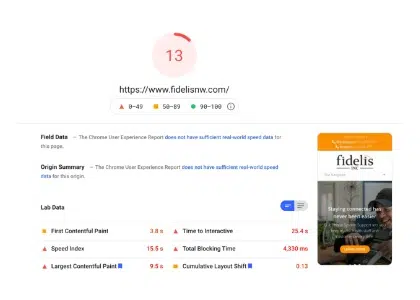
A Speed & Performance Analysis to Identify and Address Bloated Website Elements
Our technical support team used GTMetrix and Google PageSpeed Insights to fully understand the site’s overall health and identify its performance gaps.
Before we started our work, Fidelis carried PageSpeed performance scores of 13 and 41 for their mobile and desktop sites, respectively.
To boost these numbers as close to 100 as possible, we initiated a thorough optimization sweep which included a concerted effort in compressing some of Fidelis’ most bloated elements.
Our team minimized and compressed several JavaScript (JS) and Cascading Style Sheets (CSS) entries and even removed unused scripts altogether. In addition, we compressed all oversized images where necessary.
Lastly, we preloaded all Google fonts on the site and enabled Lazy-Load for Fidelis’ images.
A Faster and More Reliable Web Presence for Mobile and Desktop Site Visitors
Improved Performance Scores
Faster Load times
Better User Experience
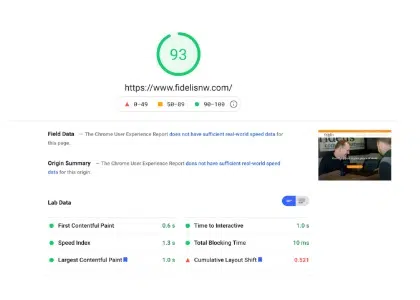
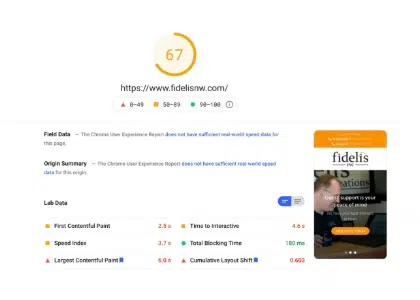
Once we completed the sweep, Fidelis saw immediate improvements on both their mobile and desktop websites. On Google PageSpeed Insights, Fidelis now scores 67 (mobile) and 93 (desktop) for performance, nearly a 300% increase across the board.
In the web developer world, to provide a good user experience, sites should strive to have Largest Contentful Paint (LCP) of 2.5 seconds or less. Fidelis’ desktop site now clocks in way above average at 1.2 seconds after our latest work.
5 Tips to Speed Up Your WordPress Site
The million-dollar question is… how do you speed up your WordPress site?
There are several performance optimization best practices that you can put in place today to reduce page load time and make your WordPress site load faster. Here’s our complete list of actionable recommendations, from easy to advanced.
You can watch the video about the 9 easy ways to speed up your site or keep reading and discovering them all, including the WordPress performance optimization techniques that are part of the WordPress pre-launch checklist you should consider for your projects.
Choose a powerful hosting
Your WordPress hosting service plays a major role in website performance. What makes a good hosting provider? A good hosting provider takes the extra measures to optimize your website for performance and provides good customer support. There are a few types of hosting on the market:
Shared hosting – you share the server resources with many other people. If one of them gets a traffic peak, your website may be impacted. You need to be careful.
Dedicated hosting – in this model, a hosting provider rents a single server with all its available resources to one client: you. You are free to do whatever you want with your server, and it’s good for your loading speed.
Managed WordPress hosting – that gives you the most optimized server configurations to run your WordPress site. Those companies know WordPress inside out and offer features dedicated to WordPress, such as automatic WordPress updates, security configurations, and much more.
You can also take a look at our hosting partners — they have been carefully selected and play great with WP Rocket.
Optimize your images and use lazy loading
Check that your images are optimized. There are three essential tips you can follow to improve the loading speed of your images:
Reduce their weight
Resize them according to the real size on your pages.
Upload large media files to suitable services
Instead of using the WordPress backend to host your video or audio files, it’s much more efficient to upload those pieces to YouTube, Viméo, or SoundCloud — they are much better suited to handle the bandwidth requirements. Your WordPress site can then point to that digital asset rather than render it, and your whole site will get much faster as a result.
Make use of a Content Delivery Network (CDN).
If your target audience is distributed around the world, it makes a lot of sense to use a CDN to have your site hosted closer to the end-user. Instead of having everything coming from one server in one location, a CDN creates a network of servers around the world that store static files that make for much faster loading times in different scenarios.
Do I need a CDN? You’ll need one if your clients are located far from the server’s location. It could take a while before all the content (products, images, JS and CSS files, or even videos) are loaded. If you are planning on selling internationally or going multilingual, then you should consider using a CDN.
Load JavaScript deferred and delay Javascript execution
You can see how JavaScript execution affects performance by looking at the First Input Delay metric and the Lighthouse performance score.
For instance, Lighthouse and Page Speed Insights will tell you if you need to “Eliminate render-blocking resources”.
The Opportunities section of your Lighthouse report contains all the URLs blocking the first paint of your page.
Defer non-critical CSS, remove unused CSS, and inline critical CSS
Non-critical CSS is not relevant for rendering the page. Such files can affect loading time and generate PSI recommendations such as “Eliminate render-blocking resources” and “Avoid chaining critical requests”.
On the other hand, critical CSS should have the highest priority: these are the resources above the fold that need to be loaded as fast as possible.
✅ You have to inline critical resources, defer non-critical CSS resources, and remove unused CSS. WP Rocket offers the Remove Unused CSS option, which will take care of the CSS optimization and remove unused CSS easily.
Minify JavaScript
Minification refers to removing unnecessary and redundant code without affecting how the browser processes the data. JavaScript minification removes all the unnecessary JS content such as:
“(// …)” and all the extra spaces or strips comments from the code. In other words, the goal is to make the file much lighter by reducing the size of the code.
Minify CSS
In a CSS file, you will find whitespace, comment, and punctuation. This content helps the developer read the code better, but it’s unnecessary for the visitor. By getting rid of the unnecessary content, you’ll get lighter files seeing as CSS minification removes extra spaces and comments from your CSS files such as: “(/*” or whitespaces.
